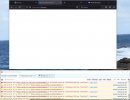
3cx portal bank page

Status
Not open for further replies.

Patch1

SOHO User
Joined
Jun 29, 2013
Messages
21
Reaction score
3
I'm not sure if this is the correct place to post this issue, please move it if my guess is wrong.

I can login to https://www.3cx.com/ however when I try and access my account information I get a blank web page to a URL such as

I am using the web browser Firefox 116.0 64 bit on Windows 10. I have tried
Deleting web site data for 3cx.com.au (there is no data for www.3cx.com or portal.3cx.com)​
Disabling enhanced tracking protection for www.3cx.com portal.3cx.com www.3cx.com.au portal.3cx.com.au​
Disabling pop protection​
Disabling uBlock origin and DuckDuck go addons for Firefox​
Manually entering the url https://portal.3cx.com/login which redirects to https://portal.3cx.com/customer/login which is also a blank web page​

Is the something I'm missing or is the portal not compatible with Firefox on Windows?
 
Is this new or a long term thing? I’ve never had a problem using Firefox. Not near a PC to check right now. I usually log in directly on portal.3cx.com though.
 
Hello @Patch1
can you please advise if you have tried from a different Public IP to see if it makes a difference?
 
@Patch1
Also, could you PM me with your email address login and the current public IP?

Thank you
 
More things I have tried that made no difference
Changing my public IP address makes no difference (hot spot to phone)​
Updating to Firefox v116.0.3 Windows 64 bit made no difference.​
Using Firefox banking protection (no addin) made no difference​
Disabling ESET anti virus made no difference​

What does work
Change browser to Brave current version 116​
Safari on phone​

Which suggests it is either a web site iteration with Firefox or my set up of Firefox. I note there is a lot of rediretion during the login via Brave, which Firefox and web protection utilities may not like.
 
Did you try a private window in Firefox?

(Side note that is irrelevant but I like to point out: all private or Chrome Incognito windows are the same session, they are not independent from other private windows. Which is why Firefox's containers plugin is so nice, especially to keep Microsoft accounts separated.)
 
  • Like
Reactions: ltri37
Load Firefox in troubleshooting mode and see if it loads.
 
Did you try a private window in Firefox?
yes
Load Firefox in troubleshooting mode and see if it loads.
That's a good idea but portal page still does not display.
The repeated error message shown below is from clicking refresh in the Firefox v116.0.3 (64 bit), Trouble shooting mode, private browser window.
10 Portal blank - Firefox - private window - cache clear - no policies - Windows 10.jpg
 
Do you get anything actually useful if you click on the 'learn more' link on the error line(s)?
 
Status
Not open for further replies.

Forum statistics

Threads
111,974
Messages
590,081
Members
164,899
Latest member
mazet