3CX SBC Appliance Box- Showing up as Normal not router or SBC

Status
Not open for further replies.

andytelco

Gold Partner
Basic Certified
Joined
Jun 29, 2022
Messages
55
Reaction score
2
Hi team,

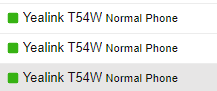
We have a few sights with this sbc- But on V20 it is showing up as 'Normal' - 1724213435063.png
1724213332058.png

The phones are registered to the sbc.

Is this a bug or should we turn all phones to routed phones.

Thanks
 
Hi Andy,

If you have T54W phones, you can make them all routers.
In the picture above, you set them up as normal phones.

As for the box it's unrelated to any of this, speak with the vendor who sold it directly for more info as we do not produce those.

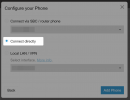
Delete the phone, and add it again but choose connect directly
1724226163936.png

Then factory reset and give it a few minutes to come online and configure itself.

Ensure the firmware is correct: https://www.3cx.com/docs/phone-firmwares/
 
  • Like
Reactions: andytelco
When you provision phones behind a 3cx SBC they will appear as normal phones. This will mean they are not provisioned as router phones.

https://www.3cx.com/sip-phones/yealink-t5-series/
Hi Andy,

If you have T54W phones, you can make them all routers.
In the picture above, you set them up as normal phones.

As for the box it's unrelated to any of this, speak with the vendor who sold it directly for more info as we do not produce those.

Delete the phone, and add it again but choose connect directly
View attachment 43323

Then factory reset and give it a few minutes to come online and configure itself.

Ensure the firmware is correct: https://www.3cx.com/docs/phone-firmwares/
When you provision phones behind a 3cx SBC they will appear as normal phones. This will mean they are not provisioned as router phones.

https://www.3cx.com/sip-phones/yealink-t5-series/
 
Hi Everyone,

Thank you for the responses! I appreciate it.

I'll try and provide better context.

The current system the customer is on is v20, previously on v18 all their phones were provisioned via the 3CX NX32 -
Would they need to be re-provisioned as they show as normal?

My guess would be to just turn them all to router phones?
 
Hi Andy,

If you have T54W phones, you can make them all routers.
In the picture above, you set them up as normal phones.

As for the box it's unrelated to any of this, speak with the vendor who sold it directly for more info as we do not produce those.

Delete the phone, and add it again but choose connect directly
View attachment 43323

Then factory reset and give it a few minutes to come online and configure itself.

Ensure the firmware is correct: https://www.3cx.com/docs/phone-firmwares/
Hi John,

Thank you for the response.

However, I understand the misconception by the photo. As described below, on v18 they were connected via an sbc device either raspberry or 3CX Nx-

Overall are sbc devices not compatible with v20?
 
No, everything is fine. They appear as normal phones if they are connected over an sbc. SBC devices are fine with v20.
 
I see, you are not facing any issues, you just saw the new term Normal phone that appears in V20.

Normal Phone = Any phone that is connected via any SBC

Router Phone = Any phone that has a built in SBC and has been configured as "Connect directly"

Local Phone = Any phone that connect to the PBX via LAN (implying no SBC is used)


Hope this clears things up, sorry if there was any misunderstanding. You don't need to do anything at all if your phones work fine via your SBC. Mentioning the NX32 is not really relevant in this case I would think.
 
  • Like
Reactions: bitn2
Thank you heaps! That's what we were after.

I appreciate your help.
 
Status
Not open for further replies.

Latest Posts

Forum statistics

Threads
111,953
Messages
589,915
Members
164,850
Latest member
masvty