Solved 3CX SBC install on a Pi has no web GUI on port 5015

Status
Not open for further replies.

JohnnyD

Free User
Joined
Nov 19, 2021
Messages
16
Reaction score
9
HI, I am trying to install SBC on a pi and downloaded the recommended raspian ISO and after i install 3CX SBC, its up and running OK, but i cant access it on port 5015, i have even installed nginx onto the pi and then installed, but still nothing on port 5015.

Can anyone help?

Thanks

JD
 
  • Like
Reactions: chance-wmt
Please note that the 3CX SBC does not have a web gui. If you've installed nginx or any other packages on the Pi other than the 3CX SBC I highly recommend you uninstall them.

If it is the installation wizard you are looking for it should start once you perform step 5.2 of our guide.

If this is not the case, please let me know what you are trying to do so that I can hopefully provide you with a solution.
 
Ah OK, I think the guide is confusing me, so the SBC has no configuration after installing? So i need to point the phones at the SBC now from the phones directly and not via a GUI in the SBC?
 
  • Like
Reactions: chance-wmt
Yes, if you've selected 3CX SBC and then completed the steps that came up(enter FQDN, Auth Key, etc) that is all that's needed. Step 5.4 in our guide is only for when you selected to install the 3CX PBX.

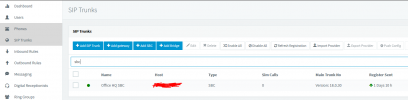
If you see the SBC in the 3CX Management Console's SIP Trunk section as connected(green) then the SBC should be fine, all you'll need to do is reset the IP Phones and they should come up in the Phones section of the management console so that you can assign them to an extension.
 
  • Like
Reactions: chance-wmt
Thanks both, all setup and working fine, I already had the phones provisioned for direct SIP so it was fairly easy to just change them to SBC, does SBC work OK on a dynamic IP out of interest?
 
Yes, SBC will work on a dynamic IP address - all traffic is outbound
 
does SBC work OK on a dynamic IP out of interest?
If you're talking about the public IP then as @Saqqara said it should be fine yes. If however you're talking about the local IP then you'll have issues every time it changes as the IP Phones are provisioned with the local IP as their SIP proxy, meaning they'll be sending all SIP traffic to the wrong IP.
 
It was the Publc WAN IP I was refering to Chris, many thanks for the prompt replies by the way :)
 
You're very welcome!

As this seems to be sorted I'll be closing this thread.

Please feel free to start a new thread should you need anything else!
 
Status
Not open for further replies.

Forum statistics

Threads
111,974
Messages
590,081
Members
164,899
Latest member
mazet