3cx sbc ssl ceritifcation error

Status
Not open for further replies.

gtcldn

Premier Customer
Joined
Feb 12, 2022
Messages
27
Reaction score
3
I have been trying to switch my on perm pbx over to digitalOcean, which seems to work but i can only THEN access it via ip address. When i have it on perm i can only access it via FQDN.
So i created a dns lookupzone and added hosts but for some reason it STILL doesn't work but i at least am able to access it even if it's only through ip when going to cloud. ANYWAYS

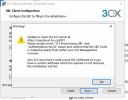
I switched it over to cloud host and i can not get SBC installed, i keep getting this SSL error, i have looked through forums and i haven't been able to get this to work.
I was able to create a SBC a couple of months ago no problem but now i seem to be having issues.

3cx must have a valid secure SSL certificate so if you have a custom certificate which has expired or not renewed, the installation will fail. Now the SSL cerfiticate renewed about a week ago, so i don't understand whats going on.
 

Attachments

  • image (1).png
    image (1).png
    86.7 KB · Views: 17
What type of license is it? Pro has a 6 hour TTL.
Can you browse to the hosted server from that location? It sounds like you can’t so is the hostname resolving correctly?
 
I have been trying to switch my on perm pbx over to digitalOcean, which seems to work but i can only THEN access it via ip address. When i have it on perm i can only access it via FQDN.
So i created a dns lookupzone and added hosts but for some reason it STILL doesn't work but i at least am able to access it even if it's only through ip when going to cloud. ANYWAYS

I switched it over to cloud host and i can not get SBC installed, i keep getting this SSL error, i have looked through forums and i haven't been able to get this to work.
I was able to create a SBC a couple of months ago no problem but now i seem to be having issues.

3cx must have a valid secure SSL certificate so if you have a custom certificate which has expired or not renewed, the installation will fail. Now the SSL cerfiticate renewed about a week ago, so i don't understand whats going on.
The system should be accessible with the FQDN now, Did you try it, does it work for you?

There may have been a delay in the DNS propagation from whichever DNS servers you are using from the time you switched off the old instance to starting the services in the DO instance. On our side, this was pretty instant.
 
  • Like
Reactions: IrinaP_3CX
What type of license is it? Pro has a 6 hour TTL.
Can you browse to the hosted server from that location? It sounds like you can’t so is the hostname resolving correctly?
yes its pro, and when i switched it over to vm on digitalOcean i was able to access it via IP-which is fine but i could not get SBC going because of SSL certificate
 
The system should be accessible with the FQDN now, Did you try it, does it work for you?

There may have been a delay in the DNS propagation from whichever DNS servers you are using from the time you switched off the old instance to starting the services in the DO instance. On our side, this was pretty instant.
i ended up up going back to on prem. since i couldn't get sbc to work and phones wouldn't work.
 
Note the popup message says, "also" it needs a certificate. It sounds to me like the hostname hadn't updated to the new IP yet so just couldn't connect and was showing a general "can't connect" message. Setting up a local zone to point to the new IP, on the DNS server the SBC was set to use, could override that.
 
  • Like
Reactions: Charles_3CX
Note the popup message says, "also" it needs a certificate. It sounds to me like the hostname hadn't updated to the new IP yet so just couldn't connect and was showing a general "can't connect" message. Setting up a local zone to point to the new IP, on the DNS server the SBC was set to use, could override that.
i did add it to dns but i will try again
 
Status
Not open for further replies.

Forum statistics

Threads
111,974
Messages
590,081
Members
164,899
Latest member
mazet