Solved 3CX Services Failing To Start After Server Reboot

Status
Not open for further replies.

Alan Figgins

Free User
Joined
Jan 27, 2019
Messages
56
Reaction score
3
Hi All,

I have a 3CX server that fails to start up the 3CX services after a server reboot.

I am runnning 3CX Version 16.0.910 and it is installed on a local Debian server, which is fully updated as of right now (Debian 9.9).

When I reboot the server, it comes back up, but if I try to login to the console web interface, the web login page appears, but always rejects the login credentials with a 'server error' message in red just above the credentials boxes.

If I connect to the server via ssh, and check the services thus:

Code:
service 3* status

Nothing comes up in response, so I start it manually with:

Code:
systemctl start 3CXPhoneSystemMC01.service

This appears to work fine, and I can now login to the console web interface.

If I now go to:

Dashboard > PBX Status > Services

I see a number of services that are not running.

I can select each one and 'restart' manually and as far as I have observed, they stay running fine.

However, this should not be necessary.

Can anyone help / suggest where I should look to see why it is not starting up automatically after a server reboot?


Thanks,

Alan.
 
Hi , did you install from 3CX iso ? is your debian machine dedicated to 3CX pbx?
 
Hi Alan,

You can check the Linux system logs to see why the system failed to start.

Note that sometimes if the network is not ready, the SIP server cant start and the rest of the 3CX services wont either.
 
Hi AWS2P,

Hi , did you install from 3CX iso ? is your debian machine dedicated to 3CX pbx?

Yes to both - The ISO is the one currently linked on 3cx.com, and the machine is running nothing else.

Thanks,

Alan.
 
Hi John,

Hi Alan,

You can check the Linux system logs to see why the system failed to start.

Note that sometimes if the network is not ready, the SIP server cant start and the rest of the 3CX services wont either.

Good point - I will reboot the server, and let it sit for, say, 15 mins, then check to see if it is just a timing issue.

If that is not the problem, I will check the server log. Is there any particular log you know of that I should look at?

Thanks,

Alan.
 
You can go for /var/log/syslog and read the output after a reboot.

In case the service fails during startup (ie. due to network interface not ready) it won't try to restart again.

Once the interface is up you can execute 3CXStartServices
 
Hi John,

You can go for /var/log/syslog and read the output after a reboot.

In case the service fails during startup (ie. due to network interface not ready) it won't try to restart again.

Once the interface is up you can execute 3CXStartServices

I let it sit for 15 mins after rebooting, but I still could not login to the 3CX console. Just to be sure, I left it another 45 mins for an hour total, but still no go, so I suspect it is not just a slow startup issue.

I then moved the 'old' syslog, and rebooted.

I am not sure what to look for - there are six mentions of 'network' in the log, but none jump out at me as showing an issue.

I have attached the entire syslog file from the reboot, and I left the machine for ten mins after booting up, so it should be complete.

I have attached the log file in both Linux and Windows formats for your convenience - they are the same, but if you (or others that may look at this thread) open the Linux version in Windows, it will look all screwy.

Does anything look amiss to you?

Thanks,

Alan.
 

Attachments

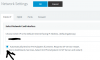
Perhaps this is not relevant but are you using IPV6 network settings?
11564
 
I would also check the daemon.log, thats where the 3CX Services will appear starting
 
Hi AWS2P,

Perhaps this is not relevant but are you using IPV6 network settings?
View attachment 11564

Yes - that was turned on, so I disabled it, rebooted the server, and it seems to have solved the problem.

I have to admit that I don't understand why have that setting turned on would cause an issue. Are you able to explain what that setting does, and more specifically, why it would cause the issue I was seeing?

Thanks,

Alan.
 
  • Like
Reactions: AWS2P
Hi John,

I would also check the daemon.log, thats where the 3CX Services will appear starting

As you'll see from my post above, changing the IPv6 setting seems to have fixed the issue, which means that the daemon.log file will not now show the problem.

Would it be useful in helping to understand what was happening if I change that setting back, reboot to experience the issue again (presumably), and copy the log file here?

Thanks,

Alan.
 
@JohnS_3CX Would you please pass on to the team that IPv6 should probably be off by default. Weird little issues like this crop up with no benefit of having it on by default. Folks that know about/need IPv6 can turn it on. Besides this posts there's been a number of activation/license issues related to IPv6 (probably DNS related).
 
IPv6 should not normally pose a problem, I suspect on Alan's machine we see IPv6 up but the route on his network may not lead anywhere hence the 3CX services don't start due to lack of a connection.

I will pass on the suggestion though because IPv4 is the predominant protocol
 
Hi John,

IPv6 should not normally pose a problem, I suspect on Alan's machine we see IPv6 up but the route on his network may not lead anywhere hence the 3CX services don't start due to lack of a connection.

I will pass on the suggestion though because IPv4 is the predominant protocol

I'm not entirely sure what you mean, but I am very happy to check any settings / config if it would help in any way - perhaps 3CX could check for something to see if it will cause a problem and proactively disable IPv6 (or enable it) if a setting is in a certain state?

If it helps, this is as 'plain vanilla' as it could be - I used the Debian ISO downloaded fresh from 3cx.com, and had done almost no setup at all. The only possible thing is that I ran updates on Debian early in the game (and then rebooted, which is when I noticed the issue) - maybe that brought in something that caused the problem?

Thanks,

Alan.
 
Hi Alan,

It's speculation on my part of course, I suspected that perhaps the machine picked up an IPv6 address from your network but there was not path to the internet over that address. If the PBX cannot establish network access during startup, the services will terminate.
 
Okay - I'm not sure how that could be, as I am not using IPv6 anywhere on the LAN, and it is explicitly disabled in the router, but clearly it solved the problem!

Thanks,

Alan.
 
Glad i pointed the right setting that fixed this problem for you
 
Yes - Thanks AWS2P - Very much appreciated.

Alan.
 
Status
Not open for further replies.

Latest Posts

Forum statistics

Threads
111,932
Messages
589,807
Members
164,805
Latest member
Diana Paladutsa