- Joined
- Jun 14, 2017
- Messages
- 54
- Reaction score
- 2
Dear all,
Hope somebody has experience in SSH setup on Windows Server and connecting 3CX to it. I have setup the access externally for this purpose as I want to backup whole system prior to updating to v20 with new Debian. We did not setup passwords/passphrases only private and public keys, also I have intentionally changed SSH port and forwarded it on firewall.
SSH with keys works when I login from another network using WinSCP for example to the Windows Server SFTP but I can't seem to get it up and running with 3CX when II want to alter location.
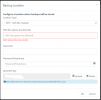
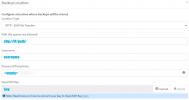
Not sure what needs to be put in SFTP Path section and do I need to fill in username when I am not using password?
Best Regards,
Slaven.
Hope somebody has experience in SSH setup on Windows Server and connecting 3CX to it. I have setup the access externally for this purpose as I want to backup whole system prior to updating to v20 with new Debian. We did not setup passwords/passphrases only private and public keys, also I have intentionally changed SSH port and forwarded it on firewall.
SSH with keys works when I login from another network using WinSCP for example to the Windows Server SFTP but I can't seem to get it up and running with 3CX when II want to alter location.
Not sure what needs to be put in SFTP Path section and do I need to fill in username when I am not using password?
Best Regards,
Slaven.