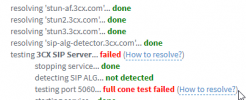
3CX SIP Server failed,5060. full cone test failed

Status
Not open for further replies.

Davidbk

Free User
Joined
Jul 16, 2021
Messages
4
Reaction score
0
Hi Guys,
I have been going through the 3CX forum looking for the solutions and I can't seem to find anyone who solved this error, most suggest that as long as the phones are working internally I must just ignore this error or use a VPN to register external phones to the PBX. But this will rather be a lot of admin, so I'm trying my luck maybe I will get assistance.
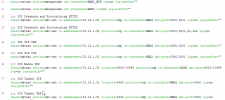
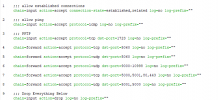
Steps taken to troubleshoot; 1 turned off windows firewall. 2 setup port forwarding I can telnet to port 5000,5001 and 5060 from outside my network. But I still cannot access the system from outside my network....Below are my configs:
1626434597720.png


Mikrotik Config

1626435097843.png

1626435247330.png
 
Hi Saqqara, yes I went through this article, and SIP ALG is disabled on the Mikrotik Router.
 
The fact that the Firewall checker is failing definitely means that there's something up with your config somewhere. I cannot confirm whether the firewall is the one at fault with what you've provided but I can suggest maybe running a packet capture on both LAN and WAN interfaces of the firewall so that you can confirm this being a firewall configuration issue or at least eliminate this possibility based on your findings. (It goes without saying that you could possibly just check the firewalls logs instead of running packet captures)

What exact Windows OS are you running? I'd also recommend removing any security/antivirus software from the machine completely along with any other network based services/packages if present such as DNS Server, IIS, DHCP, etc as the machine must be dedicated to 3CX.

But I still cannot access the system from outside my network
Do you mean you cannot access the Management Console? If yes, can you access the Management Console from within the same LAN okay?
 
The fact that the Firewall checker is failing definitely means that there's something up with your config somewhere. I cannot confirm whether the firewall is the one at fault with what you've provided but I can suggest maybe running a packet capture on both LAN and WAN interfaces of the firewall so that you can confirm this being a firewall configuration issue or at least eliminate this possibility based on your findings. (It goes without saying that you could possibly just check the firewalls logs instead of running packet captures)

What exact Windows OS are you running? I'd also recommend removing any security/antivirus software from the machine completely along with any other network based services/packages if present such as DNS Server, IIS, DHCP, etc as the machine must be dedicated to 3CX.


Do you mean you cannot access the Management Console? If yes, can you access the Management Console from within the same LAN okay?
Hi Chris, I'm unable to access the management console outside of the network but I can locally and the phones work only when registered locally but not over the public IP or with FQDN.....i will run packet capture and revert
 
Last edited by a moderator:
I have deleted your images as they show your FQDN, but can you please try accessing your management console externally using this link format:
https://yourfqdn.3cx.co.za:5001

You cannot access the Management Console from an external IP over HTTP, only HTTPS.
 
  • Like
Reactions: ChrisC_3CX
I have deleted your images as they show your FQDN, but can you please try accessing your management console externally using this link format:
https://yourfqdn.3cx.co.za:5001

You cannot access the Management Console from an external IP over HTTP, only HTTPS.
Thank you it worked, my last issue is how do I register a phone that is outside of my network? is there a way of accessing the management console without specifying the port?
 
Thank you it worked
Great! Glad to hear it!

my last issue is how do I register a phone that is outside of my network?
If you're talking about IP Phones then you'll either have to use the STUN or SBC provisioning method. You might want to take a look at our training material on this here: https://www.3cx.com/3cxacademy/videos/intermediate/configuring-remote-extensions/

You can check which IP Phone models and what provisioning methods they support here: https://www.3cx.com/sip-phones/3

is there a way of accessing the management console without specifying the port?
Not really, if you had used the default https port (443) then you would not have to type in the browser but this is simply because web browsers assume port 443 when trying a destination with https.
 
  • Like
Reactions: Davidbk
Status
Not open for further replies.

Forum statistics

Threads
111,982
Messages
590,121
Members
164,909
Latest member
Jacob.Ive