3cx skype gateway problum

Status
Not open for further replies.

sahara92

Joined
Oct 12, 2012
Messages
4
Reaction score
0
i am tryuing to configure 3cx skype gateway v 2.0.9919.0 with 3cx phonesystem v 11 on window xp sp3 with firewall turned off i have getting this error (failed to start the gateway serviceand trcerlog is here can anyone help me to solve this and skupe v 4.1.0.179 is installed
00:46:21:031 - Info : Logger started
-------------------------------------------------------------------------
00:46:21:031 - Info : Gateway started by user [SYSTEM], having administrative rights
00:46:21:031 - Info : Gateway computer domain for accounts is [UPS-9311746687D]
00:46:21:031 - Info : Skype installed on C:\Program Files\Skype\Phone\Skype.exe
00:46:21:031 - Info : Gateway rights set01 updated
00:46:21:046 - Info : Gateway rights set02 updated
00:46:21:046 - Info : Gateway rights set03 updated
00:46:21:046 - Info : Gateway rights set04 updated
00:46:21:046 - Info : Loading gateway configuration from C:\Documents and Settings\All Users\Application Data\_3CXSkypeGateway\3CXSkypeGateway.ini
00:46:21:046 - Info : Configuration file is in proper Unicode format
00:46:21:062 - Info : Searching for existing Skype gateway computer accounts [3cxskypeacc]:
00:46:21:078 - Info : - found [3cxskypeacc01]
00:46:21:078 - Warning : ----------- Logging is now filtered according to option "info warning error time" -----------
00:46:21:328 - Info : Computer account [1] for channel [10004] successfully loaded
00:46:21:328 - Info : Found 1 channel(s) declared in the configuration file
00:46:21:328 - Info : Effectively loaded 1 channel(s)
00:46:21:328 - Info : Channel listener running on [127.0.0.1:5545]
00:46:21:328 - Info : Starting PBX server checker on [localhost], checking at every [2000] msec
00:46:21:328 - Info : Starting Skype server checker on [www.skype.com:80], checking at every [2000] msec
00:46:21:343 - Error : Gateway service cannot be started, no channels available
00:46:21:343 - Info : Gateway service is shutting down
00:46:21:984 - Info : Logger closed
 
sahara92 said:
00:46:21:343 - Error : Gateway service cannot be started, no channels available

I take it that the Skype service is running correctly on the PC, all appears to be normal? You've disabled auto updates?

What does you 3CX Gateway for Skype window show? You can X out part of your Skype name. What if you click on the configure button?
 
thank u for help me dear leejor. i have disabled auto update in skype. and skype is runing properly on tha pc and i am able to call any contact from skype. i have created skype gateway acount in 3cx phone system with these settings
voip gateway detail
gateway host name or ip:127.0.0.1
gateway port :6060
acount detail
port identifecation :10004
authentication id :10004
auth password :12345
maximum simulatinus call:1
2nd when i start skype gateway
i go to file> setting >
3cx host/ip :localhost
acount prefix :3cxskypeacc
pasword :3cxskypeacc
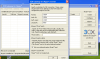
and press ok then a new window opens up with name
3 cx gateway for skype channel
port id :10004
auth id :10004
pasword :12345
local port:6060
act as inbound master skype
and press ok
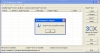
then message appeared {skype port successfully created}
then i pressed ok
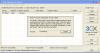
and new window appears with name {skype account configuration for port 10004}
acount ..............connecting
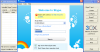
skype window opens with name create account
i have already my acount :and i pressed sign in
i filed my id and pass and presed sign in but skype not connects .after some time message appeared
{skype cannot connect.get help fixing this problem}
 
i have aded pictures kindly look these
 

Attachments

  • 2.png
    2.png
    29 KB · Views: 1,099
  • 3.png
    3.png
    76 KB · Views: 1,099
  • 4.png
    4.png
    29.6 KB · Views: 1,099
  • 5.png
    5.png
    24.1 KB · Views: 1,099
  • 6.png
    6.png
    35.7 KB · Views: 1,099
Ok...Nor sure about the first one showing "Skype can't connect" message. Is that the way it is at present? If so then Skype itself has an issue.

As far as the other screenshots go...what does the 3CX Gateway for Skype window look like once you have the Skype account "set" Does it show as "set"?

Did you go over the installation guide...

http://www.3cx.com/voip-gateways/skype.html

Pay attention to this part. i missed it once and had some problems...

Skype will ask you to “allow 3CXSkypegateway.exe”, click the “Allow access” button.
 
thank u for help leejor. issue has been solve after install skype v 5.3.0.111.i think fault was in skype v 4.1.0.179,thank u very much for hlp. another issue has remaining when i called any extension other party hears my sound very loud and breaking and i also and me hears my voice returns and other party also.kindly help for this
 
I'm not sure what is causing the audio issues that you are experiencing...but, keep in mind that the gateway, and Skype make use of the audio card in your machine...so you may have some luck correcting the problem if you do some tweaking of the audio settings in the PC. As I say, that may, or may not have any affect, it could be something completely different.

Just make a note of what the setting are, before you change, or start playing with anything.

Are you using a VoIP set, ATA, or a headset and the 3CX phone to make calls? You should never use the built in Mic and speakers , on a PC, when using the 3CX phone, that is just asking for audio problems.
 
Beware of Skype versions in setting this up ... I've got a note in my archives saying;

Skype version 4.0.225 or above is required. Note however that access to 'Skype Extras' is required, and therefore the last version of Skype that can be used is 4.2.0.187 - versions after this don't support Skype Extras.

If you allow Skype to update past that version - you can no longer get access to Skype Extras, and you loose the two-way connect between the 3cxSkypeGateway.exe application, and Skype ...

best regards
 
3CXfoxhallsolutions said:
If you allow Skype to update past that version - you can no longer get access to Skype Extras, and you loose the two-way connect between the 3cxSkypeGateway.exe application, and Skype ...
I do not quite agree with you.
I am running Skype v5.1.112 together with 3CX Gateway for Skype v2.0.9919.30 without any problem and two-way audio is functioning as it should be.
 
After mine updated itself, and stopped functioning (probably close to two years ago?), I went to version 4.2.0.169, and it has been stable since. There was a flurry of posts on the forum about this just after Skype came out with a release that did not work with 3CX. At that time, most of us did not have auto-update disabled.
 
complex1 said:
3CXfoxhallsolutions said:
I am running Skype v5.1.112 together with 3CX Gateway for Skype v2.0.9919.30 without any problem and two-way audio is functioning as it should be.

Thanks for that feedback Complex 1 ... I'm wondering ... Did you re-install using a later version of Skype, or just update what you had already configured and running??? I seem to remember having big problems trying to re-install the Skype Gateway using that later Skype versions - But - It would be good to know that once installed, it can be updated.

best regards
 
Hi Graham,

All versions of Skype prior to v5.1.0.112 I have removed from my computer.
The Skype version as I use now was a “fresh” install on Feb 13, 2011. I have checked the installation date.
Also I have never updated this version Skype to a newer version.
I use Skype<->3CX for several years now; the 3CX Gateway for Skype was installed on my computer at May 17, 2010.

I hope this helps you.

Regards.
 
Status
Not open for further replies.

Latest Posts

Members Online Now

Forum statistics

Threads
111,843
Messages
589,328
Members
164,680
Latest member
JV J