3CX SMB FREE v20 - Phonebook on cordless Yealink W73H + DECT W70B.

Battistini

Silver Partner
Basic Certified
Joined
Oct 15, 2021
Messages
8
Reaction score
1
Good morning, I am installing a 3CX SMB FREE PBX v20.
I have configured a Fanvil v63 as an SBC and a W73B with a cordless phone.
My need is to insert the contacts into the phones, but it does not work on the cordless phone because the personal phonebook is not visible.Is there a way to make it work? Or is it not possible to use personal directories in this and other versions?

Greetings,
Matteo.
 
On hardware phones you can use only the company phonebook
 
How do I make it appear on DECT phones (DECT W73H handset, 2xW80B base) ? I guess something to setup in the base station ?
 
Good morning, I am installing a 3CX SMB FREE PBX v20.

Hi,

The SMB edition does not provide IP phone contacts.
You need to use the Pro or Enterprise edition.

Alternatively, you can upload and maintain your own contacts list on the devices if you wish.
 
We have an Enterprise 4SC
 
We have an Enterprise 4SC
I was replying to the original post.

But in your case it should already work, provided the following:

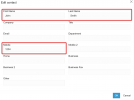
1. It will only contain "System > Phonebook" entries as well as any User extensions that are not currently hidden.
2. For system Phonebook entries, we populate only the following fields
1742311050530.png
3. You must not have Multicompany Mode enabled
4. You need to provision the device via 3CX (we give the device a phonebook URL)

If you still have issues, please start a new thread in the IP Phones > Yealink section of our forum.
 
  • Like
Reactions: A.Takacs
Thanks - was not using the "correct" fields in the system Phonebook. Also there is some sync latency.

All good.
 
  • Like
Reactions: JohnS_3CX

Latest Posts

Forum statistics

Threads
111,964
Messages
590,004
Members
164,869
Latest member
hpgitsupport