Solved 3CX SoftPhone Not Resolving Contacts

Status
Not open for further replies.

priority

Gold Partner
Basic Certified
Joined
Sep 13, 2010
Messages
22
Reaction score
4
Hello,

I have a 3CX System on 16.0.655 Standard Annual [3CX Phone System Pro Edition features=No]
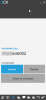
When a call comes in I can see the Caller ID Number on the 3cx Phone Windows Application but it does not display the name of the Person or Company that is in the PhoneBook on the 3CX System.

What am I missing?

 

Attachments

  • 3cx Contacts.png
    3cx Contacts.png
    14.1 KB · Views: 15
  • MCFS_MyPhone.png
    MCFS_MyPhone.png
    17.6 KB · Views: 16
  • MCFS_ContactOptions.png
    MCFS_ContactOptions.png
    29.9 KB · Views: 16
This is about the Windows 3cx app and the contacts in the 3CX PBX and not in a Phone.
 
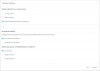
You need to tick 'Append Name' or 'Prepend Name' under the contact options.
 
Isn't the " 'Append Name' or 'Prepend Name' " for displaying the name of the Inbound Rule or Call Queue and not the Contact name in the 3cx Phone Book?

I have set this to "Append Name" and "Prepend Name" and it still only displays the Caller ID not the Contact Name in the 3cx Phone Book
 
Hi,

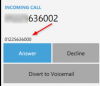
Take a look here, notice that the number calling you is shown in the smaller font below, but above the "Name" is showing something different.. The number is not matching it seems, you should search for both those numbers in your contacts and see if you have duplicates.

1603355365839.png
 
Notice the duplicate number entry in red, and the two different names in green (one of which is a number instead of an actual name).

1603356201446.png
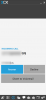
This is one way to replicate what you were facing:
1603355998940.png
 
Thanks, This was resolved by rebooting the 3cx Linux box.

What it looks like was the Contacts were imported via the CSV and the matching wouldn't work until the server was rebooted.
 
  • Like
Reactions: JohnS_3CX
Status
Not open for further replies.

Latest Posts

Forum statistics

Threads
112,322
Messages
591,882
Members
165,468
Latest member
kanderson