3CX softphone status display issue

Status
Not open for further replies.

PeterCheng

Forum User
Joined
Jan 5, 2021
Messages
105
Reaction score
11
Hello sir,

I have a softphone status display issue: How come the status will change from available to away of DND?
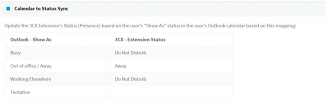
From my point of view, it should sync with O365 calendar. But it's near real time?
ex. Now is 15:00 , and I add an appointment at 15:02, the status is set to busy.
But when it's 15:02, the status of the softphone does not change.
Would someone tell me the operating principle for the status of the phone? Thanks.
1616138820042.png
 
I thought that maybe you were being a little optimistic giving 3CX and 365 2 minutes to sync between one another. So I tested it, creating an appointment for 2 minutes time and my status changed.

I would log in to your MGMT console and check the sync status and even review the 365 set up again following this link:

https://www.3cx.com/docs/office-365-integration/

Even try giving your 3CX a reboot.
 
You could try removing the Microsoft 365 Integration from 3CX completely and also remove the App registration you created in https://portal.azure.com/

Then, follow the guide @kieferschild mentioned to set it up from scratch.
 
Right now I found that when there's a meeting marked busy in outlook tomorrow, basically then 3CX softphone will also show at that time, so the calendar sync function seems to work! But if I set a meeting with busy status 10 minutes or one hour later, when the time arrives, it won't change its status. And sometimes the status will change to away, and I don't know what triggers it to switch the status. I remember that I don't change anything. It really confuses me. Would somebody tell me the operation regsarding to the status is detail? Many thanks.

Peter
 
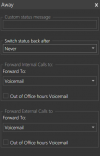
Somebody knows "switch status back after " item for?
I think if status changes to away, It will be back when changing the setting.
Is it correct? Because I tried to change it but it always back to "never"
 
But if I set a meeting with busy status 10 minutes or one hour later, when the time arrives, it won't change its status
Do 10 minute or 1 hour meetings never trigger the Profile Status change?
Right now I found that when there's a meeting marked busy in outlook tomorrow, basically then 3CX softphone will also show at that time
What do you mean exactly by this? For it to work the meeting must have been created from the day before? Could you clarify?

You might want to make sure that the PBX's https port (default:5001 or 443) is open and not restricted otherwise, O365 servers may have problems connecting. Access the Management Console and navigate to Settings >> Microsoft 365 Integration, you should get the following:
1617968364666.png
Is this the case?


The "switch back after" option allows you to temporarily set a Profile Status exactly as you can do from within the 3CX Webclient with the "Set Status Temporarily" option. So if you set your profile Status to away and then set the "switch back after" to 15 minutes, you will be in Away status for 15 minutes and then it will automatically switch back to Available.
 
Do 10 minute or 1 hour meetings never trigger the Profile Status change?
--> ex. now is 9:50, I set up a meeting at 10:00 in outlook.
--> Now it's 10:00, status of outlook shows me in busy status, but 3CX still keeps available.
What do you mean exactly by this? For it to work the meeting must have been created from the day before? Could you clarify?
--> According to the previous example, when will be the synchronization time 3CX do with O365?
--> midnight everyday? or 10 p.m. everyday? or ...?
--> It seems that if I set up a meeting today and the meeting's schedule is tomorrow in Outlook, 3CX status can display DND normally tomorrow.
You might want to make sure that the PBX's https port (default:5001 or 443) is open and not restricted otherwise, O365 servers may have problems connecting. Access the Management Console and navigate to Settings >> Microsoft 365 Integration, you should get the following:
View attachment 21526
Is this the case?
--> I didn't see this message. 3CX PBX's port (5001 or 443) should open to O365 server, right? I'll check it.
The "switch back after" option allows you to temporarily set a Profile Status exactly as you can do from within the 3CX Webclient with the "Set Status Temporarily" option. So if you set your profile Status to away and then set the "switch back after" to 15 minutes, you will be in Away status for 15 minutes and then it will automatically switch back to Available.
--> Thanks for your explanation about "switch back to"
 
--> I didn't see this message. 3CX PBX's port (5001 or 443) should open to O365 server, right? I'll check it.
Your PBX's HTTPS port must be accessible by Microsoft's servers. The PBXs source port you are using will depend on what you selected during installation. The default port used is 5001 unless we are talking about a 3CX Hosted Instance or a 3CX Instance deployed via PBX Express, then it would be port 443.

That said, traffic from and to this port must be allowed from and to Microsoft's servers. If all traffic to this port is forwarded to the 3CX PBX and no outbound traffic is restricted whatsoever, you should not be required to do anything else. There are some cases where security services running on the firewall such as packet filtering, dpi, etc may have adverse effects on these types of connections so you might want to consider disabling such services if any.
 
Status
Not open for further replies.