3CX stating that the License is expired

Status
Not open for further replies.

FuTech-Nel

Bronze Partner
Advanced Certified
Joined
May 25, 2020
Messages
82
Reaction score
3
I have a client running 3CX v 15.5 Update 2 (yes I know it is out of date).

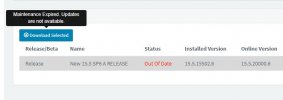
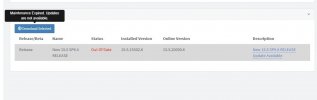
I am trying to update them to version 15.6 so I can update them to v16. but when I go to the update page and select the update, it says that the maintenance is expired and the updates are not available.

I purchased the Renewal through Telin and they confirmed that the maintenance is up to date. I spoke to their tech support and they recommended that I change the primary DNS to 8.8.8.8 (Did not work).

I did a firewall check and the PBX passes everything.

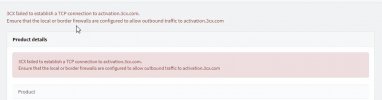
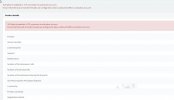
When I am on the activation page, and refresh the key, it says that the PBX could not establish a TCP connection to activation.3cx.com. (See screenshots)
 

Attachments

  • 2021-01-26_15-23-41.jpg
    2021-01-26_15-23-41.jpg
    65.5 KB · Views: 7
  • 2021-01-26_15-32-13.jpg
    2021-01-26_15-32-13.jpg
    20.7 KB · Views: 7
Getting the same on 16.x.x.x servers. Is the service down I wonder.
Actually, weird. My personal one has no problems but our production servers can't reach it.
 
I purchased the Renewal through Telin and they confirmed that the maintenance is up to date. I spoke to their tech support and they recommended that I change the primary DNS to 8.8.8.8 (Did not work).
So they sold you a license and gave you that terrible advice on upgrading? I'd recommend supporting someone else a little more helpful.

Here are the instructions for bringing that install current:

Upgrading your 3CX installation to V15.5, Update 6 is as easy as ever

But that being said it looks like you are on update 6 already and would just need 6a which you can do by following the instructions below which should be in the email inbox of the license holder.


Or you can just take that backup and restore it directly to v16 as long as the system meets the v16 requirements (Windows 2016+ or Windows 10). Just make sure to copy the backup off the system before uninstalling.
 
So they sold you a license and gave you that terrible advice on upgrading? I'd recommend supporting someone else a little more helpful.

Here are the instructions for bringing that install current:

Upgrading your 3CX installation to V15.5, Update 6 is as easy as ever

But that being said it looks like you are on update 6 already and would just need 6a which you can do by following the instructions below which should be in the email inbox of the license holder.


Or you can just take that backup and restore it directly to v16 as long as the system meets the v16 requirements (Windows 2016+ or Windows 10). Just make sure to copy the backup off the system before uninstalling.

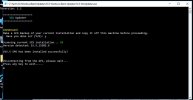
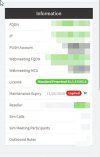
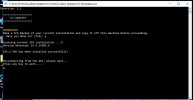
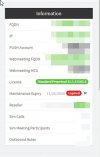
Ran the batch updater and it said that 15.5 SP6 was installed successfully. I went back into the management console and key still says that the key is still expired. And when go to the update section it still says that I cannot get it because the key is expired.
 

Attachments

  • 3CX-updates-2.jpg
    3CX-updates-2.jpg
    27.7 KB · Views: 7
  • 2021-02-06_17-55-31.jpg
    2021-02-06_17-55-31.jpg
    51.7 KB · Views: 8
  • 2021-02-06_17-56-02.jpg
    2021-02-06_17-56-02.jpg
    22.2 KB · Views: 9
  • 2021-02-06_17-56-17.jpg
    2021-02-06_17-56-17.jpg
    25.2 KB · Views: 8
Did you run the update from the first link (Update 6) or the second link? The first link will bring you up to Update 6 but won't talk to the activation server. The second link will bring you to Update 6a which will talk to the activation server.
 
Did you run the update from the first link (Update 6) or the second link? The first link will bring you up to Update 6 but won't talk to the activation server. The second link will bring you to Update 6a which will talk to the activation server.

I went to the article on 3CX's website and downloaded the batch installer.
 
Follow the other instructions cobaltit mentioned, specifically this:
But that being said it looks like you are on update 6 already and would just need 6a which you can do by following the instructions below which should be in the email inbox of the license holder.

 
Follow the other instructions cobaltit mentioned, specifically this:

I clicked the link for windows and it brings me to a splash page that says that it is scanning for a viruses and it just sites there.
 

Attachments

  • 2021-02-06_17-55-31.jpg
    2021-02-06_17-55-31.jpg
    51.7 KB · Views: 8
  • 2021-02-06_17-56-02.jpg
    2021-02-06_17-56-02.jpg
    22.2 KB · Views: 8
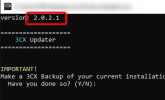
You are running the very old version of the Updater.
Please re-download the one from the link you actually quoted and try again.

You will see that the version number is also much much newer...
1614186684908.png
 
Status
Not open for further replies.

Forum statistics

Threads
111,974
Messages
590,081
Members
164,899
Latest member
mazet