Solved 3cx System is ignoring Office Hours

Status
Not open for further replies.

GWA

Forum User
Basic Certified
Joined
Apr 30, 2018
Messages
15
Reaction score
5
We received the complaint from a client that their Out Of Office forwarding was not working. All items seemed correct on the system but still not working. Had to manually set the extension for the evening.

Today I am using a test trunk to test the issue and it is getting the same results.

Out of office is set to forward to an IVR and during office hours to an extension.

Here is the test trunk settings:
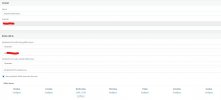
SipTrunkWithRule.jpg

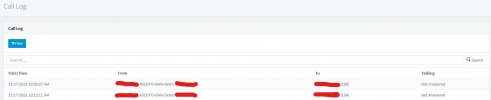
And here is the call Logs:

CallLog.jpg
 
Make sure the system is set to default office hours - dial *641 on a phone

https://www.3cx.com/docs/pbx-dial-codes/#h.665f9ex1w4m3

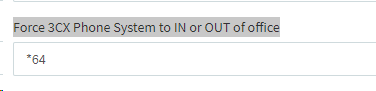
If the dial code does not work, under settings - Dial code make sure 'Force 3CX Phone System to IN or OUT of office' has *64

1637163050564.png

Have you set any office hours on the sip trunk / ddi number ?
 
Tried that, still not working.
There are specific hours on this test trunk, otherwise it is usually only using global hours.
 
Have you got any hours set up on the inbound rules and is the date/time correct on the server?
 
Make sure the system is set to default office hours - dial *641 on a phone
@Saqqara is right to say that this is what you must check first but, Just a small correction here, if the dial code is indeed *64, then all you need to dial is *64. *641 will actually force the PBX to IN office hours instead of DEFAULT.

There are specific hours on this test trunk, otherwise it is usually only using global hours.
Can you please explain exactly where the specific office hours are set? Are they in "SIP Trunks >> Edit SIP Trunk" or are you talking about the DIDs for this SIP Trunk in the Inbound Rules section? Also, what exactly do you mean by "otherwise it is usually only using global office hours"? If you set specific hours on a SIP Trunk or DID then it will never follow the global office hours.
 
I have used the *64 to put the system back to default. It is still not working.

All trunks are using the global office hours except for this one particular "test" trunk. I am using it to test the out of hours settings during normal business hours. The issue happens on all trunks.

My test trunk has the Office Hours set in "Sip Trunks" > My test trunk > General Tab > "Set up Specific Office Hours for this trunk"

Looking at the logs, the date and time seem to be correct.
 
My test trunk has the Office Hours set in "Sip Trunks" > My test trunk > General Tab > "Set up Specific Office Hours for this trunk"
Do you perhaps have a separate DID or CID Rule for this trunk? If yes, you'll have to modify THAT in the "Inbound Rules" section instead of the SIP Trunk. A quick way to check if something else other that the SIP Trunk routing is being matched is to change the in office routing to something else, say a voicemail, then make another call to see if it actually gets sent to voicemail, if it does then you've at least confirm that it is the routing directly on this SIP Trunk that is being applied.
 
Yes, I have tried changing the inbound rules and it always updates to the new change. The issue is simply the system is ignoring the Office Hours.

System is running version 18.0 Update 1.

I have 7 other 3cx systems all running the same version, yet only this one is experiencing the issue.
 
• Have you checked the systems time is correct as @kieferschild mentioned?

• What timezone is set for this PBX in "Settings >> Timezone"? The screenshot you sent in your initial post shows the office hours as 11am - 5pm and that the call was made before 11am. The Management Console call log will adjust the timezone to that of the browser, meaning that if the PC you're using is set to a different timezone, the call log will show the time based on that timezone. That said, pelase confirm that the timezone set on the PBX is correct and that you are indeed calling within those hours.

• Where is this PBX hosted, is it on premise? What OS and Hypervisor(if a VM) is it running on?

• Does it seem to be stuck IN or OUT of office hours? If you use the dial code to force to IN (*641) or OUT (*642) does the routing actually change accordingly?
 
I'm not sure when it happened, as the settings were there last week, but looks like the Dial code for *64 was removed from the "Force 3CX Phone System to In or Out Office" settings menu.

Just tried using the code and it was giving a "No rates found for account" error in the logs.

Re-adding the dial code to the settings, then called *64 to enter the system into default and my test trunk is now working correctly.

Thanks you all for all your assistance.
 
  • Like
Reactions: ChrisC_3CX
Brilliant! Glad to see you managed to get this sorted!
 
Status
Not open for further replies.

Forum statistics

Threads
111,974
Messages
590,081
Members
164,899
Latest member
mazet