3CX to ConnectWise CRM issue

Status
Not open for further replies.

AdamGroves

Free User
Joined
Feb 3, 2023
Messages
2
Reaction score
0

Does anyone know how to resolve this issue? We're trying to integrate 3CX with our ConnectWise environment to log phone calls but we're getting the below error.


"CRM Integration is working OK but contact number does not exist. Check log for more info or try a different number."
Even though the number does exist in ConnectWise.

We've been told
"your user record needs to have Communication Items Type = Phone or Fax and Communications Value = your phone number "

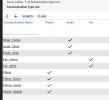
but i'm not sure where to find "Communication Items or Communication Type"

Request text: https://api-eu.myconnectwise.net/v2022_2/apis/3.0/company/contacts?conditions=inactiveFlag=false&childconditions=(communicationItems/communicationType='Phone' OR communicationItems/communicationType='Fax') AND communicationItems/value='07961659386'

Any help would be much appreciated.

Kind regards

Adam
 
Check your setup tables.
 
  • Like
Reactions: edossantos

Attachments

  • Screenshot at Feb 03 17-02-21.png
    Screenshot at Feb 03 17-02-21.png
    81.6 KB · Views: 25
This message:
"CRM Integration is working OK but contact number does not exist. Check log for more info or try a different number."
is generated when you make the test under the integration configuration in the PBX. You need to ensure first that this number is in your CRM contacts.
Then as per guideline below you need to ensure that:
• Under Dashboard<<Advanced<<Contacts<<Options the matching strategy is set to match exactly
• The number is in E164 format

Please ensure that all steps are followed as per 3CX Guidelines:https://www.3cx.com/docs/pbx-crm-integration-connectwise/#h.rqhrtoh952xo
 
Please advise. I have exactly the same issue with integration, however, it can recognize company numbers but fails with contacts.
The test pulls correct Data but 3CX does not assign results to its variables and fails. Please see the log below:

Started GetContactByNumber
Request text: https://api-eu.myconnectwise.net/v2...=(communicationItems/communicationType='Phone' OR communicationItems/communicationType='Fax') AND communicationItems/value='8135555566'
Response text: [{"id":8,"firstName":"Matt","lastName":"Jones","company":{"id":19297,"identifier":"XYZTestCompany","name":"XYZ Test Company","_info":{"company_href":"https://api-eu.myconnectwise.net/v4_6_release/apis/3.0//company/companies/19297","mobileGuid":"2685633f-6375-4375-9df2-9ae518232583"}},"site":{"id":1002,"name":"Main","_info":{"site_href":"https://api-eu.myconnectwise.net/v4_6_release/apis/3.0//company/companies/19297/sites/1002","mobileGuid":"c1a1d306-3e15-4218-be55-319018a5cd11"}},"relationshipOverride":"","department":{"id":3,"name":"Sales","_info":{"department_href":"https://api-eu.myconnectwise.net/v4_6_release/apis/3.0//company/contacts/departments/3"}},"inactiveFlag":false,"title":"Sales Manager","marriedFlag":false,"childrenFlag":false,"disablePortalLoginFlag":true,"unsubscribeFlag":false,"mobileGuid":"bb7a9073-a352-45cb-86a3-8724c604bd3b","defaultPhoneType":"Phone","defaultPhoneNbr":"8135555566","defaultBillingFlag":false,"defaultFlag":false,"companyLocation":{"id":2,"name":"Global Access","_info":{"location_href":"https://api-eu.myconnectwise.net/v4_6_release/apis/3.0//system/locations/2"}},"communicationItems":[{"id":45615,"type":{"id":2,"name":"Phone","_info":{"type_href":"https://api-eu.myconnectwise.net/v4_6_release/apis/3.0//company/communicationTypes/2"}},"value":"8135555566","defaultFlag":true,"communicationType":"Phone"}],"types":[],"ignoreDuplicates":false,"_info":{"lastUpdated":"2023-04-03T14:15:04Z","updatedBy":"sysadmin","communications_href":"https://api-eu.myconnectwise.net/v4_6_release/apis/3.0//company/contacts/8/communications","notes_href":"https://api-eu.myconnectwise.net/v4_6_release/apis/3.0//company/contacts/8/notes","tracks_href":"https://api-eu.myconnectwise.net/v4_6_release/apis/3.0//company/contacts/8/tracks","portalSecurity_href":"https://api-eu.myconnectwise.net/v4_6_release/apis/3.0//company/contacts/8/portalSecurity","activities_href":"https://api-eu.myconnectwise.net/v4_6_release/apis/3.0//sales/activities?conditions=contact/id=8","documents_href":"https://api-eu.myconnectwise.net/v4...ystem/documents?recordType=Contact&recordId=8","configurations_href":"https://api-eu.myconnectwise.net/v4...ompany/configurations?conditions=contact/id=8","tickets_href":"https://api-eu.myconnectwise.net/v4_6_release/apis/3.0//service/tickets?conditions=contact/id=8","opportunities_href":"https://api-eu.myconnectwise.net/v4_6_release/apis/3.0//sales/opportunities?conditions=contact/id=8","projects_href":"https://api-eu.myconnectwise.net/v4_6_release/apis/3.0//project/projects?conditions=contact/id=8","image_href":"https://api-eu.myconnectwise.net/v4...cts/8/image?lastModified=2023-04-03T14:15:04Z"}}]
Response finished
Variable Id set to 8
Variable CompanyId set to 19297
Variable FirstName set to Matt
Variable LastName set to Jones
Variable CompanyName set to XYZ Test Company
Variable Email set to
Variable DirectPhone set to
Variable CellPhone set to
Variable MobilePhone set to
Variable Pager set to
Variable HomePhone set to
Variable FaxBusiness set to
Variable FaxHome set to
Finished GetContactByNumber
Finished scenario with empty id

Started scenario with empty id

Many thanks.
Vitaliy
 
@vit_vai From the provided log file it seems that the contact matching strategy is set to match at least 10 digits. Have you confirmed that under Dashboard<<Advanced<<Contacts<<Options it is set to Match Exactly?
 
@vit_vai From the provided log file it seems that the contact matching strategy is set to match at least 10 digits. Have you confirmed that under Dashboard<<Advanced<<Contacts<<Options it is set to Match Exactly?
yes, as per your guide. it does not work without that step.
I tried different combinations of numbers, E164 and with leading 0 - no luck for individuals but always work for companies.
And as you can see, there is a reply from CRM matching the number - it is just not mapped correctly to variables:

Variable DirectPhone set to
Variable CellPhone set to
Variable MobilePhone set to
Variable Pager set to
Variable HomePhone set to
 
Is this number also configured as a mobile number of an extension the 3CX Management Console<<Users?
 
Is this number also configured as a mobile number of an extension the 3CX Management Console<<Users?
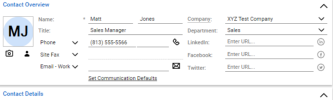
no, that data does not relate to 3CX. It is from ConnectWise user 1680535442910.png
 
Can you please clarify if the default template has been modified?
 
Just chiming in here, the reason why it doesn't work is because the 3CX default template uses filters that don't match the newest ConnectWise defaults (we have the same problem, never bothered to fix it.)

Things like "Phone"/"Mobile" is now "Phone - Mobile" as field name, even if the type is Phone already.
 
  • Like
Reactions: TheodorosG_3CX
From what I can see in the log, the server is returning the phone number as follows:
JSON:
"communicationItems":[
   {
      "id":45615,
      "type":{
         "id":2,
         "name":"Phone",
         "_info":{
            "type_href":"https://api-eu.myconnectwise.net/v4_6_release/apis/3.0//company/communicationTypes/2"
         }
      },
      "value":"8135555566",
      "defaultFlag":true,
      "communicationType":"Phone"
   }
]

As you can see, the path type.name is Phone, however that's not what the template expects. The template will consider any phone as long as the type is one of the following:
  • Direct
  • Cell
  • Mobile
  • Pager
  • Home
  • Fax
  • Fax/Home

Those were the default values when we developed this integration. I'm not sure if ConnectWise changed this now. Did you make any change to the values in your Setup Tables? Can you try editing your contact to use "Phone - Direct" instead of "Phone"?
 
  • Like
Reactions: TheodorosG_3CX
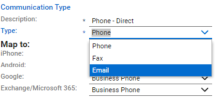
in CW the only types are phone, fax and email:
1680550907100.png

i have changed to the original description "Phone - Direct" - makes no difference.

JSON:
"communicationItems":[
    {
        "id":45615,
        "type":{
            "id":2,
            "name":"Phone - Direct",
            "_info":{
                "type_href":"https://api-eu.myconnectwise.net/v4_6_release/apis/3.0//company/communicationTypes/2"
            }
        },
        "value":"8135555566",
        "defaultFlag":true,
        "communicationType":"Phone"
    }
]
 
i have changed to the original description "Phone - Direct" - makes no difference.
Change it to just "Direct" and let me know.
 
Change it to just "Direct" and let me know.
you are a "star" - it works.
would you be able to add this trick to the original guide?
 
  • Like
Reactions: edossantos
  • Like
Reactions: Evolute IT
Did you add this to the guide? As I can't see it and have the same issue.
 
  • Like
Reactions: Evolute IT
Status
Not open for further replies.