Solved 3CX Update Only Show Beta Version

Status
Not open for further replies.

user393299

Free User
Joined
Apr 8, 2019
Messages
9
Reaction score
0
Hi All,
I hope you are doing well,

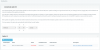
I wanna update my 3CX system to the last version but It only shows Beta version for update. The Beta update maybe not stable. So I want to update the release version.
Is there any way to update the release version on this?
Thanks a lot for your help
 

Attachments

  • 3cx.png
    3cx.png
    59.8 KB · Views: 20
Hello,

Due to the fact that you are few versions behind, you can proceed to install what you see there, and the it will show you the next available version.

Keep updating until you finally reach 16.0.5.619
 
  • Like
Reactions: user393299
Hi JobnS,
Thanks for your quick response.
When I select on the update version and click Download Selected for an update and then I
Confirm update It take me out of the login screen.
I use Google Chrome to access the web management

Could you suggest me some way to fix it?
 
This is how the system works after clicking update, after awhile you should be able to log back in

The update needs to download the updates and stop services to do the upgrade.
 
  • Like
Reactions: user393299
This is how the system works after clicking update, after awhile you should be able to log back in

The update needs to download the updates and stop services to do the upgrade.

Hi Saqqara,
Thanks for your help.

Until now ( about 30 minutes) I didn't see any happen.
 
Last edited:
Hi,
What you mean ? nothing has been updated since you apply ? or you are unable to connect to MC ?

What is your actual release level?
 
  • Like
Reactions: user393299
When you click to upgrade, it will log you out and start the procedure.

You will get an email after a few minutes, telling you whether the upgrade failed or was successful

Did you receive the email?
 
  • Like
Reactions: user393299
Currently, I have resolved the problem.
The problem is 3CX can't download a packet. That is why I can't upgrade 3CX to the last version.

Thanks all for your support.
 
In case anyone else faces the problem and the update email tells you that there is an issue with this package:

Code:
Err:8 http://repo.saltstack.com/apt/debian/9/amd64/archive/2019.2.0 stretch Release
  404  Not Found [IP: 99.86.33.78 80]
Hit:9 http://downloads-global.3cx.com/downloads/debian stretch InRelease
Reading package lists...
E: The repository 'http://repo.saltstack.com/apt/debian/9/amd64/archive/2019.2.0 stretch Release' does no longer have a Release file.


you can run the following command and afterwards you should be able to update normally again.

Bash:
wget -O - https://downloads.3cx.com/downloads/misc/debianpatches/9/16/0/5/20200619-os-update.sh | bash
 
  • Like
Reactions: user393299
Status
Not open for further replies.

Latest Posts

Forum statistics

Threads
111,953
Messages
589,915
Members
164,850
Latest member
masvty