• We do not provide troubleshooting help for unsupported phones. Please try with a supported phone.
  • V20 Update 10 Alpha 2 Learn more

3CX Using Internal Domain For Provisioning

Status
Not open for further replies.

pdreyer

New User
Joined
Jun 9, 2021
Messages
10
Reaction score
2
Hi everyone,

I'm currently working on an install of 3CX for my company. I had originally performed an install of 3CX using an internal domain. We have now updated our firewall rules to allow port 5001 to reach the PBX remotely. I would like to use QR codes to provision our employee's softphones, but the QR code links to the internal domain, rather than our my3cx.us domain. Is there a way to change this?
 
Hi @pdreyer

If you originally installed using an internal domain as described in step 4 here, then your should not have a problem
https://www.3cx.com/docs/manual/configuring-your-pbx/#h.us8asarjs8i8

Try the following so we can verify that this works before we check anything else:

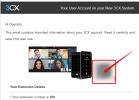
1. Create a brand new extension, add your email on it, but leave everything else default and just press OK to save.

2. Send yourself a welcome email for that extension, we will use email to scan the QR - NOT the management console or webclient QR.

3. When the email arrives, pick up your mobile phone and freshly install the 3CX app

4. Now (important) kill the WiFi on the phone, and enable only LTE

5. Run the app, and scan the QR that appears in the email like below
1624977270506.png


If everything went ok, the mobile app should contact the PBX via the internet, retrieve provisioning, and will show "Ready for calls" on the top right.
 
  • Like
Reactions: pdreyer
Hi @pdreyer

If you originally installed using an internal domain as described in step 4 here, then your should not have a problem
https://www.3cx.com/docs/manual/configuring-your-pbx/#h.us8asarjs8i8

Try the following so we can verify that this works before we check anything else:

1. Create a brand new extension, add your email on it, but leave everything else default and just press OK to save.

2. Send yourself a welcome email for that extension, we will use email to scan the QR - NOT the management console or webclient QR.

3. When the email arrives, pick up your mobile phone and freshly install the 3CX app

4. Now (important) kill the WiFi on the phone, and enable only LTE

5. Run the app, and scan the QR that appears in the email like below
View attachment 22755


If everything went ok, the mobile app should contact the PBX via the internet, retrieve provisioning, and will show "Ready for calls" on the top right.
Thank you so much for the help! This QR code does point to the my3cx.us domain as it should. Provisioning through this QR code is currently giving me a hard time, but I believe this is due to a firewall issue on my end. Is it possible to change the domain provided by the Webclient's QR code? If not, it isn't fatal, I'll just be sure to inform employees to use the one from their email.
 
I can explain further if needed of course, but just for clarity, did the instructions above result in a provisioned app?
 
  • Like
Reactions: pdreyer
I can explain further if needed of course, but just for clarity, did the instructions above result in a provisioned app?
Apologies for the late response. The instructions worked perfectly. There's still an issue with the apps not connecting, but this is due to the 3CX tunnel still being blocked by our firewall and will get corrected in the next several days.
 
Understood, and that is good news so far. Once the tunnel port gets forwarded they should start operating fully.

Just to explain a bit how our QR codes work: it depends on the URL you used to access the webclient or the management console

Just use any old QR scanner app on your phone, and it will reveal the URL to you, this way you can see how the QR will change depending on the url you used to reach the webclient.
 
  • Like
Reactions: pdreyer
Understood, and that is good news so far. Once the tunnel port gets forwarded they should start operating fully.

Just to explain a bit how our QR codes work: it depends on the URL you used to access the webclient or the management console

Just use any old QR scanner app on your phone, and it will reveal the URL to you, this way you can see how the QR will change depending on the url you used to reach the webclient.
That makes sense. I'll be sure that all employees use the my3cx.us domain to prevent any issues going forward. Thanks so much for the help. It really helped me!
 
Happy to hear :)
 
Status
Not open for further replies.

Forum statistics

Threads
112,148
Messages
590,963
Members
165,169
Latest member
Isaac415