3CX V 20 Recording set up

MM1969

Premier Customer
Advanced Certified
Joined
Jul 19, 2023
Messages
68
Reaction score
15
I have a director who wants all calls recorded of everyones phones. They want the director to be able to listen to anyones recordings. The managers should be able to listen to any of the agents or managers recordings but not the directors recordings. the director wants full control over status control presence barg in etc for everyone. is this possible on a 3CX?
 
seems it comes down to this: if you are not in someones department you can't listen to their recordings or set status etc. Therefore if you are in someones department you can't deny them from listening to your recordings. you can deny them access to all recordings but not a single user in your same department.any 3cx experts out there with a solution for this. directors don't want the general population to have access to their phone calls but the directors want to be able to listen to everyone elses calls
 
I encourage you to take a look at our 3CX Recording Manager tool. We offer granular control over who can see specific recordings.

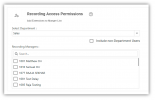
In the screenshot below, you select the desired department, and then select who can manage recordings made by members of the selected department. Initially, the list of users you can select from are only members of the selected department, but if you have Quality Assurance staff (or in your case a Director) that need to review call recordings , who are not members of that department, you can expand the list of possible users to include anyone.

1746451629940.png
The other benefit is that you don't have to give the Director, or anyone else for that matter, access to the 3CX Console to access and manage recordings. You can do everything directly from our web application.

And then there are all the advanced AI things we can do with our "Ask AI Anything" feature, and both AI scoring and human scoring. You will be amazed by the level of AI integration we have implemented in Recording Manager. We are releasing the next version TODAY!
 
Hello MM1969,

Yes, this setup is possible in 3CX with the right roles and group configuration, please check out the Access Roles Guide .

Anyways To achieve this you will have to
  • Put the director as Owner or System Owner.
  • Put the director in a separate group so managers can’t access their recordings.
Note : Managers can be allowed access only to agents and their own group recordings.

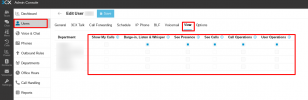
To give the director full control, go to their your Admin Console > Users > Director extension > View tab, and tick the relevant options for each department (Screenshot below)

1746452949723.png
 
  • Like
Reactions: Itel628
figured out a work around. the director uses an ip phone to make phone calls. They use the web interface to administer queue and recordings. Since they do not take phone calls on the web interface, i created a new user put that user in both departments so it can see all recordings. i moved the original user that is logged in to the phone to directors department only so agents can't see the recordings and the director has full call control over everyone in both departments since they are in both (status assign clear etc).
 
  • Like
Reactions: AbdullaR_3CX
I encourage you to take a look at our 3CX Recording Manager tool. We make the setup of recording access so much easier, and we provide a huge number of AI enhancements as well.

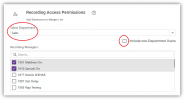
1748006999434.png
First, you select the desired department, second you decide whether the person needing access is a member of that department, and if not include non-department users. Then select the users who need access to the recordings.

With our solution there is no need to give 3CX console permissions at all.
 

Latest Posts

Forum statistics

Threads
111,962
Messages
589,996
Members
164,867
Latest member
swegner