3CX V15.5 No Audio Between Branch Locations

Status
Not open for further replies.

[email protected]

Premier Customer
Joined
Jun 17, 2015
Messages
84
Reaction score
21
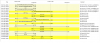
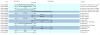
I have an issue with a new branch location and its sister location where they get no audio when calling each other. According to the packet captures (images of call flow attached) SIP connects the two phones but there's no RTP stream on the no audio call. I've gone through 3CX and the ring groups, extensions, and phones (Yealink T27G & T28) are all configured the same. If either of these 2 locations calls any other location around our company everything works fine. The problem only exists between these 2 locations.

I'm starting to think this is a network issue but I haven't found anything out of place yet. When I get back in the office tomorrow I'm going to log into their phone GUI's and make sure everything is correct.

Does anyone have any thoughts on this problem? Thank you for any answer in advance.
 

Attachments

  • No Audio.png
    No Audio.png
    35.3 KB · Views: 6
  • Working Call.png
    Working Call.png
    65.6 KB · Views: 6
Yes. With 'PBX Delivers Audio' 3CX will route audio between the phones. Without that enabled, they will try to go direct. You need to confirm you the phones can reach each other directly.It's a routing issue.
 
It appears that PBX Delivers Audio is the solution but I can't figure out why. I've gone over routers, switches, phones, and the 3CX provisioning templates. I've tested from each branch by doing traceroutes, pings, and packet captures. I'm unable to find anything that would cause RTP to fail for juse these 2 locations.
 
I have to assume you are using STUN at one, or both locations. While, with proper port forwarding, assignment of ports and use of PBX delivers audio, many times issues can be overcome. However you may still have an issue with the particular routers at each end, and their ability to "keep track" of the voice packets. If you are using more than a couple sets at each location, then a 3CX SBC is the way to go, for reliability.
 
In the captures that can be taken off the device interface, you need to see the contact IPs and RTP IPs as well as any audio packet payload that made it to the other side.

If those are correct and also reachable, it should work. Then again we don't know how your network is set up, how the devices are provisioned, what the two sites allow to pass across and what not..
 
Status
Not open for further replies.

Forum statistics

Threads
111,935
Messages
589,823
Members
164,818
Latest member
Guriqbal Singh