3CX v16 custom CRM template JSON Array singular

Status
Not open for further replies.

it145

Free User
Basic Certified
Joined
Feb 4, 2014
Messages
24
Reaction score
3
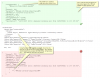
Like most API's, we need to create a specific formatted JSON POST and in this case it must contain a single array item with no key value. It works if we have the JSON formatted in this way and this also validates correctly at JSONLint. We've tried to use the Zoho CRM template as an example but an error occurs if you leave out the "Key" attribute in the <Value ... Although you can assign an empty string to the key, it still generates a blank key and also the array object generates a pair of curly braces, within the square braces which is unwanted.
I suspect the only answer will be to generate a raw JSON object (if that's possible) with the syntax, which again we thought might be the case using the vTiger example.

Please could someone suggest how we might generate the correct <PostValues> items to format the JSON as illustrated in the following image?
11004

As always, hopefully this will help others out to that might be having the same or similar issues?
 
Hello @it145,

You need to put the <Value> element just inside the array, without the object, as follows:
Code:
<PostValues>
  <Array Key="contactIds">
    <Value Key="" Passes="0" Type="String">[Contact::ContactId]</Value>
  </Array>
... and so on
 
Simple when you know how! Thank you and can't believe I didn't try that - Perfect.
 
  • Like
Reactions: edossantos
Is there any way of opening a web page, much like Contact Look/Create but for Report Call, after the journal record has been created, the new record ID obtained and then use this to update a ContactURL? I've studied a few templates (as time permits) but haven't found an example of this?

I've also noted that there is an issue with multiple journals being created if you use a "Ring All" polling strategy on queues but understand this is something that will be rectified hopefully in v16 update 2, is that correct?
 
Is there any way of opening a web page, much like Contact Look/Create but for Report Call, after the journal record has been created, the new record ID obtained and then use this to update a ContactURL? I've studied a few templates (as time permits) but haven't found an example of this?
Unfortunately this is not possible. The URL provided to the Web Client is only during contact lookup.

I've also noted that there is an issue with multiple journals being created if you use a "Ring All" polling strategy on queues but understand this is something that will be rectified hopefully in v16 update 2, is that correct?
Yes, this is a known issue that is addressed in Update 2, which is currently in beta.
 
Thanks for the confirmations.

Is there surely not a good use-case here. Once a call ends surely most people would want to be able to at least review, if not add to the call log information which will require the call log entry to be displayed in the browser? Is this not something that could also easily be added in update 2 and even if it wasn't required by everybody, it would be there to implement as required and would make the whole CRM integration more flexible?
 
  • Like
Reactions: edossantos
Status
Not open for further replies.

Latest Posts

Forum statistics

Threads
112,324
Messages
591,897
Members
165,475
Latest member
lastshadow