3CX V18: Connecting Teams & Customers - Faster, Better, More Efficiently

N_G

Founder
Joined
Jun 6, 2006
Messages
4,866
Reaction score
9,339
The final version of 3CX V18 is here offering best in class audio quality, performance and reliability. With customer communication at the forefront, V18 provides an all-in-one integrated solution to communicate internally and connect with prospects - via voice, live chat or video.

New 3CX Client and Desktop App​

With V18 we’v...
Continue reading the Original Blog Post.
 
Last edited by a moderator:
I really want to say I really appreciate 3cx's efforts in this, I think V18 is going to be a major stepping stone and the platform is getting better and better.

Most of our "major" issues have been addressed in this release and we appreciate all the work your team has done on this release.
 
Only renamed the RC2 to Final :-D Is this a normal way to do?

On our German 3CX there is still only the Alpha version available to upgrade to (or it is only the description).
"3CX Version 18 Alpha (inkl. OS-Upgrade von Debian 9 auf 10)
Eine frühe Testversion von 3CX Version 18 ist ab sofort verfügbar, einschließlich des Betriebssystem-Upgrades von Debian 9 auf 10. Achtung: Diese Version sollte nur auf für Tests vorgesehenen Systemen installiert werden oder auf Systemen, bei denen Downtime ohne Folgen bleibt! Führen Sie ein Backup durch, bevor Sie dieses Upgrade durchführen. Zur Installation in Produktivumgebungen/für Live-Systeme sind kommende Beta- oder Release-Versionen von 3CX Version 18 geeignet."

When I change the settings to UK or US it looks ok. Just to inform you about this.
 
Only renamed the RC2 to Final :-D Is this a normal way to do?

On our German 3CX there is still only the Alpha version available to upgrade to (or it is only the description).
"3CX Version 18 Alpha (inkl. OS-Upgrade von Debian 9 auf 10)
Eine frühe Testversion von 3CX Version 18 ist ab sofort verfügbar, einschließlich des Betriebssystem-Upgrades von Debian 9 auf 10. Achtung: Diese Version sollte nur auf für Tests vorgesehenen Systemen installiert werden oder auf Systemen, bei denen Downtime ohne Folgen bleibt! Führen Sie ein Backup durch, bevor Sie dieses Upgrade durchführen. Zur Installation in Produktivumgebungen/für Live-Systeme sind kommende Beta- oder Release-Versionen von 3CX Version 18 geeignet."

When I change the settings to UK or US it looks ok. Just to inform you about this.
There is no reason to generate a new build by the time we are happy with what we released for RC2. :)

About the description, this is probably browser cache, but if you enable automatic updates, will update to the right version periodically.

If you are REALLY itching to do the update now without waiting, you could restart the Management Console and that should make everything show as you'd expect them immediately.
 
Thanks 3CX team, does this mean the attended transfer issue from teams to teams user has been fixed or is it still only working with blind transfer?
 
  • Like
Reactions: N_G
Fantastic job guys! We have been using a demo box since alpha and upgraded our first production box this evening.

@NickD_3CX @Nick Galea I've seen this asked before, but no answer yet. We have a bunch of clients that rely on the Click to Call functionality. I see that https://pbx.3cx.us/webclient/#/call?phone=5165551212 format still works, but once the chrome extension is disabled there is no longer Click to Call functionality. Is this on the roadmap? Maybe the old click to call extension?

Thanks,
Jon
 
Just updated to V18. Looks nice. Chat improvement is a big +

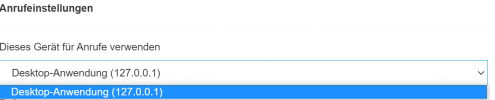
However: Maybe a stupid question but how do i get my deskphones to be used as phone in the new windows client? Cant Select them.
1628588454446.png

althoug they are conneted: 1628588509000.png
 
  • Like
Reactions: N_G
@ata

how do i get my deskphones to be used as phone in the new windows client? Cant Select them.
If the device is the one shown "Cisco SPA504G" then it's expected not to appear as CSTA is not supported for this model.
 
  • Like
Reactions: N_G and Evolute IT
Hi! Nice job! I'm really curious about the Teams integration. Is there any way to achieve it without an SBC? We have a VM in Azure for testing right now and we are only 3 users without IP phones. Just the app installed in our mobiles. How can we integrate it?
 
  • Like
Reactions: N_G
@Trust9
short question: is it possible to say when a dark theme will be released?
We don't have any info on this yet, but since there is a drop-down for themes I think we'll be adding at least one other option eventually.;)

@Lantera
I'm really curious about the Teams integration. Is there any way to achieve it without an SBC? We have a VM in Azure for testing right now and we are only 3 users without IP phones. Just the app installed in our mobiles. How can we integrate it?
Actually, the 3CX SBC is not a requirement for adding Teams integration.

You can read the guide here: https://www.3cx.com/docs/microsoft-teams-business-voice/
 
  • Like
Reactions: N_G and Evolute IT
@Trust9

We don't have any info on this yet, but since there is a drop-down for themes I think we'll be adding at least one other option eventually.;)

@Lantera

Actually, the 3CX SBC is not a requirement for adding Teams integration.

You can read the guide here: https://www.3cx.com/docs/microsoft-teams-business-voice/
thanks! This is the 4th time that I read the exact same guide. As you see, there's a point that says:
  • Domain for Teams FQDN should be registered in Domains of the MS365 tenant. *.onmicrosoft.com is not supported as the FQDN name of the SBC.
And we don't have an SBC.
 
  • Like
Reactions: N_G
thanks! This is the 4th time that I read the exact same guide. As you see, there's a point that says:
  • Domain for Teams FQDN should be registered in Domains of the MS365 tenant. *.onmicrosoft.com is not supported as the FQDN name of the SBC.
And we don't have an SBC.
They call it this way but that "SBC" is built-in the PBX. Thus using port 5062 instead of 5060 or 5061.

Microsoft calls them this way too, but it doesn't matter.
 
  • Like
Reactions: N_G and accentlogic
They call it this way but that "SBC" is built-in the PBX. Thus using port 5062 instead of 5060 or 5061.

Microsoft calls them this way too, but it doesn't matter.
oh! Thanks for the clarification.
 
  • Like
Reactions: Evolute IT
  • Like
Reactions: N_G
Hi!

I'm stucked or confused a little bit with this new MS Teams feature. Specifically in the article where it says:
  1. Specify the Teams FQDN that match the domain email of MS365. Find your domain by accessing the Microsoft 365 admin portal center > Settings > Domains.
(e.g. MS365 Domain: contoso.com, Teams FQDN can be: teams.contoso.com)

our domain is, for example, whatever.com. I just need to type teams.whatever.com? Where to point that A record to?

Also, in step 2. I understand I have to purchase a commercial certificate. I may try with Comodo to get a 90 day trial. Where should I install it first? As far as I know, when you purchase a commercial certificate, you need to deploy it in a web server or similar. In this particular case, where do I have to install it? in teams server which is a cloud service?

Our test scenario is pretty simple: 3cx in Azure VM with 3 extensions, 1 sip trunk for external calls and office365 accounts.

Thanks in advance.
 
@Nick Galea Could you tell us regarding times when 3CX Dev. team release V18 for Windows OS ?
 
  • Like
Reactions: Noik and N_G
Hi!

I'm stucked or confused a little bit with this new MS Teams feature. Specifically in the article where it says:
  1. Specify the Teams FQDN that match the domain email of MS365. Find your domain by accessing the Microsoft 365 admin portal center > Settings > Domains.
(e.g. MS365 Domain: contoso.com, Teams FQDN can be: teams.contoso.com)

our domain is, for example, whatever.com. I just need to type teams.whatever.com? Where to point that A record to?

Also, in step 2. I understand I have to purchase a commercial certificate. I may try with Comodo to get a 90 day trial. Where should I install it first? As far as I know, when you purchase a commercial certificate, you need to deploy it in a web server or similar. In this particular case, where do I have to install it? in teams server which is a cloud service?

Our test scenario is pretty simple: 3cx in Azure VM with 3 extensions, 1 sip trunk for external calls and office365 accounts.

Thanks in advance.
The domain can be any subdomain of your O365 domain. "teams.yourdomain.com" or "sbc" or "3cx". It's as you wish.

The important part is to have a DNS record of that subdomain and point it to your 3CX public IP.

For the certificate, it must be a regular SSL registered for the SBC Domain you chose. You can install the certificate in the Teams Direct Routing section, there are fields for it.
 
The domain can be any subdomain of your O365 domain. "teams.yourdomain.com" or "sbc" or "3cx". It's as you wish.

The important part is to have a DNS record of that subdomain and point it to your 3CX public IP.
got it! I have now an A record with teams.whatever.com that points to the Azure VM. So far, so good.

For the certificate, it must be a regular SSL registered for the SBC Domain you chose. You can install the certificate in the Teams Direct Routing section, there are fields for it.
Let's forget I'm trying to make it work in a test environment. But, right now, I'm in Teams Direct Routing section (Voice -- Direct Routing) and there is not a place to generate a CSR nor anything related. (url https://admin.teams.microsoft.com/direct-routing/v2)