3CX V18: Connecting Teams & Customers - Faster, Better, More Efficiently

A couple of things I didn't see noted but might be helpful for others:

1. Debian Buster uses a DUID-LLT/random MAC address for DHCP instead of the real hardware/VM MAC address. If you're using DHCP reservations, your instance will have a new IP once upgraded. You should either set the IP up statically in the instance before upgrading or use this after the upgrade to force using the hardware MAC if you can't statically set it for some reason.

2. The Windows desktop app has removed the ability to launch an external application upon receiving a call. The desktop application for V16 no longer works so if you have integrations relying on the launching of external applications, you (and I) are out of luck on V18. I really hope this feature is restored at some point - otherwise we'll be stuck on V16 until I can find a different solution for our use-case.
 
Last edited:
Is there an issue with V18 and ad-hoc video conferences? I upgraded my self-hosted server yesterday to V18 and now today I created an ad-hoc VC like I've done every working day for over one year and on the hour every hour it disconnects every participant. I can click the "join now" button to reconnect.
 
Anyone else having a problem with the softphone and audio? I don't get anything on either side. My physical desk phone works fine. I have tested my speakers and microphone on windows and they are working fine. It's just when I try to use the softphone in the app or the WebClient that I get no audio.

I have tried a Bluetooth headset, a USB headset, and the built-in speakers and mic. Nothing works through the new native app or web client.

It did work before the upgrade and it worked well.

I have verified the firewall with the checker from 3cx.
 
Last edited:
@liss @FridayIT - Thank you for the headsup!
@VianKomen - Keep in mind Teams has some limitations in this area. Receptionists and queue agents must use 3CX for sure to get proper telephony experience. I think attended transfer is one of those.
@liss - We rely on the tel protocol which now many websites and CRMs use. That said we will release an extension that scans for numbers. There are a few extensions that do this already by the way.
@knight @Aarronbrown - We are off for holidays for 1-2 weeks but after that we will address any issues we found in the debian release and then release a windows build.... Cant say exactly when but early September i would think.
@Danvarii - Thanks for the heads up! Re your two issues - 1. Yes we are working on this. Re 2. Will look into this - however only cached CRM contacts will be found. CRm should be main point to start a search. Where exactly are you doing the search from? Are your CRM contacts hidden for other users?
@SteveITS - Will check this, thank you for reporting
@mcoacollins - Not aware of the DHCP issue we will check. The old Windows app continues to work with V18 and is not deprecated yet. It just won't receive new features. Running executables from a web based application is going to present problems though from a security perspective. At some point another mechanism will have to be found....
 
Last edited:
  • Like
Reactions: Charli
Running executables from a web based application is going to present problems though from a security perspective. At some point another mechanism will have to be found....
If the app had a JS or some kind of event API, we could build small bridges that takes the infos and send it to the CRMs/ERPs/whatever else. Electron has many APIs you could use for this.

By the way, the "Back to Meet" in the app is nice while in a WebMeeting ;)
 
  • Like
Reactions: N_G
If you have a M365 Business and not E3/E5, I believe you need Business Voice and not Phone System. AFAIK.
Even I wish not to go into the licensing of MS, in super short, you only need a Microsoft Phone System add-on, which can be attached to any business plan of MS365. In case you have the E5 plan, you don't need the add-on as it is bundled. Business Voice - save your money and go down to Phone System addon. Conference service is built in 3CX, so no need to pay MS $$$ for it.

Also, a small reminder, I don't see Teams Phone System for everyone in an organization, firstly the price is too high and the functions are low. It is great for the executive level which only likes to deal with simple in and outbound calls from the Teams app. Staff, Warehouse, CallCenter users should only be in 3CX. More Functions - No Add On Fees.
 
  • Like
Reactions: N_G and Evolute IT
thanks! This is the 4th time that I read the exact same guide. As you see, there's a point that says:
  • Domain for Teams FQDN should be registered in Domains of the MS365 tenant. *.onmicrosoft.com is not supported as the FQDN name of the SBC.
And we don't have an SBC.

Best open a new post in our integration section in the forum to monitor your case better as it would be lost here otherwise.
 
  • Like
Reactions: Evolute IT
Is there an issue with V18 and ad-hoc video conferences? I upgraded my self-hosted server yesterday to V18 and now today I created an ad-hoc VC like I've done every working day for over one year and on the hour every hour it disconnects every participant. I can click the "join now" button to reconnect.

Please try again, our team identified a configuration that needed updating in a specific zone.
 
After updating to v18 I can't open most of the extensions.
It gives an error 500 saying: Object reference not set to an instance of an object.

It looks to me it only does this with extensions who have a phone template.
Also from the phones tab I can't open them.
 
"Panel" wouldnt load in Firefox and would reload the page back to "Team". Saw FF had a pending update to take it to 91.0 so dont know if the update caused it but the update to 91.0 fixed it.
 
After updating to v18 I can't open most of the extensions.
It gives an error 500 saying: Object reference not set to an instance of an object.

It looks to me it only does this with extensions who have a phone template.
Also from the phones tab I can't open them.
Hi!

Could you please enable Verbose logging, restart all your services once, try to access an extension again to get the error, then Generate the Support Info and send it to me in a PM?
I'd like to see what may be causing this.
 
Hi!

Could you please enable Verbose logging, restart all your services once, try to access an extension again to get the error, then Generate the Support Info and send it to me in a PM?
I'd like to see what may be causing this.

Hi Nick,

I think I know the reason already, the template section is completely empty.
The question is, does this happen with everyone or is this an incident.
And how can we solve this.
 
After we upgraded our 3CX last night to v18, i'm finding the adjustment slow.

One of the moans i've had is that the contacts are not easily accessible as they once were.

With all the space on the window I dont know why the choice to hide the address book was taken.

I've got a few other moans as well but they'd probably end up on deaf ears.

Why cant we utilise this space?

Visually it's not great for big screens - the text on the left is too small and it looks better bold.

"Team" is also not a good heading, especially when there are bridges set up and lets say for example receptionist PBX has 10 PBX tenants in a building - they're not a team, they're customers. "People" was a much better title.

1628673841893.png
 
Last edited:
Duplicate Scheduled Calls Report treated at the wrong time.
Hi all !

Are we the only ones having this problem on V18?
Since I updated 3CX V16 which was installed on Debian 10 (it surely has no links). I have updated to RC1 v18.
I had this problem. I updated to V18 RC2, the problem persists.

We did not encounter this problem for another of our PBX that we did a 3CX Full Backup in V15 - Uninstall 3CX - update OS Debian 9 @ 10 - Install 3CX V18 RC2 - Restore Full Backup. Call reports are processed correctly.

I am not having a problem with sync time (NTP) on the 3CX having "trouble".
Both 3CX are installed on the same server, on separate VMs. (VMWARE)
Dedicated IP address for each of them obviously.


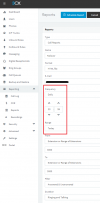
We have several call reports scheduled to be sent daily. ( Already planned before 3cx updates ).
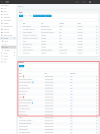
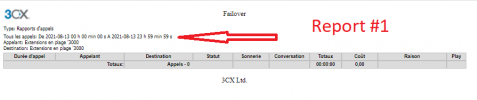
But, oddly enough, these are performed 2 times, at bad hours and for THE 2 FUTURE dates !

The new schedules (new scheduled report) are correct and working fine.

Obviously I can delete the scheduled reports to re-create them, this will fix my problem but my goal is to work with you to determine if this is not an issue caused by the update ... and that other customers will experience the same problems.

If others experience the same issue after updating, it would be good to share to allow 3CX to consider (if applicable) / if it is not a known issue.


1628675129881.png

1628675064780.png


1628675447412.png


1628675377519.png
 

Attachments

  • 1628674569109.png
    1628674569109.png
    16.9 KB · Views: 6
With all the space on the window I dont know why the choice to hide the address book was taken.
I've got a few other moans as well but they'd probably end up on deaf ears.
Why cant we utilise this space?

+1

"Team" is also not a good heading, especially when there are bridges set up and lets say for example receptionist PBX has 10 PBX tenants in a building - they're not a team, they're customers. "People" was a much better title.

+1
In addition, it is confusing with the Microsoft Teams connection believing that it would be possible to see members of Microsoft Teams. Customers tell us they don't see Teams members..

Very relevant as a sharing @kieferschild , I follow you !
 
I just saw your screenshot and was really happy that the problem with the icons is finally solved. :cool:

Then I realized ... you edited the image ;).

The issue has been raised so many times. It can't be such a big programming effort to move a few icons :eek:.
Sorry to burst your bubble...

hopefully if enough people like the post it might get sorted..
 
@bravad

I'll PM you shortly for more information regarding your post.
 
  • Like
Reactions: bravad
V18 is great so far! but i am missing 2 things,

1. The option to direct fill in a number on the home page of /webclient/
2. The contact options linked on the left menu ( now its under the 3 dots )

i dont like the extra cllicking
 
  • Like
Reactions: chili and Trust9

Forum statistics

Threads
111,978
Messages
590,100
Members
164,907
Latest member
d.obermeier