Solved 3CX V18 + Windows Desktop App V18.5.28 not provisioning

Status
Not open for further replies.

Andreas Ebinger

Trainee Partner
Basic Certified
Joined
Feb 6, 2020
Messages
18
Reaction score
3
Hi,
we upgraded our 3CX (Debian Based) to the latest V18 Build 237. When I try to install the new Desktop App everything seems to work fine (its installed and you can find it in the start menu and the tray Icon), but if I try to provision it nothing happens: no error just nothing:
- It makes no difference if the App is running while I Press the Provisioning Button in the Webclient
- Tried to lower the Security Settings in the WebBrowser
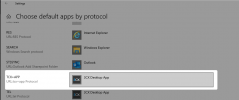
- Checked the Settings of Default Apps for the TCX+APP (is set to the Desktop App - as is TEL)
- Tried different App Versions .28 and .26
- nothing out of the ordenary in the windows event logs (as far as I can tell)
- tried the install as admin and tried the install for all users
- tried it with a pc which is not a domain member

The Desktops are all inside the domain-network and their firewalls are disabled. Only Security Software running is windows Defender.

Please help: is there a way to manually configure the desktop app oder how can we continue to troubleshoot the problem?
 
Hi!

If you have the Desktop App closed, then you from the WebClient you press the "Provision" button, is the app brought opened?

Also when you click the link, does your browser prompt you to launch "an external app"?

One more thing, how are you logged into the WebClient?
  • https://[LAN IP]:[HTTPS Port]/webclient
  • http://[LAN IP]:[HTTP Port]/webclient
  • https://[FQDN]:[HTTPS Port]/webclient
  • http://[FQDN]:[HTTP Port]/webclient
?
 
Hi,

No, the Desktop App does not open if I press the Provisioning button (It is running as Tray Icon).

I have tried:
  • https://[LAN IP]:[HTTPS Port]/webclient
  • https://[FQDN]:[HTTPS Port]/webclient
  • https://[InternalFQDN]:[HTTPS Port]/webclient
I can not connect to the WebClient via http - that is disabled on the nginx and just gives a 400 Bad Request.

I have accessed the Debug Console of the Electron App and found an error:

"Content Security Policy of your site blocks the use of 'eval' in JavaScript`"
"Affected Ressource
1 directive
Source Location Directive Status
vendor.9c67fd1….js:1 script-src blocked
"
Perhaps that has something to do with the Problem?
 
No, the Desktop App does not open if I press the Provisioning button (It is running as Tray Icon).
Try existing the App and check again, if it does not launch at all, there may be no association for the TCX+APP.
1636453119335.png


Also try this, in the WebClient, in the upper-right corner there is the option to show the QR code.
Either with a QR scanner on your phone, or using an online QR decoder like this, get the URL that the QR points to, then from the PC that you have the Desktop App installed on, open Chrome and go to this link.
Will it download a file?
 
Hi NickD,

as I wrote on my opening statetment I have checked the file association for TCX+APP and for TEL.

I have checked the QR-code as you wrote: It translates to:
  • https://[LAN IP]:[HTTPS Port]/P/WIREDSTRING/WÍREDSTRING
If I try it in my Web-Browser it downloads a 3cxprov_USERNUMBER.3cxconfig File.
 
If I try to open the file with the DesktopApp the App is starting but then just greets me with the same "open the Webclient for Provisioning" Dialog.
 
If I try to open the file with the DesktopApp the App is starting but then just greets me with the same "open the Webclient for Provisioning" Dialog.
I have checked the QR-code as you wrote: It translates to:
  • https://[LAN IP]:[HTTPS Port]/P/WIREDSTRING/WÍREDSTRING
If I try it in my Web-Browser it downloads a 3cxprov_USERNUMBER.3cxconfig File.
From these 2 things, I would guess that there must be something blocking or disallowing the app from contacting the link that the QR code resolves to (that's what the Desktop App tries to do...).

You could also try manually triggering the provisioning process of the Desktop app as explained here:
https://www.3cx.com/community/threads/v18-desktop-app-mass-deployment-option.83541/post-389805

Also, maybe try and disable Windows Defender as a test?

[EDIT]
One more thing, try creating a brand new extension on your 3CX Server, don't change any of the default settings, and try to provision that too. Does the same happen?
 
You could also triggering the provisioning process of the Desktop app as explained here:
https://www.3cx.com/community/threads/v18-desktop-app-mass-deployment-option.83541/post-389805
Yes that works like a charm - If I start the APP via cmd with the Link it works as it should. Disabling Windows Defender is not possible on short notice because that part of the Domain is administrated from the IT Department of another country (the costumer is a multi-national company). But I will try to get a hold of a new device which was never domain joined and try it with that.
 
Yes that works like a charm - If I start the APP via cmd with the Link it works as it should. Disabling Windows Defender is not possible on short notice because that part of the Domain is administrated from the IT Department of another country (the costumer is a multi-national company). But I will try to get a hold of a new device which was never domain joined and try it with that.
I'm glad to hear that this worked! Although I am a bit puzzled why this worked and from the browser it is giving you trouble, because effectively that is also what the browser does, feeds this link to the Desktop App EXE.

Yes, that's a good idea because the more I think about it, the more it sounds like some kind of policy that is causing this.
 
I installed a fresh Windows 10 on a Notebook and tried it: same result - no Provisioning. I also tried to use a Mobile Internet-Connection and accessed the 3CX from extern - same result.

Both cases worked as soon as I used the CMD with the URL from the QR-Code (the external QR code gives me a different URL with the FQDN in place of the IP - as it should).

The test machine has nothing installed (execpt 3CX Desktop APP). Windows Defender and Firewall are off. I do not see anything blocking the connection between Browser and APP.

I have checked the file association for TCX+APP and for TEL - everythings fine here.
 
This is very strange.
May I ask one more thing, are you using Chrome as your browser?
 
Testet
This is very strange.
May I ask one more thing, are you using Chrome as your browser?
of course you may ;-)

I tried Chrome and Edge, both on actual and on old (Mai 2020) Builds - makes no difference. Only thing I did not try: Firefox or IE11.

A collegue of me proposed if it could be a new windows setting. I will reinstall the notebook again with a windows build from last year and try it without making updates.
 
Sounds good! Let us know how that goes.
 
I am out of luck - installed a fresh Windows 10 20H2 without any Updates. No domain-join. Just the OS + installed old (2019) Google Chrome.

Tried provisioning again with edge and chrome - same result (which means no result). File association looks fine, but App will not start if I press "Provisioning".

I can be sure now that the Problem
- has nothing to do with the Windows Version used
- no third party software is interferring
- domain joined or not makes no difference
- Windows Defender / Firewall active or not makes no difference
- has nothing to do with browser (Edge or Chrome or version/build)
- trying to provision from external WAN or internal LAN makes no difference
- works everytime if I use the CMD to call the App and give it the URL manualy

I think there is something wrong with the App call - but I start to suspect an Error on the side of the 3CX web client page because I tried almost everything clientside.

Last thing I checked:
I had a look at the sourcecode of the webpage with the provisoning button. Is that part correct:

"<a _ngcontent-wrd-c97="" class="ml-3 btn btn-primary actionButton"> Provision </a> == $0"

In the DOM-Objects or Event Listeners I can not find any call to the Desktop APP, only a call to a URL
https://[LAN IP]:[HTTPS Port]/webclient/polyfills.RANDOMNUMBER.js
If I try to open the URL in the Browser I just get the JS-File Content but nothing is executed

I am glad about any hint what else to try because I am fresh out of idears and I need to get it working.
 
Here's one more thing you could check:
  1. Close the Desktop App from the Notification Area (right-click --> Exit)
  2. Go to %appdata%\3CXDesktopApp\logs\ and delete all log files here
  3. Open a webclient in a browser and provision the app, the app should open but not provision as you mentioned in previously post I think.
  4. Check the Log file and see if there are any clues there
Did it get the the parameter from the browser?
If yes, does it show an attempt to connect and get the settings?
 
Hi - no, the app does not open and no log is created.

If I start the App via cmd the main log is created, but there is no error Message in the.log, everything seems to be working as it should.
 
I sent you a PM.
 
For other reading this thread, we tried downloading Firefox Portable to try as a "clean" browser, and with that, through the WebClient we managed to provision the Desktop App.

This left a clue that maybe something is wrong with the other browser(s).

One more clue was the existence of a HTTP/S proxy on the network, the although we couldn't 'prove' was involved in the issue, I find it as the most likely suspect.
 
New development:
I accessed one of my demo 3cx cloud instances and tried to provision the desktop app from there - works like a charm.
It seems to be something is wrong with the local 3CX Installation. Of course that does not explain why it is working with the firefox portable.
 
I think I have found the problem and solved it - but I will need to restart the nginx-server to test my solution. So I have to wait until this evening. If it will work I will tell you what the problem was.
Thank you very much for your support so far.
 
  • Like
Reactions: NickD_3CX
Status
Not open for further replies.