- Joined
- Feb 6, 2020
- Messages
- 18
- Reaction score
- 3
Hi,
we upgraded our 3CX (Debian Based) to the latest V18 Build 237. When I try to install the new Desktop App everything seems to work fine (its installed and you can find it in the start menu and the tray Icon), but if I try to provision it nothing happens: no error just nothing:
- It makes no difference if the App is running while I Press the Provisioning Button in the Webclient
- Tried to lower the Security Settings in the WebBrowser
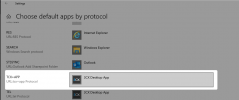
- Checked the Settings of Default Apps for the TCX+APP (is set to the Desktop App - as is TEL)
- Tried different App Versions .28 and .26
- nothing out of the ordenary in the windows event logs (as far as I can tell)
- tried the install as admin and tried the install for all users
- tried it with a pc which is not a domain member
The Desktops are all inside the domain-network and their firewalls are disabled. Only Security Software running is windows Defender.
Please help: is there a way to manually configure the desktop app oder how can we continue to troubleshoot the problem?
we upgraded our 3CX (Debian Based) to the latest V18 Build 237. When I try to install the new Desktop App everything seems to work fine (its installed and you can find it in the start menu and the tray Icon), but if I try to provision it nothing happens: no error just nothing:
- It makes no difference if the App is running while I Press the Provisioning Button in the Webclient
- Tried to lower the Security Settings in the WebBrowser
- Checked the Settings of Default Apps for the TCX+APP (is set to the Desktop App - as is TEL)
- Tried different App Versions .28 and .26
- nothing out of the ordenary in the windows event logs (as far as I can tell)
- tried the install as admin and tried the install for all users
- tried it with a pc which is not a domain member
The Desktops are all inside the domain-network and their firewalls are disabled. Only Security Software running is windows Defender.
Please help: is there a way to manually configure the desktop app oder how can we continue to troubleshoot the problem?