Solved 3CX v20 – Any way to send P-Asserted-Identity header? (Voxbeam SIP Trunk)

Status
Not open for further replies.

enes

Customer
Joined
Mar 17, 2025
Messages
5
Reaction score
0
Hi everyone,


We're integrating a SIP Trunk from Voxbeam on our 3CX v20 (on-prem) system.


Voxbeam requires that we include a P-Asserted-Identity header in the SIP INVITE using +E164 format (e.g., P-Asserted-Identity: <sip:[email protected]>).


We tried modifying the trunk template and added these lines:
<field name="ParameterOut" custom="" parameter="P-Asserted-IdentityUserPart">$OutboundCallerId</field>
<field name="ParameterOut" custom="" parameter="P-Asserted-IdentityHostPart">$GWHostPort</field>

Unfortunately, 3CX v20 seems to ignore unknown or unsupported SIP headers, so these fields don't appear in the actual SIP INVITE.

Questions:​

  • Is there any supported way to send P-Asserted-Identity in v20?
  • Has anyone used Remote-Party-ID as a workaround?
  • Or is the only real solution to go through an SBC (like Asterisk or Kamailio) to manipulate the SIP headers?

Any help or suggestions would be hugely appreciated.

Thanks
Enes
 
Hi @enes

Try this in the template:

Code:
<field name="ParameterOut" custom="" parameter="P-AssertedIdentityUserPart">$OutboundCallerId</field>

<field name="ParameterOut" custom="" parameter="P-AssertedIdentityHostPart">$GWHostPort</field>
 
The options are not visible in the UI. You can import a template with these options and it will work when sending an Invite but they will not be visible in the UI.
Export your template, make the required changes and import the template back in.
 
Unfortunately, the connection was not accepted even after the adjustment.
Is there any other method?
The company responded that one of the clients is using 3CX — it was a bit of a hassle, but it eventually worked.
 
Unfortunately, the connection was not accepted even after the adjustment.
Is there any other method?
The company responded that one of the clients is using 3CX — it was a bit of a hassle, but it eventually worked.
Check an export of your trunk again to confirm the change is there. I think the built in templates cannot be overwritten so you may have to import a custom provider template and use that.
 
@Alphabetic how can i import a custom provider template in 3CX v20.
 
@Alphabetic how can i import a custom provider template in 3CX v20.
Export your current trunk, make your edit then go to Advanced > Templates > Provider templates and upload yours. You'll have to set up your trunk again
 
Due to some changes with our provider we have to use a new IP address. I'm having problems with exporting the existing SIP Trunk, modifying the file and importing it through Advanced > Templates > Provider templates.

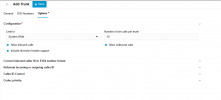
When I upload the file and try to setup the new Trunk and click Save - it shifts to the Options tab and a red dot appears above Options and Configuration.

1744818538047.png

No matter what I change, I can't add this new trunk.


Is there another way to only change some of the parameters of the existing Trunk? I tried downloading the backup, modifying the .xml and re-uploading the modified backup file - but it fails when trying to restore (probably a checksum fail). I also tried to use this modified backup file with a fresh install but after the installation was complete there was no configuration (no users, no trunk - just the FQDN and the license,...)
 
I think if you modify anything outside of the template then it isnt overwritten.

Have you tried making a generic SIP trunk?
 
What do you mean by this - it isn't overwritten?

We're using a generic SIP trunk as is - there are no officially supported templates in our country (technically they are but they're for global providers).

In v18 it was easy to change the outbound parameters from the GUI. This is the first time I need to do it on v20 and I've hit a dead end...

I need to change these:

<SpecifiedIPForRegistrationContact>[IP_address]</SpecifiedIPForRegistrationContact>
<OutboundParam ParamName="ContactHost" ValueName="$CustomIPRange" Custom="[IP_address]" />
<OutboundParam ParamName="FromHostPart" ValueName="$CustomIPRange" Custom="[IP_address]" />
<OutboundParam ParamName="RemotePartyIDCallingPartyHostPart" ValueName="$CustomIPRange" Custom="[IP_address]" />
 
Hi
Thanks so much to everyone who took the time to reply and assist me I truly appreciate your support!
Thankfully, everything is working perfectly now.
I solved the issue simply by modifying the provider template directly and adding the following lines:


<field name="ParameterOut" custom="" parameter="P-AssertedIdentityDisplayName">$OutboundCallerId</field>
<field name="ParameterOut" custom="" parameter="P-AssertedIdentityUserPart">$OutboundCallerId</field>
<field name="ParameterOut" custom="" parameter="P-AssertedIdentityHostPart">$GWHostPort</field>

Everything is stable and working as expected.
 
Status
Not open for further replies.

Latest Posts

Forum statistics

Threads
111,990
Messages
590,161
Members
164,926
Latest member
tohoken1