Solved 3CX V20 New Data connectors Option not working

Status
Not open for further replies.

Ferdnand.ouma

Premier Customer
Joined
Feb 9, 2025
Messages
30
Reaction score
2
Hello,
I see 3cx did a good thing in the latest version release by introducing data connectors which I believe this was to help customers be able to connect main database CDR information to a secondary 3CX database instance. For my case I'm trying to connect my main 3CX Database instance CDR's information to a secondary 3CX instance so that my users who do heavy reporting can pull reports from there relieving the main instance for live calls but for some reason I have followed all the recommended ways of doing it, but nothing is forthcoming. 1747909359287.png
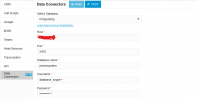
 
Did you click the link that says "learn how to set up PostgreSQL"
 
  • Like
Reactions: Evolute IT
Hello,
I see 3cx did a good thing in the latest version release by introducing data connectors which I believe this was to help customers be able to connect main database CDR information to a secondary 3CX database instance. For my case I'm trying to connect my main 3CX Database instance CDR's information to a secondary 3CX instance so that my users who do heavy reporting can pull reports from there relieving the main instance for live calls but for some reason I have followed all the recommended ways of doing it, but nothing is forthcoming. View attachment 47957
You're trying to connect to the local DB. That won't work.

The connector is meant to send the CDR data OUTSIDE the 3CX into a separate PostgresSQL database.

You're using it wrong.
 
I have gone through this document and doing the same thing, but the feedback is always "failed to connect to my remote host"
Do you have any insights?
 
I have gone through this document and doing the same thing, but the feedback is always "failed to connect to my remote host"
Do you have any insights?
Clearly you didn't read the document properly.

Read the blog posts too, it helps to understand the concept.
 
You're trying to connect to the local DB. That won't work.

The connector is meant to send the CDR data OUTSIDE the 3CX into a separate PostgresSQL database.

You're using it wrong.
On the contrary I'm connecting to a remote host, but again when I try to test local host connection (127.0.0.1) connection is successful.
 
It wou
Clearly you didn't read the document properly.

Read the blog posts too, it helps to understand the concept.
ld help if you point out what you think I'm doing wrong I confirm if it's true rather than dismissing that I read the document, I presume you have tried this on your instance, has it worked for you?
 
If you cannot connect to your database remotely but can internally it would suggest your firewall is blocking the connection. You will need to open the port on your NAT device.
 
  • Like
Reactions: Evolute IT
It wou

ld help if you point out what you think I'm doing wrong I confirm if it's true rather than dismissing that I read the document, I presume you have tried this on your instance, has it worked for you?
Yes it worked for us.

Setup a postgresql server, setup a user and an initial database, then configure the connector to talk to that database. Don't use the 3CX database name/user/options, it has nothing to do here.

If you still can't get a connection, check your Postgresql firewall rules. 5432 must be opened for 3CX to talk to it.

We use AWS RDS for ease of setup during our testing.
 
On the contrary I'm connecting to a remote host, but again when I try to test local host connection (127.0.0.1) connection is successful.
Localhost should not be used. And the postgresql must not be on the same server as the 3CX, as it already as its own.
 
You're trying to connect to the local DB. That won't work.

The connector is meant to send the CDR data OUTSIDE the 3CX into a separate PostgresSQL database.

You're using it wrong.
ConceptsWeb, it seems you have some knowledge on how to go about this; you've pointed out that I'm connecting to the local host eventhough I'm connecting to a remote host what makes you think I'm connecting to local host, I'd appreciate your insights.
 
Localhost should not be used. And the postgresql must not be on the same server as the 3CX, as it already as its own.
Told you I'm connecting to a remote host, any more meaningful feedback?
 
hello *wave* see my comment
 
  • Like
Reactions: Evolute IT
ConceptsWeb, it seems you have some knowledge on how to go about this; you've pointed out that I'm connecting to the local host eventhough I'm connecting to a remote host what makes you think I'm connecting to local host, I'd appreciate your insights.
The configuration you showed had "database_single" and the readonly username, which is used for the local DB. This is why I assumed you tried localhost.

Anyways. Check your postgresql server firewall rules, as it's probably the cause of the connection issue. 3CX just connects to the database like a plain old regular app.
 
I'm hosting both the Primary 3CX server and the secondary instance in Azure on the same VPC, opened this port 5432 on the inbound rules on my secondary 3CX instance as well as outbound port 5432 on my Primary instance just in case the firewall is blocking anything, but nothing happens, could it be that this is only meant to work for a standalone Postgres instance but not on two 3CX database instances as the document states that this option allows connection to a standalone Postgres SQL and Grafana.
 
I'm hosting both the Primary 3CX server and the secondary instance in Azure on the same VPC, opened this port 5432 on the inbound rules on my secondary 3CX instance as well as outbound port 5432 on my Primary instance just in case the firewall is blocking anything, but nothing happens, could it be that this is only meant to work for a standalone Postgres instance but not on two 3CX database instances as the document states that this option allows connection to a standalone Postgres SQL and Grafana.
So you're not using properly and didn't read the docs.

It's NOT meant to be used to connect 3CX instances together.

It's meant to export the CDR to an independent database, to then be used with external dashboard tools.

That's why you can't connect. The 3CX db server doesn't expose the port to the Web as you are not allowed to connect to it.
 
  • Like
Reactions: Ferdnand.ouma
The configuration you showed had "database_single" and the readonly username, which is used for the local DB. This is why I assumed you tried localhost.

Anyways. Check your postgresql server firewall rules, as it's probably the cause of the connection issue. 3CX just connects to the database like a plain old regular app.
Alright, but maybe where I'm getting it wrong...when you are running two 3CX DB instances, the usernames and database names for both instances are always the same by default, right? the only thing to differentiate the two instances (localhost and remote) are the IPs, I stand to be corrected, but this is my understanding. Now assuming all the firewall rules are properly configured, what else could lead to connection being unsuccessful?
 
So you're not using properly and didn't read the docs.

It's NOT meant to be used to connect 3CX instances together.

It's meant to export the CDR to an independent database, to then be used with external dashboard tools.

That's why you can't connect. The 3CX db server doesn't expose the port to the Web as you are not allowed to connect to it.
Now this conclusively answers all my question, I was getting it wrong the whole time, my understanding was it can be used to transfer CDR data to another 3CX database, considering it's also using a Postgres DB.:)
 
Now this conclusively answers all my question, I was getting it wrong the whole time, my understanding was it can be used to transfer CDR data to another 3CX database, considering it's also using a Postgres DB.:)
He technically did tell you this from the 1st response.

You're trying to connect to the local DB. That won't work.

The connector is meant to send the CDR data OUTSIDE the 3CX into a separate PostgresSQL database.

You're using it wrong.

Just so that anyone reading this is on the same page. This is used to send the CDR information off the server to be used by external reporting tools.
 
  • Like
Reactions: Evolute IT
He technically did tell you this from the 1st response.


Just so that anyone reading this is on the same page. This is used to send the CDR information off the server to be used by external reporting tools.
Hello Nic,
Thanks for the feedback, so you confirm that it's not possible to get a positive connection when I try to sync two separate active 3CX DB using this option (since I'm always getting "connection failed" when trying to), also clarify this " 3CX db server doesn't expose the port to the Web as you are not allowed to connect to it." as stated by Concepts web, is this true, if so how is it sending the CDR information to the external standalone DBs
 
Status
Not open for further replies.

Latest Posts

Forum statistics

Threads
111,962
Messages
589,995
Members
164,867
Latest member
swegner