3CX V20 SIP DIRECT

Status
Not open for further replies.

Alle CTEC

Silver Partner
Advanced Certified
Joined
Sep 11, 2023
Messages
360
Reaction score
45
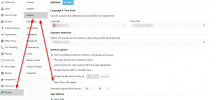
In V20 I don't have the menu that allows me to activate the fqdn domain for Direct SIP CALLS?
 
This is listed under System<<Options:

1717384081464.png
 
I found the option I can't find where to specify the domain???

where do I set the domain @spi.domain.com example?

In V18 it was in Networking - FQDN

1717423505267.png
 
Last edited:
It is not needed. Just enable the option mentioned by my colleague above. Then add the SIP ID under each user you wish this to be active.
 
Sorry, I enable the option by setting the id for example 200 in the user, at this point wherever I set the correct DNS records he responds in the sense that regardless of the domain it is domain1, domain2, domain3.

200@domain1 200@domain2 etc....

Obviously I must have set the appropriate DNS records.
 
Status
Not open for further replies.

Latest Posts

Forum statistics

Threads
111,952
Messages
589,888
Members
164,843
Latest member
sambannoura