3CX V20, Update 2 Release Candidate

MichaelB_3CX

3CX Team
Staff member
3CX Support
Joined
Aug 25, 2009
Messages
568
Reaction score
699

Microsoft Teams synchronization, AI & more admin control.​

Following the ALPHA and BETA releases of Update 2, the release candidate is now available for download. This release includes some exciting features the main ones being:
  • Microsoft Teams presence syncing
  • Speech to text transcription from OpenAI
  • Summary & S...
 
Last edited by a moderator:
I am glad the add Holiday message option is back. I had a coupled upset customers for this American July 4th holiday. I would like to see the ability to send a welcome message without having to reset all the passwords on an extension. Would be nice that just the webclient password changes or they have to create a new webclient password when the welcome email is sent out and not all the phone and authentication passwords.
 
When will this appear available for hosted accounts?
 
Is there any updated ETA as to when the API documentation will be release for version 20?
 
I am glad the add Holiday message option is back. I had a coupled upset customers for this American July 4th holiday. I would like to see the ability to send a welcome message without having to reset all the passwords on an extension. Would be nice that just the webclient password changes or they have to create a new webclient password when the welcome email is sent out and not all the phone and authentication passwords.
They can do this themselves via the "Forgot password" link in the login screen.
 
Any ideas when the per department phonebook is coming ? We'd like to restrict phonebooks based on departments so it isn't global.
 

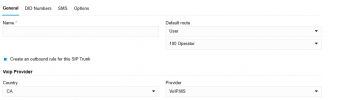
Thanks for the suggestion, however that did not work for me. Selecting CA and then voip.ms still does not give me the SMS tab. No idea if it's something I have set wrong or if maybe they changed something...

What I'm doing now is using a Generic Trunk for voip.ms and this give me a working SMS, however I've been experiencing weird stuff since setting this up and I'm suspecting it may be due to the Generic Trunk (though some testing today indicates a possibly faulty phone).

I think for now I'll change it back to a true voip.ms trunk and use the "SMS forward to phone number" option until 3CX gets the SMS tab in the voip.ms trunks.
 
  • Like
Reactions: GregG_3CX
@malachi What version you on are, I just checked and its available on our testing system, V20 U2 RC:


1720106612795.png
 
  • Like
Reactions: GregG_3CX
@malachi are you 3CX hosted or Self hosted? If self-hosted, updates are sequential, so to see V20 U2 RC you would have to go through the alpha/beta upgrades first, they function differently than final release as they are for testing.

Though not final V20 U2 RC seems very stable just make sure it covers everything you need, and don't forget backups first...hope this helps...

https://www.3cx.com/blog/change-log/phone-system-change-log-v20/
 
  • Like
Reactions: GregG_3CX
@malachi are you 3CX hosted or Self hosted? If self-hosted, updates are sequential, so to see V20 U2 RC you would have to go through the alpha/beta upgrades first, they function differently than final release as they are for testing.

Are you sure about this? I'd hate to update to the alpha release and it be super buggy and then be stuck on it for days...
 
@malachi Release candidates are just that, not final but by the time it gets there the next step is usually final. With that said final is the safest for production. If I was a betting man, I suspect final might land sometime the next week or so baring an unexpected issue so you really would not have long to wait...
 
  • Like
Reactions: GregG_3CX
@GregG_3CX

Do you have an update when the Release Candidate will be available for hosted? I took the leap to voip.ms back in May due to @Nick Galea stating on May 14th "So you can simply use voip.ms knowing it will come say in a month max" but it's pushing 2 months now and still nothing more than an Alpha release(which I can not use on a critical system).

https://www.3cx.com/community/threads/sms-with-voip-ms.124541/post-601783
@malachi - the V20 Update 2 Release Candidate was launched yesterday as several others have mentioned. The thing to note is that if you have automatic updates turned on, they will not work on Alpha, Beta, or RC candidates, only full releases. So you can still upgrade to the RC, but you will have to do it manually. You can access this by Admin Console > Updates > Download.
 
@malachi are you 3CX hosted or Self hosted? If self-hosted, updates are sequential, so to see V20 U2 RC you would have to go through the alpha/beta upgrades first, they function differently than final release as they are for testing.
Just want to confirm for anyone else having the same issue, this does indeed work. I am now on RC and SMS working excellent for voip.ms

@illcsales thanks for the help
 
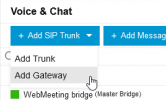
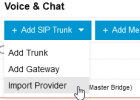
FYI, Since we updated this last version, the option to Import a file to create a new SIP TRunk has disappeared.
1720168211491.png

Previous versions do include that option. hopefully, the final version will include it again since we need this method to include the Outbound parameters which are no longer possible to add/change within the 3CX interface since v20 :)
1720168546276.png


Also, I hope we can have again the option for Scheduled reports to be sent to email addresses. We are a Reseller who offers our customers the support to create the reports on their behalf but now each agent can only see their reports. Our customers won't create them which means we now have to ask our customers for each agent's login details and create the same reports for each one of them using their login credentials, which is not secure and increases the work time. Previously we would create this once and assign as many emails as required who will receive the results of the reports automatically.

Thanks!
 

Forum statistics

Threads
111,992
Messages
590,171
Members
164,929
Latest member
Cloudstar