3CX v20 Where is "Rights" Option

Status
Not open for further replies.

VUSALDADASHOV

Gold Partner
Basic Certified
Joined
Dec 30, 2021
Messages
68
Reaction score
15
Hello
Just Upgraded to 3CX v20

To be honest Admin Console a little unusual

I wnat to assign Admin right to an extension

Where can I find this option ?
 
Test upgraded a v18 to v20, users are set to Reception and can confirm phones do not auto-answer for intercom here either.. please fix this its a majorly used feature for this client!

I just ran into this as well and searched the forums and found this :-)
Phones do not auto-answer / intercom at my end either.
 
  • Like
Reactions: Peoria IT
@Nick Galea I can confirm that v20 does not pass the "Call-Info: <sip:3cx.pbx>;answer-after=0" header to the phone for paging.
I have tested v20 as well and ran into the same.. can we have an update on this fix please?
 
Test upgraded a v18 to v20, users are set to Reception and can confirm phones do not auto-answer for intercom here either.. please fix this its a majorly used feature for this client!

I had opened a support ticket with 3cx for this same/similar issue today. Wasn't sure if you had this resolved yet on your end or not, but just so its visible and possibly help others with the same situation:

Screenshot 2024-04-22 112849.png

For context; updated a system hosted by 3cx from v18 to v20 as it was to be forced to upgrade by end of May anyway.

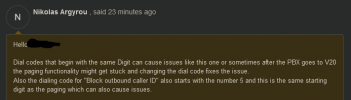
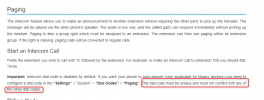
Dial code for paging on this system was originally set to *50 and we changed it to *8 then updated all the BLFs to reflect this new dial code.

Afterwards, paging/intercom functionality was restored.
 
  • Love
Reactions: Peoria IT
This is also mentioned in our guideline:

1713838884720.png
 
Since switching to version V20, I no longer have filters on the recordings. To have them, you must give Admin rights to a user.
The Provision link does nothing and I cannot retrieve the configuration for the Windows application.
I have been using 3CX for a year and a half. I don't like limitations and therefore I consider migrating my clients to other solutions.
 
What is the process for giving the calls quality assurance department access to only reporting and recording?

I'm granting the user's manager access, at which point user management becomes fully accessible.

Reporting access option in v18 is preferable to v20. Please keep in mind the duties of the users. The some users can only access the reporting, recording, and both off-board features. Quality assurance or call centres must produce reports, but we won't provide access to the entire manager access.


Thank You
 
Good morning,
If just to pollute the thread, no thanks.
I talked about filters that allow you to select the date, the extension or something else that only appears with an admin account.
I'm not expecting a response, I just posted a testimonial.
 
Really quick simple question: what role do I give someone to allow them to edit the company phonebook?

More complicated question, can I make company phonebook the default or disable personal phonebooks altogether as it just isn't needed here?
 
@Oliver Broad Hi there.
You will need to have access to the System settings, so in that case it is System owner/System administrator
 
OK so which roles can add contacts to the phonebook. It appears as if Managers can but Users can't.

Also minor irritation but the 3CX talk link name is now mandatory, I can't leave it blank.
 
System owner or System administrator roles can do that.
 
System owner or System administrator roles can do that.
I think there's a misunderstanding here. I get that company phone book administration is admin level, since it is part of the admin console. That's not what I mean.

What I mean is if as a user you go to "contacts" as far as I can tell some levels of user can click the pencil symbol and edit the contact.

Also when saving a contact some users get the option to save to company phone book instead of personal.

FWIW it is possible that what I'm talking about is actually a department phone book, I'm running a single department system so I wouldn't know any different.
 
I had opened a support ticket with 3cx for this same/similar issue today. Wasn't sure if you had this resolved yet on your end or not, but just so its visible and possibly help others with the same situation:

View attachment 41030

For context; updated a system hosted by 3cx from v18 to v20 as it was to be forced to upgrade by end of May anyway.

Dial code for paging on this system was originally set to *50 and we changed it to *8 then updated all the BLFs to reflect this new dial code.

Afterwards, paging/intercom functionality was restored.
Thanks a bunch for posting this!
 
What I mean is if as a user you go to "contacts" as far as I can tell some levels of user can click the pencil symbol and edit the contact.

Also when saving a contact some users get the option to save to company phone book instead of personal.

FWIW it is possible that what I'm talking about is actually a department phone book, I'm running a single department system so I wouldn't know any different.
Departments don't have phone books, yet.

Receptionist level users can edit the company phone book. Possibly the Operations checkbox on the user's View tab, I didn't test toggling that. (a shift+reload in the web client is sufficient to pick up the permission changes)
 
Status
Not open for further replies.

Latest Posts

Forum statistics

Threads
111,953
Messages
589,916
Members
164,851
Latest member
DrunkeMeister