3CX v20 Where is "Rights" Option

Status
Not open for further replies.

VUSALDADASHOV

Gold Partner
Basic Certified
Joined
Dec 30, 2021
Messages
68
Reaction score
15
Hello
Just Upgraded to 3CX v20

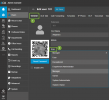
To be honest Admin Console a little unusual

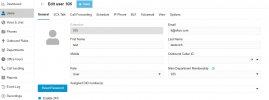
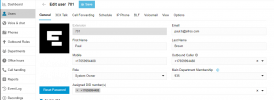
I wnat to assign Admin right to an extension

Where can I find this option ?
 
  • Like
Reactions: Alroger
whops didn't notice.... Thanks yo
But where Inbound rules gone?
 
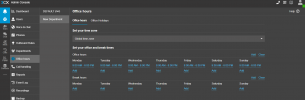
Well you can configure different departments and each one using their own office hours.

1700939753225.png

1700939771544.png

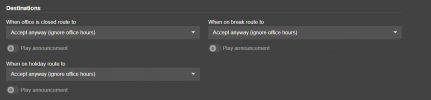
Then when you configure a system extension such as queue, ring group, digital receptionist, you can select the DID, department and the destination when is office hours, break or out of office hours.


1700939806233.png
 
ahhh
I did understand. You changed the way to implement inbound call
Everithing is now thru groups / departments
 
  • Like
Reactions: Alejandro_3CX
What is the best way to create a group in 3cx where users cannot see each other, but only managers can see them? I am using V20 and I am not able to do this. Is there a way to create a group for each user that is restricted to see the presence of group/department users, while the user is allowed to view the presence of managers but not users?
 
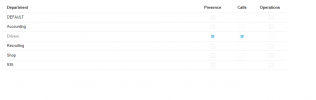
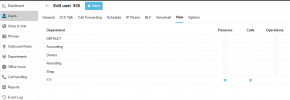
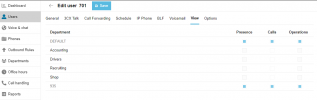
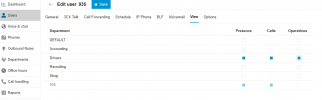
Hi, if you edit the user --- view --- you can enable/disable the presence on the different departments

1701208295203.png
 
I hoped it would be this. Unfortunately, those options are disabled for me, even if I have owner rights
I can enable presence in other departments. However, I can't disable presence in the user's department
Screenshot 2023-11-28 155300.png
 
Last edited:
I hoped it would be this. Unfortunately, those options are disabled for me, even if I have owner rights
I can enable presence in other departments. However, I can't disable presence in the user's department
View attachment 38436
These roles are customizable: User ,Manager, Receptionist.

Check that the user has one of those roles in the group. Then the user who will edit this must have the proper role, see here
 
well, i think there is a glitch, I have extension 935 with user role in department 935, where I'm present as well with system owner role, and all those tickmarks are greyed out like I can't edit nor my group or users group, i tried and changed my role as a sysadmin and group owner, but nothing helped, did a restart to 3cx (just in case) still same issue... attaching screenshots5.jpg4.png1.png2.png3.png

however, i can edit the presence of this user in other departments ...6.png
 
Hello,
which role assignment is the right to let the user add contacts to the company phonebook ? Manager can not edit or add contacts to the company phonebook. I dont want to giv e all users the system administrator role to add contacts to the phonebook. But if tested alle the roles and the system administrator is the only one who can add , modify or delete from the company phonebook.
 
In update 2 we will have a group phonebook and then managers will have the right to edit their group phonebook....
 
Hi @Nick Galea .. Am I crazy or I can't find the "Can Intercom" option in v20 ?

Configure the intercom dial code in “Settings > Dial codes > Paging”. The extension using intercom needs to have the “Can Intercom” option enabled in “Users > Edit Extension > Rights”.
 
You can no longer define rights, but you can choose a predefined level that has this.
 
  • Like
Reactions: Evolute IT
Ok, I think there may be an issue with this feature then. I'll test under 18.0.9 to double check I'm doing this right and open a support ticket if I still can't t make it work with V20.
 
@Nick Galea I can confirm that v20 does not pass the "Call-Info: <sip:3cx.pbx>;answer-after=0" header to the phone for paging.
 
Last edited:
  • Like
Reactions: Peoria IT
Hi,

I must say I find the upgrade to V20 very disappointing.
May I ask how predefined roles are an improvement from being able to select only what is needed? They could be an addition - to select between predefined and the list of options.
It seems like security is taking a step backwards.

And this is not the only the only step back.

You went from a nice and clear management console which had a timeout period to the smushed integrated admin section on the web app. There is no auto logoff because that would not work with an integrated phone function. Meaning, everyone with admin console access will have this on their app, where that used to require a separate login and if inactive, would log you out. Now if the admin/manager forgets to lock their computer going to a meeting, anyone walking by even 2 hours later, would have access to anything on the admin console of that user.

So to achieve similar level of security as before, admins now need to have admin and non-admin extension, which doubles the amount of required extension and there is still no timeout option.
 
Hello,

This upgrade to V20 is driving me crazy!
we need to be able to edit the Roles with specific rights , I upgraded a client to version 20 and assigned role user and could not use Shared Parking , I had to make them role "Receptionist" so they can use the feature, this is like operating in the bling and playing guess work.
After over 8 years selling and supporting 3cx this is a big disappoinment , everything used to work fine in version 18.
AM I missing something?
 
Why did you upgrade a client to v20 when its still in Release Candidate form without getting familiar with the changes made to the platform?
A lot of this information has been easily accesible on the blogs and forums about what is possible, what changed and what is coming.
 
  • Like
Reactions: bitn2 and pangel
Test upgraded a v18 to v20, users are set to Reception and can confirm phones do not auto-answer for intercom here either.. please fix this its a majorly used feature for this client!
 
Status
Not open for further replies.

Forum statistics

Threads
111,974
Messages
590,081
Members
164,899
Latest member
mazet