3cx via FQDN not able to access

Status
Not open for further replies.

meeas

New User
Joined
Feb 23, 2021
Messages
8
Reaction score
0
Dear team,

I have tried reinstalling and everything i could but i am not able to access the pbx via FQDN.

what i did earlier

i installed 3cx software on a windows 10 operating system and it was accessible and afterward i had a vacant machine so i took the liberty to install Debian based 3cx os. now i can access from ip address but not from the FQDN and also no extension could connect.

secondly, receiving only missed calls on android app while using any random ip. no port has been disturbed during process.

Regards
 
Firewall test results
  • resolving 'stun-eu.3cx.com'... done
  • resolving 'stun2.3cx.com'... done
  • resolving 'stun3.3cx.com'... done
  • resolving 'sip-alg-detector.3cx.com'... done
  • testing 3CX SIP Server... failed (How to resolve?)
    • stopping service... done
    • detecting SIP ALG... failed (How to resolve?)
    • testing port 5060... not reachable (How to resolve?)
    • starting service... done
  • testing 3CX Tunneling Proxy... done
    • stopping service... done
    • testing port 5090... done
    • starting service... done
  • testing 3CX Media Server... done
    • stopping service... done
    • testing ports [9000..9398]... done
      • testing port 9000... done
      • testing port 9002... done
      • testing port 9004... done
      • testing port 9006... done
      • testing port 9008... done
      • testing port 9010... done.........................................same done below all
 
Have you switch off your old Windows 3CX machine ?

Does the debian machine have the same IP address as the windows machine, if not have you adjusted your firewall rules to point to the debian server
 
Hi @meeas,

Are you able to resolve the FQDN to the correct IP?
 
Have you switch off your old Windows 3CX machine ?

Does the debian machine have the same IP address as the windows machine, if not have you adjusted your firewall rules to point to the debian server
Ans 1 i have uninstalled 3cx on machine 1
Ans 2 no second machine have different ip adress and yes have changed the ip against ports in router
 
Hi @meeas,

Are you able to resolve the FQDN to the correct IP?
i am using static ip and that ip was same as i did in first and second installation. Different broswer report connection rufused error where i can access it via https://ipaddress:5001

also dns checker report to correct ip address.

1614082809604.png
 
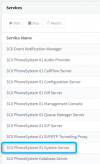
If you can't resolve the FQDN, try to restart the System Server.

1614083273919.png

Once it's back up, click Settings >> License >> Edit >> OK then Refresh License Key Information. Let me know when this has been done.
 
If you can't resolve the FQDN, try to restart the System Server.

View attachment 20819

Once it's back up, click Settings >> License >> Edit >> OK then Refresh License Key Information. Let me know when this has been done.
as you said its has been done.
 
Hi @meeas,

Is the PBX installed on the same local LAN as the computer that you're trying to access it from?
 
onething more i am observing that even on ip address i was able to connect secure connection but now it is showing unsecured or no certificate.
 
There is a good chance you won't be able to access your FQDN from the same location. Are you able to access it from a location different to that of your local lan? If yes, then you'd need to look into your firewall settings as they may be preventing hairpin traffic.

For more assistance, feel free to contact a 3CX Partner to assist.
 
There is a good chance you won't be able to access your FQDN from the same location. Are you able to access it from a location different to that of your local lan? If yes, then you'd need to look into your firewall settings as they may be preventing hairpin traffic.

For more assistance, feel free to contact a 3CX Partner to assist.
strange thing is now i can access it from any other ip. why i have no idea but not from the same ip.
 
In this case it does sound like the issue you are experiencing may be connected to loopback (hairpin) traffic being blocked by your network.
 
Status
Not open for further replies.