Solved 3CX Video Conferencing

Status
Not open for further replies.

SistemiAziendali

Silver Partner
Advanced Certified
Joined
Sep 25, 2023
Messages
2
Reaction score
4
Good morning, one of our customers uses the Microsoft TEAMS APPS on an Interactive Whiteboard, with a Camera monitor, to make video conferences. The interactive whiteboard has the Android 11 operating system. Instead of MS Teams, he would like to use the 3CX APP. However, when he tries to install the 3CX video conference app, he receives the error that the APP is not compatible with the device in question. The interactive whiteboard is a HIKVison 65" with Android11 as the operating system. Has anyone ever tried to do something like this?
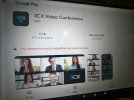
 

Attachments

  • Immagine errore.jpg
    Immagine errore.jpg
    106.8 KB · Views: 11
The device is likely running Android TV and not the regular AOSP version which is the likely reason for the incompatibility.

Instead of the app, perhaps the following might work if your TV has a WebRTC compatible browser:
1) Take your mobile device (Phone) and tap/open your meeting URL
2) You should see this. Select the "Join from another device"
unnamed (7).jpg

3) Follow the instructions shown in the next part of the UI by opening the room.3cx.net on the TV
unnamed (8).jpg
4) After successfully scanning the QR code, the meeting should open on your TV.

Whether the meeting will actually be joinable on your TV after this step depends on your TV browser WebRTC compatibility, but it's worth a try.
 
The device is likely running Android TV and not the regular AOSP version which is the likely reason for the incompatibility.

Instead of the app, perhaps the following might work if your TV has a WebRTC compatible browser:
1) Take your mobile device (Phone) and tap/open your meeting URL
2) You should see this. Select the "Join from another device"
View attachment 45467

3) Follow the instructions shown in the next part of the UI by opening the room.3cx.net on the TV
View attachment 45468
4) After successfully scanning the QR code, the meeting should open on your TV.

Whether the meeting will actually be joinable on your TV after this step depends on your TV browser WebRTC compatibility, but it's worth a try.
Meeting Room? That's new?
 
  • Like
Reactions: N_G
Good evening Leonidas,
sorry, first of all, for the late reply that I was convinced I had already given you and, I realize only now, instead, I have not done!
Your advice was decisive and solved my problem. I really thank you very much.
Best regards
 
Status
Not open for further replies.

Latest Posts

Forum statistics

Threads
111,973
Messages
590,075
Members
164,895
Latest member
jasonkkrause