3CX Wallboard is not up to date

Status
Not open for further replies.

Mike94

Silver Partner
Advanced Certified
Joined
May 31, 2019
Messages
53
Reaction score
12
Hi,

I have a very weird problem with a Wallboard running on the Windows Client. Basically, the content from all tiles like: Time & Date, Abandoned Calls, Answered, etc is not showing correctly in comparison to the Wallboard on a Web Client which is always up to date.

I have done my research and tried various of things including: re-installation of the 3CX client, updating Windows libraries such as: .Net and Visual++ and so on. The most interesting fact about it is that sometimes the problem doesn’t exist for weeks and then all of the sudden is coming back. Wallboard is programmed to reset its content everyday but it looks like this doesn’t always work with the PC client.

I have never encountered such a fault with the Wallboard, but that site seems to have a big issue. Moreover, the PC which is running the Wallboard is brand new unit with a fresh Windows 10 installation and it is solely used for presenting the Wallboard on a big screen.

Any advice would be much appreciated

Thanks,
Mike
 
Hi again, it seems to be that we have more than one user having this problem on the forum, it would be very useful to find a solution. Any ideas would be much appreciated :)
 
Hi Mike,

It would be good to know the exact version numbers of the PBX and the app where this happens.

Also if you have a method for replicating this, we can take a look at it.
 
Hi Mike,

It would be good to know the exact version numbers of the PBX and the app where this happens.

Also if you have a method for replicating this, we can take a look at it.

Hi John,

The 3CX is currently on 16.0.5.389 and the app is on 16.0.1.81. At this moment I have no clue how can I replicate this problem as it seems to be occurring at random times. However if the problem comes back I will be definitely notified. What would you suggest in order to isolate the problem when the issue comes back next time ?
 
Hi Mike,

As a first step, I would recommend to upgrade the PBX to 16.0.5.611 which is the stable release version (you are currently on the Alpha version).

Once the PBX is updated, check that there no other pending updates, and proceed to re-open your app. It should inform you that there is an update for the app too, so let it run through the update and you will end up with:

PBX = 16.0.5.611
App = 16.3.0.111

After you update the above let it run and see if you have any issues.
 
Hi Mike,

As a first step, I would recommend to upgrade the PBX to 16.0.5.611 which is the stable release version (you are currently on the Alpha version).

Once the PBX is updated, check that there no other pending updates, and proceed to re-open your app. It should inform you that there is an update for the app too, so let it run through the update and you will end up with:

PBX = 16.0.5.611
App = 16.3.0.111

After you update the above let it run and see if you have any issues.

Hi John,

Thank you for your reply, I am just scheduling the update time with my customer and once this will be done I will update this topic so we can have a clear solution for this problem :)
 
  • Like
Reactions: JohnS_3CX
Hi John,

Thank you for your reply, I am just scheduling the update time with my customer and once this will be done I will update this topic so we can have a clear solution for this problem :)

Hi,

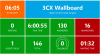
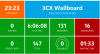
I have updated the 3CX, it's been around 2 weeks since I done it and the customer reported today the same issue. It looks like all tiles are getting updated apart from the Time & Date. Restarting the 3CX client and reopening the Wallboard always resolve the issue although I am still looking what could be the reason of this mismatch.

When I logon remotely a while ago to the customer's wallboard PC I saw the time and date showing as
per the 1st screenshot so I just closed the Wallboard view without restarting the 3CX app and I ended up with even more weird results as per the 2nd screenshot. Eventually restarting a soft phone and reopening the Wallboard view did the trick, although it is still a mystery for me why this particular tile is being updated/stacked with the wrong info.

It is always working fine after restart for some longer period of time and than it will eventually come back.
 

Attachments

  • ugr-weird-screen1.PNG
    ugr-weird-screen1.PNG
    388.9 KB · Views: 18
  • ugr-weird-screen2.PNG
    ugr-weird-screen2.PNG
    381.8 KB · Views: 19
  • Like
Reactions: FM Telecom
Status
Not open for further replies.

Latest Posts

Forum statistics

Threads
111,948
Messages
589,880
Members
164,841
Latest member
erre