3CX Web Conference - remote control

TCI_user

SOHO User
Joined
Jun 7, 2024
Messages
11
Reaction score
1
Hello,

During our 3CX Web Conference today we noticed that if the host shares an application window, there is no option to give remote control to the participant to the already shared window.

Based on the 3CX documentation, the participant has to be set as a Co-host but this gives the participant too much power:
- Allows the participant to control the Web Conference
- Allows the participant to select any screen on the remote PC instead of accessing only the application window that the host is sharing

As a result, we had to cancel the 3CX Web Conference and move our meeting to ZOOM.

Am I missing something about the 3CX Web Conference Remote Control functionality?


Thank you,
Slav
 
The remote control functionality is to control a participants computer, think of something like anydesk, or teamviewer.
 
Thank you Nicholas for your prompt reply.

As a host, I did not find a 3CX option to get Remote Control over the participant's shared screen. The only option was the participant to get access to the host screen (only if I set the participant as Co-host).

Do you know if 3CX has plan to bring the Web Conference Remote Control to the next level (like MS Teams and ZOOM)?
In my experience, we often share screens with each other during video conference calls and the remote control functionality helps a lot through the discussion.

Regards,
Slav
 
The screen would not be shared in this case. It would be for example you are in a one on one with me, in my meeting and need my assistance. I would enable remote control, you would need to install the plugin, and then I would control this.

Do note that the remote control capabilities are within the confines of the WebRTC protocol. Other platforms use a dedicated app which might give more functions.
 
Thank you Nicholas :(

I hope one day 3CX Web Conference to move away from the WebRTC protocol or to find a way to use it and to fix the Remote Access functionality (see my initial post for more details on the problems).

In the meantime, we will have to use other Web Conference platforms when Remote Access is needed.

Regards,
Slav
 
I dont think that will be the case. We integrate heavily with the WebRTC and not requiring any additional plugins to run a 3CX Video conference.

1741865566014.png

This allows 3rd parties to join meetings without any other prerequisites.
 
Hi Nicholas,

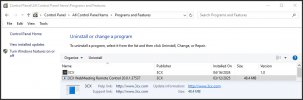
Actually, the 3CX Web Conference do need to download an additional application when it comes to remote control:
3CX.jpg

NOTE: MS Teams and ZOOM also have the option to connect only through the web browser and they do not require any additional software.

Just to clarify, I do not say that 3CX has to move away from their current configuration. I only hope that one day there will be a better and restricted way for all participants to be able to use the remote control functionality in both directions.

Regards,
Slav
 
That is for a very specific use case, where there might be security implementations as well, but nothing is required to join a video conference.
 
Thank you Nickolas.

Yes, this thread was open specifically for the Remote Control.

Regards,
Slav
 

Latest Posts

Forum statistics

Threads
111,973
Messages
590,075
Members
164,895
Latest member
jasonkkrause