3CX Web Meeting Error

Status
Not open for further replies.

cmunteanu21

Joined
Apr 29, 2015
Messages
2
Reaction score
0
I'm trying to delete an extension but the username is configured with 3CX WebMeeting . The webmeeting is deactivated so I want to activate it again .

When I click settings -> Web Meeting -> Activate , I receive the error attached in the image , and user and access upper menu from webmeeting is not appearing.

I've also restarted the machine .

Can someone help me to get rid of this error , and finaly remove the extension ?

3CX System Standard Edition , Version v12 with SP 6.1 .
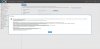
 

Attachments

  • 3cx error when i click settings -webmeeting.JPG
    3cx error when i click settings -webmeeting.JPG
    175.1 KB · Views: 898
Try install and activate 3CX System 12.5
 
Thank you , installing 3CX v12.5 worked.

Also I t've submited a ticket to 3CX and they've helped me for user deletion.
 
We are seeing the same error. However, we are unable to upgrade to 12.5, as we are using 3cx Cloud.

I have deactivated and reactivated both the Webmeeting license, and the actual PBX license - with the same results.

Thanks!
 
serverwork said:
We are seeing the same error. However, we are unable to upgrade to 12.5, as we are using 3cx Cloud.

I have deactivated and reactivated both the Webmeeting license, and the actual PBX license - with the same results.

Thanks!

I had this issue with 12.5. The fix is to backup, uninstall and then re-install and load configuration from backup. Doing the same on your v12 cloud instance should also fix it.
 
Thanks lifeline, I tried your suggestion. However, I still get the error. I am submitting a ticket. I'll let you all know how it goes.
 
Status
Not open for further replies.

Members Online Now

Forum statistics

Threads
111,835
Messages
589,291
Members
164,668
Latest member
Infinity Network