Hi Jeff, you have described a number of issues there, all of which need to be checked separately. So I've compiled a list of things below and what are the main check-points you need to pass when troubleshooting:
1) No audio - first things first, you need to select a default audio output from Windows, then in the Webmeeting Client select the gear icon and set Input. Press "Start" to check your audio devices
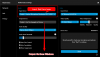
2) No video - same as above and for both points
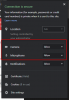
1 & 2 you must provide permissions because this is a WebRTC browser based session, and without those it will not even see audio/video from your PC due to security/privacy permissions not granted
3) Lag - this will depend on various factors, some which rely on us (ie. MCU must be close enough to you and the participants, and must have resources) and this is is something that has been heavily upgraded recently. We will continue to expand the MCU availability. Other factors depend on you: your connection speed and type (wired/wireless), your endpoint's ability to decode multiple streams at once if we have many video participants and the other participants connection+machine. You may not lag if you are on a powerful machine with a fiber connection, but if ie. Joe working from home on an old laptop, on a 802.11g connection over a slow modem joins, I expect you will notice "bad quality" from your end because this participant can't keep up.
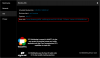
4) Dial-in participants "stuck" in waiting state - this relies on a couple of things. The Webmeeting bridge needs 1 available sim call to join your meeting, it needs 443 open towards the current MCU so it can establish a connection (the usual culprit) and it also needs your firewall checker to pass especially for the audio ports. You should join the meeting first and then wait for the first dial-in caller to connect. If they still hear MoH then it's highly likely that the Webmeeting bridge (which always appears green btw) is up but it cannot establish a link to the MCU.
As for WireShark, it's a very good tool to see if the connection from your PBX IP reaches the MCU IP at the expected ports. If you know what to look for, then you have the advantage of seeing whether the prerequisites have been ,met and so you can expect things to work or not accordingly. The webmeeting info tab is your friend here as it will list the actual MCU you have connected to. Remember, just setting the preferred MCU in the management console, does not mean you will necessarily connect to it. It may be too busy, offline, unreachable, too far etc. so the system will select the one that is likely to give you the best possible experience if your preferred MCU is less viable