Solved 3CX Webadmin stuck when provisioning phones

Status
Not open for further replies.

yankee80

Forum User
Joined
Mar 17, 2022
Messages
11
Reaction score
2
Hi

we have an AWS self-hosted 3CX PBX (version 18.0 update 3, build 450).

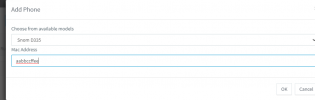
We are unable to provision any kind of phones, whether in Chrome / Firefox / with/without Incognito/In.Private mode.

After clicking Ok, nothing happens.

Am I missing something obvious?

Thank you in advance

1647481598222.png

1647481624310.png
 
That does sound very odd.

Does it happen from another computer?

Can you reboot VM and try again?
 
Hi, I've restarted the AWS instance and tried from two different computers (both virtual) to no avail.

Kind regards
Eric
 
So to be clear ,

Are you trying to provision physical phones or are you just nog getting into the webclient?
 
To try and and get a bit more info on this:

1. Does it happen regardless of what device you try to add?
2. I'm sure you've already tested but just want to add that the MAC address you're using is 10 characters, I assume the same happens even when using 12 yes?
3. Can you confirm that all 3CX Services are running? What do you see if you ssh to the machine and use the following command:
systemctl list-units 3CX* nginx* postgres*

A hotfix has been released that adds to PBX stability and security. It should very soon come out of Beta so you might want to consider updating to it and see if that helps:
1647591725677.png


EDIT: It just occurred to me that I might have completely misunderstood the situation. When you say that you click on OK and it does nothing, do you mean, nothing happens as in the dialog stays there and you're basically stuck on that screen that asks for the MAC address or you mean the IP Phone does not provision?
 
  • Like
Reactions: yankee80
To try and and get a bit more info on this:

1. Does it happen regardless of what device you try to add?
2. I'm sure you've already tested but just want to add that the MAC address you're using is 10 characters, I assume the same happens even when using 12 yes?
3. Can you confirm that all 3CX Services are running? What do you see if you ssh to the machine and use the following command:


A hotfix has been released that adds to PBX stability and security. It should very soon come out of Beta so you might want to consider updating to it and see if that helps:
View attachment 28793


EDIT: It just occurred to me that I might have completely misunderstood the situation. When you say that you click on OK and it does nothing, do you mean, nothing happens as in the dialog stays there and your basically stuck on that screen that asks for the MAC address or you mean the IP Phone does not provision?
Hi, yes that's exactly what happens Chris.
All of a sudden, it's started working. After several months of not being able to provision phones, now it seems to be ok again.

No changes done the environment whatsoever. Perhaps the PBX could sense that you experts were breathing down its neck?

Thank you everyone for your kind help and advice!
 
No changes done the environment whatsoever. Perhaps the PBX could sense that you experts were breathing down its neck?
Well this is a very well-known troubleshooting method I think :P

Thank you everyone for your kind help and advice!
In any case, glad to see this got sorted!

I'll be closing this thread for now so please do let us know if it happens again!
 
Status
Not open for further replies.

Forum statistics

Threads
111,974
Messages
590,081
Members
164,899
Latest member
mazet