3cx Webmeeting Issues

Status
Not open for further replies.

Steven Tingate

Silver Partner
Advanced Certified
Joined
Oct 12, 2018
Messages
13
Reaction score
0
Hi
I have just created a 3cx webmeeting on my windows pc with video but having some issues
we have a DID assigned for webconfrencing and it shows this on the email that goes out

if i dial that number and enter the confrence ID it connects me to the confrence but i am on hold. this is also happening for any other user that dials in from a mobile device
users joining via the link in chrome and firefox are ok
 
Hi Steven,

There are a couple of things to look out for. Firstly can you ensure your ports are open? Because the PBX needs to connect to the 3CX MCU servers in order to merge the dial in callers with the webmeeting.

https://www.3cx.com/docs/ports/
 
Hi John

i can confirm ports are open, and firewall check passes all
 
Ok let's verify

  1. Go to the Webclient
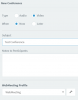
  2. Click Schedule Conference and set it like here12338
  3. Click Create Meeting
  4. Notice now that the scheduled meeting has a conference URL and ID
  5. Now click its URL link to join
  6. When you join, click the Invite people Icon 12336
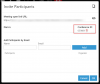
  7. When the Invite Participants menu appears like below, do you see the Conference ID from before or is it empty?

12337
 
Ok let's verify

  1. Go to the Webclient
  2. Click Schedule Conference and set it like hereView attachment 12338
  3. Click Create Meeting
  4. Notice now that the scheduled meeting has a conference URL and ID
  5. Now click its URL link to join
  6. When you join, click the Invite people Icon View attachment 12336
  7. When the Invite Participants menu appears like below, do you see the Conference ID from before or is it empty?
View attachment 12337
Hey
John

Confrence ID is present
 
Hi Steven,

Can you also confirm if the dial in user (while on hold) will appear in the meeting list of participants?
 
Status
Not open for further replies.

Forum statistics

Threads
111,973
Messages
590,077
Members
164,896
Latest member
sameage