


- Joined
- Oct 31, 2024
- Messages
- 162
- Reaction score
- 110
Hello,
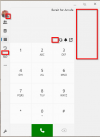
for a few days now, we have been having problems with the 3CX Windows app (version 20.0.664.0) apparently no longer reliably loading the data correctly and then remaining in a semi-live state:
1) The user account is logged in (initials are displayed at the top left)
2) However, the user account is grayed out/logged out in the app
3) The BLF are not displayed (neither the entries nor their status)
4) The “Chat” button is missing
5) The menu item “Conference” is missing
6) Outgoing calls are possible, but are not displayed graphically in the app (call goes out, but you can't see anything in the app)
7) The “Q” button is missing
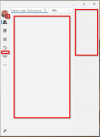
8) No contacts under Team and Phonebook
Looks like that:
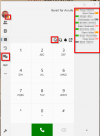
Should be like that:
No team contacs:
What was changed before the problem occurred?
1) New 3CX Windows app installed (20.0.664.0)
2) New 3CX version v20 Update 4 was installed via the automatic update
3) Approx. 250 additional users and approx. 10 additional phones created and active on the 3CX
With 250 users less, the old 3CX-WIndows-App and 3CX v20 Update 3 there was no problem.
How can the problem be solved by users?
- Partly by simply closing the 3CX Windows app
- Partly by restarting the PC
Notes:
- The two solutions above did not work on one PC
- The problem has already occurred both when a PC accesses our 3CX from LAN (inside) and from the Internet (outside).
- On-premise operation (VMware)
- Sufficient resources (8 vCPU, 16 GB RAM, 1 GBit/s)
The problem is annoying. We hope that this bug will be fixed as soon as possible.
Thank you!
for a few days now, we have been having problems with the 3CX Windows app (version 20.0.664.0) apparently no longer reliably loading the data correctly and then remaining in a semi-live state:
1) The user account is logged in (initials are displayed at the top left)
2) However, the user account is grayed out/logged out in the app
3) The BLF are not displayed (neither the entries nor their status)
4) The “Chat” button is missing
5) The menu item “Conference” is missing
6) Outgoing calls are possible, but are not displayed graphically in the app (call goes out, but you can't see anything in the app)
7) The “Q” button is missing
8) No contacts under Team and Phonebook
Looks like that:
Should be like that:
No team contacs:
What was changed before the problem occurred?
1) New 3CX Windows app installed (20.0.664.0)
2) New 3CX version v20 Update 4 was installed via the automatic update
3) Approx. 250 additional users and approx. 10 additional phones created and active on the 3CX
With 250 users less, the old 3CX-WIndows-App and 3CX v20 Update 3 there was no problem.
How can the problem be solved by users?
- Partly by simply closing the 3CX Windows app
- Partly by restarting the PC
Notes:
- The two solutions above did not work on one PC
- The problem has already occurred both when a PC accesses our 3CX from LAN (inside) and from the Internet (outside).
- On-premise operation (VMware)
- Sufficient resources (8 vCPU, 16 GB RAM, 1 GBit/s)
The problem is annoying. We hope that this bug will be fixed as soon as possible.
Thank you!


