3cx Windows Client sends wrong IP with SDP body

Status
Not open for further replies.

go2sh

New User
Joined
Feb 18, 2021
Messages
5
Reaction score
0
Hi all,
I have the strange Problem that the Windows Client is sending the wrong connection information ("c=") with the SDP response.
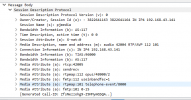
1613652674371.png
See the attached image. The call starts and the other party can hear me talk but I don't get audio back. A dump from the PBX shows that the audio data is send to the mentioned address, but this is incorect.

The client has a VPN connection running to connect to the PBX, but there is no connection issue. WebClient or a other SipClient (where the incomming ip can be set) is working properly. Its just that there is no way to speciefy the address for the "c=" field and the windows client selects the wrong one. The VPN has the 10.0.254.0/24 network and the PBX has the 10.0.6.0/24 network connected via a router. The client PC has a local address as seen above and a vpn address from the vpn network. It seams like the first interface with an IP is used.

I tried several things: restarting the client. Set a metric on the VPN to get a high priority.
 
Could you please tell us which version on the 3CX Windows App you are using?
You can see this from Settings --> Advanced --> About
 
Ah, sorry missed that. The version is 16.3.0.198.
 
Hi @go2sh

Please try to repeat your test, but make sure you connect the VPN client first, and then launch the 3CX app AFTER the VPN connection has already been established.

Let us know if the behavior changes when done in this order or if it remains the same.
 
Hi @JohnS_3CX,

I went a step further. I disabled the autostart of the 3cx client, did a reboot, spin up the vpn and started the client by hand. But this has the same result as before.
I deleted the 3cx AppData Folder, re-provisioned the client with the email attachement, did a reboot, spin up the vpn and started the client. Also the same result as before.

I tracked every try with wireshark on my vpn interface. The SDP body always contained my local IP address and not the VPN address. The same is also true for outgoing calls with the INVITE message to the PBX.

Best regards,
Christoph
 
Hi Christoph

I've also tested this using a VPN client, but in my case the 3CX app picked up the IP that the VPN assigned me so it worked as intended.

Just out of curiosity what VPN client are you using?
 
Hi John,

We use OpenVPN with a TAP Device. I deactivated all other interfaces (WSL, VirtualBox, LAN) and just had OpenVPN and WLAN enabled. I also tried to disable IPv6. Nothing changed the outcome.

I just had a quick look into the log:
- When the Software starts, it uses the wrong address to setup each of the channels (UDP, TCP, etc.)
- It sends the first register with the wrong address
- The software is detecting an IP address change, when the response comes from the PBX
- All other messages use the right IP except the "c=" field in the SDP body.
 
Hi Christoph,

We spoke with our dev team and did some further investigation. We tried to replicate the conditions you described but were not able to replicate the issue.

We recommend to contact a 3CX Partner to help look into it further at your premises.

If you don't have one already, you can find one in your area here:
https://www.3cx.com/ordering/find-reseller/
 
Hi John,

thank you for your quick support. Just one last remark from my side. I got it working with our VPN setup, but it feels like there is something wrong with the IP address detection or maybe there is a misconception on my side, how it should work.

1.) I had to change the default gateway (0.0.0.0 or default) to our vpn server. (Afterwards I got the Hyper-V Adapter address) (We only route our internal traffic through the VPN)
2.) I had to disable the Hyper-V (WSL) Network Adapter (Afterwards I got the VPN address)

I thought the 3cx client would look at the routing table to see which interface/IP to use to connect with a certain IP or where the request came from.

What stunned me a bit, direct client connections (Win 3cx client to Win 3cx client with VPN-to-internal/PBX network connection) work without the change above with a direct rtp connection in both directions. So the IP must be selected differently for that kind of connection.
 
Hi there!

Yes, now the problem you were having makes sense. Indeed the Windows App, in VPN environments, expects that all traffic to be going through the VPN because you don't have the ability to manually select the interface.

Glad to hear you go it figured out!
 
Status
Not open for further replies.

Forum statistics

Threads
112,349
Messages
592,026
Members
165,512
Latest member
gmacinit