


- Joined
- Feb 18, 2021
- Messages
- 5
- Reaction score
- 0
Hi all,
I have the strange Problem that the Windows Client is sending the wrong connection information ("c=") with the SDP response.
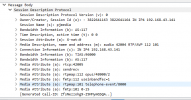
See the attached image. The call starts and the other party can hear me talk but I don't get audio back. A dump from the PBX shows that the audio data is send to the mentioned address, but this is incorect.
The client has a VPN connection running to connect to the PBX, but there is no connection issue. WebClient or a other SipClient (where the incomming ip can be set) is working properly. Its just that there is no way to speciefy the address for the "c=" field and the windows client selects the wrong one. The VPN has the 10.0.254.0/24 network and the PBX has the 10.0.6.0/24 network connected via a router. The client PC has a local address as seen above and a vpn address from the vpn network. It seams like the first interface with an IP is used.
I tried several things: restarting the client. Set a metric on the VPN to get a high priority.
I have the strange Problem that the Windows Client is sending the wrong connection information ("c=") with the SDP response.
See the attached image. The call starts and the other party can hear me talk but I don't get audio back. A dump from the PBX shows that the audio data is send to the mentioned address, but this is incorect.
The client has a VPN connection running to connect to the PBX, but there is no connection issue. WebClient or a other SipClient (where the incomming ip can be set) is working properly. Its just that there is no way to speciefy the address for the "c=" field and the windows client selects the wrong one. The VPN has the 10.0.254.0/24 network and the PBX has the 10.0.6.0/24 network connected via a router. The client PC has a local address as seen above and a vpn address from the vpn network. It seams like the first interface with an IP is used.
I tried several things: restarting the client. Set a metric on the VPN to get a high priority.


