3CX Windows Dialer Resizing

Status
Not open for further replies.

starunj

Free User
Joined
Oct 24, 2021
Messages
6
Reaction score
2
Hello,

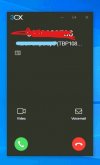
One of the key reasons we were evaluating 3CX was for the know who's calling feature. We have been able to get this to work with our 3CX installation, however, there is a usability challenge. The key pieces of information are not visible because the dialer window is too small. Is there no way we can resize this Window?

Thanks,
Tarun
 
Hello,

One of the key reasons we were evaluating 3CX was for the know who's calling feature. We have been able to get this to work with our 3CX installation, however, there is a usability challenge. The key pieces of information are not visible because the dialer window is too small. Is there no way we can resize this Window?

Thanks,
Tarun
Which Windows client are you using? The Caller ID should scroll if the window is too small, but that's on the new Desktop App.
 
Hello Frederick,

Thank you very much for your reply. We are using the latest windows client (3CXDesktopApp-18.5.26). I am not sure about scrolling, but it would be a tremendous help for us if the window was wider or resizable.

Appreciate your reply and hope to find a solution for this.

Thanks!
 
Hello Frederick,

Thank you very much for your reply. We are using the latest windows client (3CXDesktopApp-18.5.26). I am not sure about scrolling, but it would be a tremendous help for us if the window was wider or resizable.

Appreciate your reply and hope to find a solution for this.

Thanks!
The dialer itself isn't resizable but it should show enough info unless your Windows itself is scaled above 100%.

Can you me a screenshot of what you mean? (Hide all sensitive infos.) Maybe the 3CX team can work something out.
 
Hello,

I think the window scaling is fine. It is just that the CRM information is a little too long for it to be displayed. If you notice the "..." at the end you will see that there is more information.

Thanks again for your response.

Regards,
Tarun
 

Attachments

  • Screenshot 2021-10-25 011410_LI.jpg
    Screenshot 2021-10-25 011410_LI.jpg
    92.2 KB · Views: 26
Hello,

I think the window scaling is fine. It is just that the CRM information is a little too long for it to be displayed. If you notice the "..." at the end you will see that there is more information.

Thanks again for your response.

Regards,
Tarun
Okay so that part should be scrolling to show more of the text.
 
It isn't scrolling, but, that's okay, even with scrolling it won't meet our requirement.

If there's any chance to resize the width of the window, that would be perfect. I wish there is some solution to this.
 
It isn't scrolling, but, that's okay, even with scrolling it won't meet our requirement.

If there's any chance to resize the width of the window, that would be perfect. I wish there is some solution to this.
Do you plan on using deskphones? If so, those would scroll and, depending on the phone, might be able to show it all at once in conjonction with the app (the app can control a deskphone via CTI/uaCSTA.)

Maybe they can make it resizable but I doubt it. @StefanW am I right?
 
I also agree with @starunj , it would be of great help if the dialer itself was resizeable to the numbers and other features were bigger.
 
Status
Not open for further replies.

Forum statistics

Threads
112,349
Messages
592,027
Members
165,513
Latest member
megalmazan