- Joined
- Apr 30, 2020
- Messages
- 5
- Reaction score
- 3
Firstly my primary usecase here is either Text chat or Video call. The reason is a lot (not all ) of our users are hearing impaired. So visual communication and feedback is very important with video being preffered.
When I activate the plugin on a website it seems to work fine in desktop to desktop testing.
Enabling it to show on Mobile I see the 'speech bubble' but clicking it will not open a new window (or tab) on iOS or Android.
I suspect this is because it is a pop-up action? and it is being blocked.
As a work around I was experimenting with the URL I could capture on desktop to the 3CX pop up. Copying and pasting the URL from a successful opening action on the desktop to a link in the page which is then opened directly on mobile works to open the chat window on mobile. However...
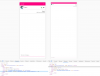
- the scale is very small on mobile, such that pinch to zoom needs to be used to accurately hit the video / call icons.
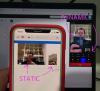
- on iOS video calls the mobile device seems to only capture and display a very low frame rate (1 frame update every 3 seconds or so) to show the user - the recipient user seems to see everything OK. Not network speed related.
So is it possible
- to have a additional meta tag in the 3CX hosted page <meta name="viewport" content="width=device-width, initial-scale=1.0"> included which would fix the mobile size issue and have no effect on desktop.
- have a solution for the low video frame rate on iOS
When I activate the plugin on a website it seems to work fine in desktop to desktop testing.
Enabling it to show on Mobile I see the 'speech bubble' but clicking it will not open a new window (or tab) on iOS or Android.
I suspect this is because it is a pop-up action? and it is being blocked.
As a work around I was experimenting with the URL I could capture on desktop to the 3CX pop up. Copying and pasting the URL from a successful opening action on the desktop to a link in the page which is then opened directly on mobile works to open the chat window on mobile. However...
- the scale is very small on mobile, such that pinch to zoom needs to be used to accurately hit the video / call icons.
- on iOS video calls the mobile device seems to only capture and display a very low frame rate (1 frame update every 3 seconds or so) to show the user - the recipient user seems to see everything OK. Not network speed related.
So is it possible
- to have a additional meta tag in the 3CX hosted page <meta name="viewport" content="width=device-width, initial-scale=1.0"> included which would fix the mobile size issue and have no effect on desktop.
- have a solution for the low video frame rate on iOS