3CX/Zoho integration not showing contact

Status
Not open for further replies.

Darsh2525

Silver Partner
Advanced Certified
Joined
Oct 11, 2021
Messages
10
Reaction score
4
We've completed the 3CX & Zoho integration using the instruction on: https://www.3cx.com/docs/pbx-crm-integration-zoho

When the Contact is already added to Zoho & that contact calls, it doesn't bring up Contact page, so we don’t have the details of the Contact we’re just talking to. 3CX Web Client is already showing Integration enabled (3CX web client >> Settings >> Integration >> Automatically open contact URL when CRM integration is enabled).

New contacts i.e. the contacts who’re not already in Zoho, are not adding up automatically when they call. Even as we select "Enable Contact Creation" (3CX >> Settings >> CRM >> Zoho), which should've created a new contact in the format "New + 3CX Contact [Number]" but nothing gets created in Zoho. We've checked that Zoho has fields not hidden either.

Is there anything we'd check further please?
 
Hello @Darsh2525,

Do you see any error when you run a test contact lookup in the 3CX Console > Settings > CRM > Zoho > Test button? Please use a phone number that you know is in Zoho CRM. Let us know what you see in that screen. Ensure that you don't post any sensitive data here, like an access or refresh token.
 
  • Like
Reactions: Evolute IT
We've completed the 3CX & Zoho integration using the instruction on: https://www.3cx.com/docs/pbx-crm-integration-zoho

When the Contact is already added to Zoho & that contact calls, it doesn't bring up Contact page, so we don’t have the details of the Contact we’re just talking to. 3CX Web Client is already showing Integration enabled (3CX web client >> Settings >> Integration >> Automatically open contact URL when CRM integration is enabled).

New contacts i.e. the contacts who’re not already in Zoho, are not adding up automatically when they call. Even as we select "Enable Contact Creation" (3CX >> Settings >> CRM >> Zoho), which should've created a new contact in the format "New + 3CX Contact [Number]" but nothing gets created in Zoho. We've checked that Zoho has fields not hidden either.

Is there anything we'd check further please?
Put the system in verbose and check the 3CXSystemService log file (Activity Log > Logs > Instance.)
 
  • Like
Reactions: edossantos
Hi, yes, for the contact that's already added in CRM, the test goes through successfully:

[
{
"UnparsedOutputs": {
"ContactUrl": "https://crm.zoho.com/crm/EntityInfo.do?module=Contacts&id=3302595000029867054",
"FirstName": "XXX",
"LastName": "Technologies",
"Email": "",
"PhoneBusiness": "0345xxxxxxx",
"PhoneBusiness2": "",
"PhoneHome": "",
"PhoneOther": "0345xxxxxxx",
"PhoneMobile": "",
"FaxBusiness": "",
"CompanyName": "XXX Technologies",
"EntityType": "Contacts",
"EntityId": "3302595000029867054"
},
"FirstName": "XXX",
"LastName": "Technologies",
"Email": "",
"ContactUrl": "https://crm.zoho.com/crm/EntityInfo.do?module=Contacts&id=3302595000029867054",
"CompanyName": "XXX Technologies",
"PhotoUrl": null,
"ContactType": 0,
"PhoneBusiness": "0345xxxxxxx",
"PhoneBusiness2": "",
"PhoneHome": "",
"PhoneHome2": null,
"PhoneMobile": "",
"PhoneMobile2": null,
"PhoneOther": "0345xxxxxxx",
"FaxBusiness": "",
"FaxHome": null,
"Pager": null,
"ContactRawData": "3302595000029867054|Contacts"
}
]
TEST
 
Hi, yes, for the contact that's already added in CRM, the test goes through successfully:

[
{
"UnparsedOutputs": {
"ContactUrl": "https://crm.zoho.com/crm/EntityInfo.do?module=Contacts&id=3302595000029867054",
"FirstName": "XXX",
"LastName": "Technologies",
"Email": "",
"PhoneBusiness": "0345xxxxxxx",
"PhoneBusiness2": "",
"PhoneHome": "",
"PhoneOther": "0345xxxxxxx",
"PhoneMobile": "",
"FaxBusiness": "",
"CompanyName": "XXX Technologies",
"EntityType": "Contacts",
"EntityId": "3302595000029867054"
},
"FirstName": "XXX",
"LastName": "Technologies",
"Email": "",
"ContactUrl": "https://crm.zoho.com/crm/EntityInfo.do?module=Contacts&id=3302595000029867054",
"CompanyName": "XXX Technologies",
"PhotoUrl": null,
"ContactType": 0,
"PhoneBusiness": "0345xxxxxxx",
"PhoneBusiness2": "",
"PhoneHome": "",
"PhoneHome2": null,
"PhoneMobile": "",
"PhoneMobile2": null,
"PhoneOther": "0345xxxxxxx",
"FaxBusiness": "",
"FaxHome": null,
"Pager": null,
"ContactRawData": "3302595000029867054|Contacts"
}
]
TEST
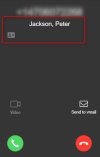
When you receive an inbound call from this number, do you see the contact name and contact card icon as in the following screenshot?
1671029718946.png
 
Hi, now that you've mentioned, we'd looked further & did some more test. Users were in the habit of simply pressing the "Green" icon to pick the phone & were hoping, it'd automatically switch to Zoho's relevant contact. But it seems it doesn't work that way. You've to specifically press "contact card icon" when the call comes through, which then takes you to Zoho. So, I'd confirm this bit appears to work now. I wondered if it'd be possible to add a note in the Zoho integration article that user actually have to click on contact card, which'd then take them to Zoho's contact page?

So, the 2 issues that remain are:

We've noticed that there's a descrepency between the external inbound calls logs in 3CX & Zoho. 3CX call logs show lot more external inbound calls, but Zoho only shows some calls in its call logs.

Secondly, when the external inbound call comes through from a number that's NOT in Zoho, we don't see this "contact card icon", so not letting us switch to Zoho, to add the number, even as we've enabled it in 3CX "Enable Contact Creation" (3CX >> Settings >> CRM >> Zoho).
 
Hi, now that you've mentioned, we'd looked further & did some more test. Users were in the habit of simply pressing the "Green" icon to pick the phone & were hoping, it'd automatically switch to Zoho's relevant contact. But it seems it doesn't work that way. You've to specifically press "contact card icon" when the call comes through, which then takes you to Zoho. So, I'd confirm this bit appears to work now. I wondered if it'd be possible to add a note in the Zoho integration article that user actually have to click on contact card, which'd then take them to Zoho's contact page?
The contact record will be automatically opened when the call is answered. If this is not the case, check if the browser is blocking popups from the Web Client.

We've noticed that there's a descrepency between the external inbound calls logs in 3CX & Zoho. 3CX call logs show lot more external inbound calls, but Zoho only shows some calls in its call logs.
In order to investigate the issue, please enable verbose logs from the 3CX Console > Dashboard > Activity Log > Settings. Then make test calls until you reproduce the issue, and check the 3cxSystemService.log file that you can download from the 3CX Console > Dashboard > Activity Log > Logs button > Instance folder. In that file you will see all the interactions between 3CX and Zoho to log calls. If there is any error logging a call, you will see it there.

Secondly, when the external inbound call comes through from a number that's NOT in Zoho, we don't see this "contact card icon", so not letting us switch to Zoho, to add the number, even as we've enabled it in 3CX "Enable Contact Creation" (3CX >> Settings >> CRM >> Zoho).
This will also be visible in the log. Maybe an error is happening during contact creation.
 
  • Like
Reactions: Evolute IT
When the call is answered, it would only go to Zoho, if the "contact card" icon is pressed, rather than big green answer option. There's no pop-up blocker & we've tried different browsers.

I believe Zoho would only log the call that comes through to 3CX from external number (and not all calls in 3CX i.e. internal calls), which is fine. However, we're seeing some calls recorded & showing in Zoho call logs, but not all.

For example, on 19/12/22, after filtering calls (3CX >> Reporting >> Call Log >> From: External numbers), I'd see quite a lot of inbound calls from external numbers, but only 3 of these showing up in Zoho? Upon looking further, it seems Zoho is only showing calls from people whose contacts details are saved in Zoho - not the ones that are NOT saved in Zoho. If the number is not saved in 3CX, shouldn't Zoho present an option to save it. If the call comes through a number that's not saved in 3CX then it doesn't show the "contact card" icon in 3CX either. I'd have thought that if the number is not saved in 3CX, clicking on this "contact card" should take us to Zoho contact page, allowing us to add contact in Zoho?

I've turned the verbose mode in 3CX & can see the 3cxSystemService.log file, but with the amount of information it has, I'm struggling to interpret.
 
When the call is answered, it would only go to Zoho, if the "contact card" icon is pressed, rather than big green answer option. There's no pop-up blocker & we've tried different browsers.

I believe Zoho would only log the call that comes through to 3CX from external number (and not all calls in 3CX i.e. internal calls), which is fine. However, we're seeing some calls recorded & showing in Zoho call logs, but not all.

For example, on 19/12/22, after filtering calls (3CX >> Reporting >> Call Log >> From: External numbers), I'd see quite a lot of inbound calls from external numbers, but only 3 of these showing up in Zoho? Upon looking further, it seems Zoho is only showing calls from people whose contacts details are saved in Zoho - not the ones that are NOT saved in Zoho. If the number is not saved in 3CX, shouldn't Zoho present an option to save it. If the call comes through a number that's not saved in 3CX then it doesn't show the "contact card" icon in 3CX either. I'd have thought that if the number is not saved in 3CX, clicking on this "contact card" should take us to Zoho contact page, allowing us to add contact in Zoho?

I've turned the verbose mode in 3CX & can see the 3cxSystemService.log file, but with the amount of information it has, I'm struggling to interpret.
Check the config, there's a "Create contact when not found" checkbox.
 
  • Like
Reactions: edossantos
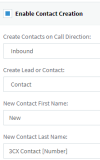
In the config (3CX >> Settings >> CRM >> Enable Contact Creation), I'd see the option to "Enable Contact Creation" being already ticked, but nothing specifically saying, "Create contact when not found".

1671462880400.png
 
In the config (3CX >> Settings >> CRM >> Enable Contact Creation), I'd see the option to "Enable Contact Creation" being already ticked, but nothing specifically saying, "Create contact when not found".

View attachment 33242
That option should create the contact if the number isn't found in Zoho. If it doesn't, you need to check the logs for errors.
 
  • Like
Reactions: edossantos
Status
Not open for further replies.

Members Online Now

No members online now.

Forum statistics

Threads
111,831
Messages
589,277
Members
164,660
Latest member
RJenkinsROCK