3CX Zoho Integration - the field is not available for search

Status
Not open for further replies.

Kiwi_at

Premier Customer
Joined
Mar 25, 2019
Messages
29
Reaction score
3
Hi dear 3cx community,
I integrated zoho as crm in 3cx and I did everything according to this documentation:
https://www.3cx.com/docs/pbx-crm-integration-zoho/
But for some reason, the Test-Button as well as the live testing produces the same error.

Server returned a non successful status code - HTTPStatusCode=BadRequest - Reason= - Content={"code":"INVALID_QUERY","details":{"reason":"the field is not available for search","api_name":"Home_Phone"},"message":"invalid query formed","status":"error"}
2023/01/24 12:17:23.789|1864|0066|Verb|CRM: Performing GET request 'https://www.zohoapis.eu/crm/v2.1/Contacts/search?criteria=((Phone:equals:xxxxx) or (Mobile:equals:xxxxxx) or (Home_Phone:equals:xxxxx) or (Other_Phone:equals:xxxxxx) or (Fax:equals:xxxxxx))&fields=Account_Name,id,First_Name,Last_Name,Phone,Mobile,Home_Phone,Asst_Phone,Other_Phone,Email,Fax'.
2023/01/24 12:17:24.210|1864|0075|Erro|CRM: Exception executing contact lookup for number 'xxxxxxx': System.Exception: Server returned a non successful status code - HTTPStatusCode=BadRequest - Reason= - Content={"code":"INVALID_QUERY","details":{"reason":"the field is not available for search","api_name":"Fax"},"message":"invalid query formed","status":"error"}
at CrmIntegration.ScenarioProcessorBase.ProcessRequest(ScenarioRequest request, IValueManager customManager, HttpClient client, CancellationToken token)
at CrmIntegration.ScenarioProcessorBase.ProcessScenario(ProtocolScenario scenario, IValueManager customManager, CancellationToken token)
at CrmIntegration.ScenarioProcessorBase.Execute(ProtocolScenario scenario, CancellationToken token)
at CrmIntegration.CrmProcessor.GetContactInfoFromCrm(List`1 result, IEnumerable`1 scenariosToProcess, IValueManager customManager, Func`2 filterResultsFunctor, Func`1 createContactRecordFunctor, CancellationToken token)
at CrmIntegration.CrmProcessor.GetContactInfo(String contactNumber, InteractionTypes interactionType, CancellationToken token)
2023/01/24 12:17:24.211|1864|0075|Verb|CRM: Removed from processing. Number=xxxxxxxx
2023/01/24 12:17:24.211|1864|0075|Info|CRM: processing of xxxxxx has been finished

It seems to be searching in the wrong fields, we don't use "Home_Phone" or "Other_phone".
 
I am having this issue also, I have removed Home_Phone from Zoho Contacts layout as per link above, but still when I press test I have tried an E164 mobile number this then removes the + in front of the number, also tried bland number 5551234 both numbers populated in contact and lead 5551234 and Phone and +7957****** number in Mobile.

Test CRM integration​

Server returned a non successful status code - HTTPStatusCode=BadRequest - Reason= - Content={"code":"INVALID_QUERY","details":{"reason":"the field is not available for search","api_name":"Home_Phone"},"message":"invalid query formed","status":"error"}
Started scenario with empty id
Started Auth
Request text: https://accounts.zoho.eu/oauth/v2/token
Request form value refresh_token set to 100-obscured-for security
Request form value grant_type set to refresh_token
Request form value client_id set to removed-for-security
Request form value client_secret set to also-removed-for-security
Response text: {"access_token":"1000-Obscured","scope":"ZohoCRM.modules.tasks.CREATE ZohoCRM.modules.accounts.READ ZohoCRM.modules.contacts.READ ZohoCRM.modules.contacts.CREATE ZohoCRM.modules.calls.CREATE ZohoCRM.users.READ ZohoCRM.modules.leads.READ ZohoCRM.modules.leads.CREATE","api_domain":"https://www.zohoapis.eu","token_type":"Bearer","expires_in":3600}
Response finished
Variable AccessToken set to 100-obscured
Variable ApiDomain set to https://www.zohoapis.eu
Finished Auth
Request text: https://www.zohoapis.eu/crm/v2.1/Contacts/search?criteria=((Phone:equals:5551234) or (Mobile:equals:5551234) or (Home_Phone:equals:5551234) or (Other_Phone:equals:5551234) or (Fax:equals:5551234))&fields=Account_Name,id,First_Name,Last_Name,Phone,Mobile,Home_Phone,Asst_Phone,Other_Phone,Email,Fax
System.Exception: Server returned a non successful status code - HTTPStatusCode=BadRequest - Reason= - Content={"code":"INVALID_QUERY","details":{"reason":"the field is not available for search","api_name":"Home_Phone"},"message":"invalid query formed","status":"error"}
 
I am having this issue also, I have removed Home_Phone from Zoho Contacts layout as per link above, but still when I press test I have tried an E164 mobile number this then removes the + in front of the number, also tried bland number 5551234 both numbers populated in contact and lead 5551234 and Phone and +7957****** number in Mobile.

Test CRM integration​

Server returned a non successful status code - HTTPStatusCode=BadRequest - Reason= - Content={"code":"INVALID_QUERY","details":{"reason":"the field is not available for search","api_name":"Home_Phone"},"message":"invalid query formed","status":"error"}
Started scenario with empty id
Started Auth
Request text: https://accounts.zoho.eu/oauth/v2/token
Request form value refresh_token set to 100-obscured-for security
Request form value grant_type set to refresh_token
Request form value client_id set to removed-for-security
Request form value client_secret set to also-removed-for-security
Response text: {"access_token":"1000-Obscured","scope":"ZohoCRM.modules.tasks.CREATE ZohoCRM.modules.accounts.READ ZohoCRM.modules.contacts.READ ZohoCRM.modules.contacts.CREATE ZohoCRM.modules.calls.CREATE ZohoCRM.users.READ ZohoCRM.modules.leads.READ ZohoCRM.modules.leads.CREATE","api_domain":"https://www.zohoapis.eu","token_type":"Bearer","expires_in":3600}
Response finished
Variable AccessToken set to 100-obscured
Variable ApiDomain set to https://www.zohoapis.eu
Finished Auth
Request text: https://www.zohoapis.eu/crm/v2.1/Contacts/search?criteria=((Phone:equals:5551234) or (Mobile:equals:5551234) or (Home_Phone:equals:5551234) or (Other_Phone:equals:5551234) or (Fax:equals:5551234))&fields=Account_Name,id,First_Name,Last_Name,Phone,Mobile,Home_Phone,Asst_Phone,Other_Phone,Email,Fax
System.Exception: Server returned a non successful status code - HTTPStatusCode=BadRequest - Reason= - Content={"code":"INVALID_QUERY","details":{"reason":"the field is not available for search","api_name":"Home_Phone"},"message":"invalid query formed","status":"error"}
You removed it and now you made it worst.

Re-enable the home phone field and make sure to read the replies correctly. No one said anything about removing fields.
 
  • Like
Reactions: edossantos
You don't have to remove it but to ensure that the field is visible.
Check the guideline provided in previous reply and ensure that you follow all steps.
 
OK re-added Home Phone in form contacts, set as 5551234 for that contact, for testing but same result

Server returned a non successful status code - HTTPStatusCode=BadRequest - Reason= - Content={"code":"INVALID_QUERY","details":{"reason":"the field is not available for search","api_name":"Home_Phone"},"message":"invalid query formed","status":"error"}
Started scenario with empty id
Started Auth
Request text: https://accounts.zoho.eu/oauth/v2/token
Request form value refresh_token set to (Hidden)
Request form value grant_type set to refresh_token
Request form value client_id set to (Hidden)
Request form value client_secret set to (Hidden)
Response text: {"access_token":"(hidden)","scope":"ZohoCRM.modules.tasks.CREATE ZohoCRM.modules.accounts.READ ZohoCRM.modules.contacts.READ ZohoCRM.modules.contacts.CREATE ZohoCRM.modules.calls.CREATE ZohoCRM.users.READ ZohoCRM.modules.leads.READ ZohoCRM.modules.leads.CREATE","api_domain":"https://www.zohoapis.eu","token_type":"Bearer","expires_in":3600}
Response finished
Variable AccessToken set to (Hidden)
Variable ApiDomain set to https://www.zohoapis.eu
Finished Auth
Request text: https://www.zohoapis.eu/crm/v2.1/Contacts/search?criteria=((Phone:equals:5551234) or (Mobile:equals:5551234) or (Home_Phone:equals:5551234) or (Other_Phone:equals:5551234) or (Fax:equals:5551234))&fields=Account_Name,id,First_Name,Last_Name,Phone,Mobile,Home_Phone,Asst_Phone,Other_Phone,Email,Fax
System.Exception: Server returned a non successful status code - HTTPStatusCode=BadRequest - Reason= - Content={"code":"INVALID_QUERY","details":{"reason":"the field is not available for search","api_name":"Home_Phone"},"message":"invalid query formed","status":"error"}

at CrmIntegration.ScenarioProcessorBase.ProcessRequest(ScenarioRequest request, IValueManager customManager, HttpClient client, CancellationToken token)
at CrmIntegration.ScenarioProcessorBase.ProcessScenario(ProtocolScenario scenario, IValueManager customManager, CancellationToken token)
at CrmIntegration.ScenarioProcessorBase.Execute(ProtocolScenario scenario, CancellationToken token)
at CrmIntegration.CrmProcessor.GetContactInfoFromCrm(List`1 result, IEnumerable`1 scenariosToProcess, IValueManager customManager, Func`2 filterResultsFunctor, Func`1 createContactRecordFunctor, CancellationToken token)
at CrmIntegration.CrmProcessor.GetContactInfo(String contactNumber, InteractionTypes interactionType, CancellationToken token)
 
  • Like
Reactions: edossantos
Hello,

I've just made the CRM integration with the Zoho of one of our customers, and I'm getting the same warning, but I checked the visibility and all the fields in Contact entity have "Read & Write" selected
Server returned a non successful status code - HTTPStatusCode=BadRequest - Reason= - Content={"code":"INVALID_QUERY","details":{"reason":"the field is not available for search","api_name":"Home_Phone"},"message":"invalid query formed","status":"error"}

Started scenario with empty id
Started Auth
Request text: https://accounts.zoho.eu/oauth/v2/token
Request form value refresh_token set to [REDACTED]
Request form value grant_type set to refresh_token
Request form value client_id set to [REDACTED]
Request form value client_secret set to [REDACTED]
Response text: {"access_token":"[REDACTED]","scope":"ZohoCRM.modules.tasks.CREATE ZohoCRM.modules.accounts.READ ZohoCRM.modules.contacts.READ ZohoCRM.modules.contacts.CREATE ZohoCRM.modules.calls.CREATE ZohoCRM.users.READ ZohoCRM.modules.leads.READ ZohoCRM.modules.leads.CREATE","api_domain":"https://www.zohoapis.eu","token_type":"Bearer","expires_in":3600}
Response finished
Variable AccessToken set to [REDACTED]
Variable ApiDomain set to https://www.zohoapis.eu
Finished Auth
Request text: https://www.zohoapis.eu/crm/v2.1/Contacts/search?criteria=((Phone:equals:208219) or (Mobile:equals:208219) or (Home_Phone:equals:208219) or (Other_Phone:equals:208219) or (Fax:equals:208219))&fields=Account_Name,id,First_Name,Last_Name,Phone,Mobile,Home_Phone,Asst_Phone,Other_Phone,Email,Fax
System.Exception: Server returned a non successful status code - HTTPStatusCode=BadRequest - Reason= - Content={"code":"INVALID_QUERY","details":{"reason":"the field is not available for search","api_name":"Home_Phone"},"message":"invalid query formed","status":"error"}

at CrmIntegration.ScenarioProcessorBase.ProcessRequest(ScenarioRequest request, IValueManager customManager, HttpClient client, CancellationToken token)
at CrmIntegration.ScenarioProcessorBase.ProcessScenario(ProtocolScenario scenario, IValueManager customManager, CancellationToken token)
at CrmIntegration.ScenarioProcessorBase.Execute(ProtocolScenario scenario, CancellationToken token)
at CrmIntegration.CrmProcessor.GetContactInfoFromCrm(List`1 result, IEnumerable`1 scenariosToProcess, IValueManager customManager, Func`2 filterResultsFunctor, Func`1 createContactRecordFunctor, CancellationToken token)
at CrmIntegration.CrmProcessor.GetContactInfo(String contactNumber, InteractionTypes interactionType, CancellationToken token)

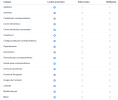
Also I don't see a 'Home Phone' field, this are the fields shown in the Zoho 'Modules and Fields'
Apellidos Línea única
Asistente Línea única
Ciudad para correspondencia Línea única
Correo electrónico Correo electrónico
Correo electrónico secundario Correo electrónico
Creado por Línea única
Código postal para correspondencia Línea única
Departamento Línea única
Descripción Multilínea (grande)
Domicilio para correspondencia Línea única
Estado para correspondencia Línea única
Fecha de nacimiento Fecha
Fuente de Prospecto Lista de selección
Imagen de Contacto Imagen de Contacto
Linkedin URL
Modificado por Línea única
Móvil Teléfono
N.º de teléfono del asistente Teléfono
No participación del correo electrónico Booleano
Nombre Línea única
Nombre de Cuenta Buscar
País para correspondencia Línea única
Propietario de Contacto Buscar
Subordinado de Buscar
Teléfono Teléfono
Título Línea única
1676897905850.png
So maybe Home_Phone is not a standard field¿?

Can someone give me some help?
 
I have followed https://help.zoho.com/portal/en/kb/...ticles/how-to-show-or-hide-fields-in-zoho-crm it does not have correct instructions it says click Layout but the options are
Layouts - Layout Rules - Validation Rules - Fields - Links and Buttons -Summary
Else I could lick on Standard which is the name of the form I have attached screen grabs to pdf to show
Cannot see any of the options document mentions
 

Attachments

@Phil Sbrana-Browning as i have tested from my side the fields are correct. If you move the Home Phone back to the list and re-add it, are you still having the issue?

@TTelecom The Home Phone is one of the Standard fields that Zoho requires.
 
  • Like
Reactions: edossantos
Yes, still the same issue, you can see it listed in the attached PDF in my previous response. just cannot find how to hide seems like it is not an option, in my Zoho picture in doc followed the. The instructions do not seem to match what I see on the screen
Home_Phone is there, but still does not match
 
Can you please also remove the custom field Phone2 from the list and try again?
 
@TTelecom The Home Phone is one of the Standard fields that Zoho requires.
OK, so maybe can you tell me what is going on here? Look's like Phil and I have the same problem.

I also looked at the settings he's talking about and I didn't see 'Home Phone' (maybe in the Spanish version it only says Phone)
 
I removed custom field Phone2 from the Contact form, but still has the same error
 
I am wondering if something went wrong earlier in setup with the section where we authorized the server side clicking accept, maybe I did not notice it using the wrong type of account, developer account rather than other account?
  1. You will be prompted to select an account, choose your normal user account (not the developer account). Press the Accept button to grant access to the data from your Zoho account, to the Client ID previously created.
Could this have caused this sort of problem.
 
  • Like
Reactions: Evolute IT
By the way it looks like the instructions are a little out
To show hide fields Home_Phone is currently set as Read and Write but instructions given in the URL https://help.zoho.com/portal/en/kb/...ticles/how-to-show-or-hide-fields-in-zoho-crm
should read
  1. Log in to Zoho CRM with Administrator privileges.
  2. Click Setup > Customization > Modules and Fields.
  3. Select a specific module and click Fields.
  4. Select Field Permissions select required from "Read and Write" "Read Only" "Dont Show"
  5. Click Save.
Perhaps the original was produced with an earlier version of Zoho?
 
Please note that the guideline is written from Zoho and this is not something that we can advice.
Furthermore, after selecting the correct account to authenticate, are you still having issue?
 
I will contact Zoho to check this out further. Yes I can see it is on Zoho url should have noticed, and will advise them accordingly.
 
I really do not know, if my account is developer or normal, but I used it to create the API so I guess it is must make it a dev account, does that make a difference to the process?
 
  • Like
Reactions: edossantos
Status
Not open for further replies.

Forum statistics

Threads
111,973
Messages
590,078
Members
164,896
Latest member
sameage