3CXManagementConsole.exe crashes randomly after Update 7 Hotfix

IASLaero

Premier Customer
Joined
Nov 30, 2022
Messages
11
Reaction score
1
Since we updated our 3CX Pro version to version Version 20.0 Update 7 (Build 1060 Release) 3CXManagementConsole.exe has been crashes randomly. Below find details or errors.

ManagementConsole.exe crash with Exception code 0xc0000409 : STATUS_STACK_BUFFER_OVERRUN

Running on Windows Server 2019 build 17763.7919

Event Viewer Error
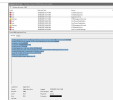
1761812773107.png

Log Name: Application
Source: Application Error
Date: 10/30/2025 3:52:15 AM
Event ID: 1000
Task Category: (100)
Level: Error
Keywords: Classic
User: N/A
Computer: 3CX-COMPUTER
Description:
Faulting application name: 3CXManagementConsole.exe, version: 20.0.7.1060, time stamp: 0x68d50000
Faulting module name: ntdll.dll, version: 10.0.17763.7919, time stamp: 0x14870b02
Exception code: 0xc0000409
Fault offset: 0x00000000000a5180
Faulting process id: 0x19f0
Faulting application start time: 0x01dc492586fabbb5
Faulting application path: C:\Program Files\3CX Phone System\Bin\3CXManagementConsole.exe
Faulting module path: C:\Windows\SYSTEM32\ntdll.dll
Report Id: a7c39dcd-f7b0-4eab-8c6e-4a43477f2876
Faulting package full name:
Faulting package-relative application ID:

1761813510204.png
 
What Spec?

What Antivirus?

Is this a physical machine or a VM?
 
What Spec?

What Antivirus?

Is this a physical machine or a VM?
  • Windows Defender (Exceptions enabled as recommended by 3CX)
  • It is a physical machine and below the hardware config.

Host Name: 3CX-COMPUTER
OS Name: Microsoft Windows Server 2019 Standard
OS Version: 10.0.17763 N/A Build 17763
OS Manufacturer: Microsoft Corporation
OS Configuration: Member Server
OS Build Type: Multiprocessor Free
Registered Owner: Windows User
Registered Organization:
Product ID: 00429-70000-00000-AA700
Original Install Date: 10/13/2025, 5:10:50 AM
System Boot Time: 10/29/2025, 4:42:55 AM
System Manufacturer: Dell Inc.
System Model: OptiPlex 7040
System Type: x64-based PC
Processor(s): 1 Processor(s) Installed.
[01]: Intel64 Family 6 Model 94 Stepping 3 GenuineIntel ~3408 Mhz
BIOS Version: Dell Inc. 1.24.0, 7/14/2022
Windows Directory: C:\Windows
System Directory: C:\Windows\system32
Boot Device: \Device\HarddiskVolume2
System Locale: en-us;English (United States)
Input Locale: en-us;English (United States)
Time Zone: (UTC+05:00) Islamabad, Karachi
Total Physical Memory: 32,692 MB
Available Physical Memory: 27,444 MB
Virtual Memory: Max Size: 37,812 MB
Virtual Memory: Available: 32,792 MB
Virtual Memory: In Use: 5,020 MB
Page File Location(s): C:\pagefile.sys
Domain: mydomain.com
Logon Server: \\DOMAIN
Hotfix(s): 5 Hotfix(s) Installed.
[01]: KB5066143
[02]: KB4589208
[03]: KB5000859
[04]: KB5070883
[05]: KB5066585
Network Card(s): 2 NIC(s) Installed.
[01]: Intel(R) Ethernet Connection (2) I219-LM
Connection Name: LAN
DHCP Enabled: No
IP address(es)
[01]: X.X>
[02]: fe80::d2e7:adc4:5416:b020
[02]: Realtek PCIe GBE Family Controller
Connection Name: SIP
DHCP Enabled: No
IP address(es)
[01]: X.X
Hyper-V Requirements: VM Monitor Mode Extensions: Yes
Virtualization Enabled In Firmware: Yes
Second Level Address Translation: Yes
Data Execution Prevention Available: Yes
 
Last edited:
Is this machine solely used for 3CX or do you have any 3rd party on there?

If it was me, Id install the HyperV Role to the server and install 3CX using the Debian ISO then restore your backup to it.

you'll have far less issues.
 
Is this machine solely used for 3CX or do you have any 3rd party on there?

If it was me, Id install the HyperV Role to the server and install 3CX using the Debian ISO then restore your backup to it.

you'll have far less issues.
We have no other services running on it other than 3CX. It is dedicated machine for 3CX
 
If it keeps happening randomly I would backup, reinstall and restore.
 
If it keeps happening randomly I would backup, reinstall and restore.
We have done this twice with fresh windows installation. Also tried with new hardware.
When this occurs we have to always first stop the gateway services and then start the management console services from the windows services
 
Interesting.. i've had no issues with any of my installs (albeit they're on Debian).

you got anything in your set up that youd consider outside of a vanilla set up?

Id stick the 3CX in to verbose logging mode and start combing logs.

alternatively, hyperv -> Debian VM.
 
2025/10/30 03:34:48.463|0064|Warn| [MyPhone.CallOwner] WebRTC: Client for session 517c8de6-ba78-a82b*** is not found
2025/10/30 03:35:04.135|0064|Warn| [MyPhone.CallOwner] WebRTC: Client for session d5dc4b4d-395c-b8ec*** is not found
2025/10/30 03:36:09.206|0074|Warn| [MyPhone.CallOwner] WebRTC: Client for session 3bd4a503-40c2-7096*** is not found
2025/10/30 03:37:51.708|0015|Warn| [MyPhone.CallOwner] WebRTC: Client for session a0fe5352-5f6b-16bc*** is not found
2025/10/30 03:41:19.891|0028|Warn| [MyPhone.CallOwner] WebRTC: Client for session cfc56cae-6a18-918d*** is not found
2025/10/30 03:42:39.797|0069|Warn| [MyPhone.CallOwner] WebRTC: Client for session 80781255-2c85-eb71*** is not found
2025/10/30 03:43:40.721|0001|Info| ------------|Log is started
2025/10/30 03:43:40.738|0001|Info| New Severity is set Warning
2025/10/30 03:44:05.256|0001|Info| ------------|Log is started

2025/10/30 03:44:05.273|0001|Info| New Severity is set Warning
2025/10/30 03:46:49.174|0021|Warn| [MyPhone.CallOwner] WebRTC: Client for session a2e35edf-89fc-249e*** is not found
2025/10/30 03:51:19.948|0013|Warn| [MyPhone.CallOwner] WebRTC: Client for session ae27b5df-86c1-5f63*** is not found
2025/10/30 03:34:48.463|0064|Warn| [MyPhone.CallOwner] WebRTC: Client for session 517c8de6-ba78-a82b*** is not found
2025/10/30 03:35:04.135|0064|Warn| [MyPhone.CallOwner] WebRTC: Client for session d5dc4b4d-395c-b8ec*** is not found
2025/10/30 03:36:09.206|0074|Warn| [MyPhone.CallOwner] WebRTC: Client for session 3bd4a503-40c2-7096*** is not found
2025/10/30 03:37:51.708|0015|Warn| [MyPhone.CallOwner] WebRTC: Client for session a0fe5352-5f6b-16bc*** is not found
2025/10/30 03:41:19.891|0028|Warn| [MyPhone.CallOwner] WebRTC: Client for session cfc56cae-6a18-918d*** is not found
2025/10/30 03:42:39.797|0069|Warn| [MyPhone.CallOwner] WebRTC: Client for session 80781255-2c85-eb71*** is not found
2025/10/30 03:43:40.721|0001|Info| ------------|Log is started
2025/10/30 03:43:40.738|0001|Info| New Severity is set Warning
2025/10/30 03:44:05.256|0001|Info| ------------|Log is started

2025/10/30 03:44:05.273|0001|Info| New Severity is set Warning
2025/10/30 03:46:49.174|0021|Warn| [MyPhone.CallOwner] WebRTC: Client for session a2e35edf-89fc-249e*** is not found
2025/10/30 03:51:19.948|0013|Warn| [MyPhone.CallOwner] WebRTC: Client for session ae27b5df-86c1-5f63*** is not found
2025/10/30 06:50:11.245|0001|Info| ------------|Log is started
2025/10/30 06:50:11.263|0001|Info| New Severity is set Warning
2025/10/30 06:50:47.961|0011|Warn| [MyPhone.CallOwner] WebRTC: Client for session 8c47769f-44c9-7d73*** is not found
2025/10/30 06:51:24.449|0015|Warn| [MyPhone.CallOwner] WebRTC: Client for session c766162f-b832-6366*** is not found
2025/10/30 06:52:54.342|0020|Warn| [MyPhone.CallOwner] WebRTC: Client for session 8c927c08-39dd-eb0a*** is not found
2025/10/30 06:50:11.263|0001|Info| New Severity is set Warning
2025/10/30 06:50:47.961|0011|Warn| [MyPhone.CallOwner] WebRTC: Client for session 8c47769f-44c9-7d73*** is not found
2025/10/30 06:51:24.449|0015|Warn| [MyPhone.CallOwner] WebRTC: Client for session c766162f-b832-6366*** is not found
2025/10/30 06:52:54.342|0020|Warn| [MyPhone.CallOwner] WebRTC: Client for session 8c927c08-39dd-eb0a*** is not found
-------------------------


We see a bunch of WebRTC errors in ManagementConsole logs .. as shown. In the above instance crash occurred at 03:43 and we had to manually intervene at 06:50:11 to restart GatewayService and then MangementConsole successfully started.
service recovery via restart only of MangementService was not successful
 
Since we updated our 3CX Pro version to version Version 20.0 Update 7 (Build 1060 Release) 3CXManagementConsole.exe has been crashes randomly.
Personally, I would completely remove Defender. This is possible on a Windows Server:
Code:
Remove-WindowsFeature -Name "windows-defender"

Since an Intel NIC is being used, offloading and similar features should be disabled. This is often a problem.
Code:
# run as administrator
#
# to keep ist simple and easy: create c:\installation, copy the script there und run it from there
# otherwise the script creates c:\installation and write a vm-nic....txt logfile there
#
# powershell -NoProfile -ExecutionPolicy Bypass -Command ". Start-Process -Wait PowerShell -ArgumentList '-NoProfile -ExecutionPolicy Bypass -File vm-nic.ps1' -Verb RunAs"
#

$isvirtual=($(get-wmiobject -computer LocalHost win32_computersystem).Model -match "virtual machine" )
$startdatum=Get-Date -Format yyyy-MM-dd_HH-mm-ss

function getfname { return $MyInvocation.Scriptname }
$fname=getfname                                 # name of the script
$runpath="c:\installation"                        #

if( -not (Test-Path -Path $runpath) ) {
    New-Item -Path $runpath -Type Directory | Out-Null    #create directory if not exist
}  
Set-Location -path $runpath

$logfile="$runpath\vm-nic_$startdatum.txt"

#NATIVE2019, HV2019, VM2019, set settings as '2016
#Get-NetTCPSetting | ft -AutoSize
get-NetTCPSetting -SettingName "InternetCustom" | Out-File $logfile
Set-NetTCPSetting -SettingName "InternetCustom" -CongestionProvider CTCP        # steht bei 2019 auf CUBIC
Set-NetTCPSetting -SettingName "InternetCustom" -DelayedAckTimeoutMs 50         # steht bei 2019 auf 40
Set-NetTCPSetting -SettingName "InternetCustom" -ForceWS Disabled               # steht bei 2019 auf Enabled

get-NetTCPSetting -SettingName "DatacenterCustom" | Out-File $logfile
Set-NetTCPSetting -SettingName "DatacenterCustom" -CongestionProvider DCTCP     # steht bei 2019 auf CUBIC
Set-NetTCPSetting -SettingName "DatacenterCustom" -CwndRestart True             # steht bei 2019 auf false
Set-NetTCPSetting -SettingName "DatacenterCustom" -ForceWS Disabled             # steht bei 2019 auf Enabled

get-NetTCPSetting -SettingName "Compat" | Out-File $logfile
Set-NetTCPSetting -SettingName "Compat" -ForceWS Disabled                       # steht bei 2019 auf Enabled

get-NetTCPSetting -SettingName "Datacenter" | Out-File $logfile
Set-NetTCPSetting -SettingName "Datacenter" -CongestionProvider DCTCP           # steht bei 2019 auf CUBIC
Set-NetTCPSetting -SettingName "Datacenter" -CwndRestart True                   # steht bei 2019 auf false
Set-NetTCPSetting -SettingName "Datacenter" -ForceWS Disabled                   # steht bei 2019 auf Enabled

get-NetTCPSetting -SettingName "Internet" | Out-File $logfile
Set-NetTCPSetting -SettingName "Internet" -CongestionProvider CTCP              # steht bei 2019 auf CUBIC
Set-NetTCPSetting -SettingName "Internet" -DelayedAckTimeoutMs 50               # steht bei 2019 auf 40
Set-NetTCPSetting -SettingName "Internet" -ForceWS Disabled                     # steht bei 2019 auf Enabled

#NATIVE2019, HV2019, VM2019
netsh int tcp show global | Out-File $logfile
netsh int tcp set global RSS=Enabled
netsh int tcp set global RSC=Enabled

#HV2019
if( -not $isvirtual ) {
    Get-NetAdapter | Get-NetAdapterAdvancedProperty | Out-File $logfile
    Get-NetAdapter | Get-NetadapterRss | Out-File $logfile
    Get-NetAdapter | Get-NetadapterVmq | Out-File $logfile
    Get-NetAdapter | Set-NetAdapterAdvancedProperty -RegistryKeyword "*FlowControl" -RegistryValue 0 -NoRestart
    Get-NetAdapter | Set-NetAdapterAdvancedProperty -RegistryKeyword "*InterruptModeration" -RegistryValue 0 -NoRestart
    Get-NetAdapter | Set-NetAdapterAdvancedProperty -RegistryKeyword "*IPChecksumOffloadIPv4" -RegistryValue 0 -NoRestart
    Get-NetAdapter | Set-NetAdapterAdvancedProperty -RegistryKeyword "*LsoV2IPv4" -RegistryValue 0 -NoRestart
    Get-NetAdapter | Set-NetAdapterAdvancedProperty -RegistryKeyword "*LsoV2IPv6" -RegistryValue 0 -NoRestart
    Get-NetAdapter | Set-NetAdapterAdvancedProperty -RegistryKeyword "*TCPChecksumOffloadIPv4" -RegistryValue 0 -NoRestart
    Get-NetAdapter | Set-NetAdapterAdvancedProperty -RegistryKeyword "*UDPChecksumOffloadIPv4" -RegistryValue 0 -NoRestart
    Get-NetAdapter | Set-NetAdapterAdvancedProperty -RegistryKeyword "*TCPChecksumOffloadIPv6" -RegistryValue 0 -NoRestart
    Get-NetAdapter | Set-NetAdapterAdvancedProperty -RegistryKeyword "*UDPChecksumOffloadIPv6" -RegistryValue 0 -NoRestart
    Get-NetAdapter | Set-NetadapterRss -NumberOfReceiveQueues 4 -Profile Closest -NoRestart # Closest ClosestStatic Conservative NUMA NUMAStaticTATIC
    Get-NetAdapter | Set-NetadapterVmq -MaxProcessors 8 -BaseProcessorNumber 2 -MaxProcessorNumber 8  -NumaNode 0
    Get-NetAdapter | Restart-NetAdapter
}

# VM2019
if( $isvirtual ) {
    Get-NetAdapter | Get-NetAdapterAdvancedProperty | Out-File $logfile

    Get-NetAdapter | Set-NetAdapterAdvancedProperty -DisplayName "IPSec Offload" -DisplayValue "Disabled" -NoRestart
    Get-NetAdapter | Set-NetAdapterAdvancedProperty -DisplayName "IPv4 Checksum Offload" -DisplayValue "Disabled" -NoRestart

    Get-NetAdapter | Set-NetAdapterAdvancedProperty -DisplayName "Large Send Offload Version 2 (IPv4)" -DisplayValue "Disabled" -NoRestart
    Get-NetAdapter | Set-NetAdapterAdvancedProperty -DisplayName "Large Send Offload Version 2 (IPv6)" -DisplayValue "Disabled" -NoRestart

    Get-NetAdapter | Set-NetAdapterAdvancedProperty -DisplayName "Max Number of RSS Processors" -DisplayValue "4 Processors" -NoRestart # <- !!!!!!!!!
    Get-NetAdapter | Set-NetAdapterAdvancedProperty -DisplayName "Maximum Number of RSS Queues" -DisplayValue "4 Queues" -NoRestart     # <- !!!!!!!!!

    Get-NetAdapter | Set-NetAdapterAdvancedProperty -DisplayName "Recv Segment Coalescing (IPv4)" -DisplayValue "Enabled" -NoRestart
    Get-NetAdapter | Set-NetAdapterAdvancedProperty -DisplayName "Recv Segment Coalescing (IPv6)" -DisplayValue "Enabled" -NoRestart

    Get-NetAdapter | Set-NetAdapterAdvancedProperty -DisplayName "Receive Side Scaling" -DisplayValue "Enabled" -NoRestart

    Get-NetAdapter | Set-NetAdapterAdvancedProperty -DisplayName "RSS Base Processor Number" -DisplayValue "2" -NoRestart       # <- !!!!!!!!!
    Get-NetAdapter | Set-NetAdapterAdvancedProperty -DisplayName "Maximum RSS Processor Number" -DisplayValue "3" -NoRestart    # <- !!!!!!!!!

    Get-NetAdapter | Set-NetAdapterAdvancedProperty -DisplayName "TCP Checksum Offload (IPv4)" -DisplayValue "Disabled" -NoRestart
    Get-NetAdapter | Set-NetAdapterAdvancedProperty -DisplayName "TCP Checksum Offload (IPv6)" -DisplayValue "Disabled" -NoRestart
    Get-NetAdapter | Set-NetAdapterAdvancedProperty -DisplayName "UDP Checksum Offload (IPv4)" -DisplayValue "Disabled" -NoRestart
    Get-NetAdapter | Set-NetAdapterAdvancedProperty -DisplayName "UDP Checksum Offload (IPv6)" -DisplayValue "Disabled" -NoRestart
    Get-NetAdapter | Restart-NetAdapter
}

#HV2019
# https://docs.microsoft.com/en-us/windows-server/networking/technologies/hpn/rsc-in-the-vswitch
if( -not $isvirtual ) {
    Get-VMSwitch | ?{ $_.SoftwareRscEnabled -eq $True} | fl | Out-File $logfile
    Get-VMSwitch | ?{ $_.SoftwareRscEnabled -eq $True} | Set-VMSwitch -EnableSoftwareRsc $false

    Get-NetAdapterVmq | fl | Out-File $logfile
    Get-NetAdapterVmq | Set-NetAdapterVmq -Enabled $true

    Get-VM | Get-VMNetworkAdapter | fl | Out-File $logfile
    Get-VM | Get-VMNetworkAdapter | %{ Set-VMNetworkAdapter $_.VMName -Name $_.Name -VmqWeight 0 }
}

$_acttime=Get-Date -Format "yyyy-MM-dd HH:mm"
Add-Content -path $logfile "Durchlauf: $_acttime"

I would also remove IPv6 on the machine and the binding in 3CX, but that's not directly related to the problem.
Code:
reg add "HKEY_LOCAL_MACHINE\SYSTEM\CurrentControlSet\Services\Tcpip6\Parameters" /v DisabledComponents /t REG_DWORD /d 255 /f
reg add "HKEY_LOCAL_MACHINE\SYSTEM\CurrentControlSet\Services\Tcpip6\Parameters" /v EnableICSIPv6 /t REG_DWORD /d 0 /f
 
  • Like
Reactions: IASLaero
Personally, I would completely remove Defender. This is possible on a Windows Server:
Code:
Remove-WindowsFeature -Name "windows-defender"

Since an Intel NIC is being used, offloading and similar features should be disabled. This is often a problem.
Code:
# run as administrator
#
# to keep ist simple and easy: create c:\installation, copy the script there und run it from there
# otherwise the script creates c:\installation and write a vm-nic....txt logfile there
#
# powershell -NoProfile -ExecutionPolicy Bypass -Command ". Start-Process -Wait PowerShell -ArgumentList '-NoProfile -ExecutionPolicy Bypass -File vm-nic.ps1' -Verb RunAs"
#

$isvirtual=($(get-wmiobject -computer LocalHost win32_computersystem).Model -match "virtual machine" )
$startdatum=Get-Date -Format yyyy-MM-dd_HH-mm-ss

function getfname { return $MyInvocation.Scriptname }
$fname=getfname                                 # name of the script
$runpath="c:\installation"                        #

if( -not (Test-Path -Path $runpath) ) {
    New-Item -Path $runpath -Type Directory | Out-Null    #create directory if not exist
} 
Set-Location -path $runpath

$logfile="$runpath\vm-nic_$startdatum.txt"

#NATIVE2019, HV2019, VM2019, set settings as '2016
#Get-NetTCPSetting | ft -AutoSize
get-NetTCPSetting -SettingName "InternetCustom" | Out-File $logfile
Set-NetTCPSetting -SettingName "InternetCustom" -CongestionProvider CTCP        # steht bei 2019 auf CUBIC
Set-NetTCPSetting -SettingName "InternetCustom" -DelayedAckTimeoutMs 50         # steht bei 2019 auf 40
Set-NetTCPSetting -SettingName "InternetCustom" -ForceWS Disabled               # steht bei 2019 auf Enabled

get-NetTCPSetting -SettingName "DatacenterCustom" | Out-File $logfile
Set-NetTCPSetting -SettingName "DatacenterCustom" -CongestionProvider DCTCP     # steht bei 2019 auf CUBIC
Set-NetTCPSetting -SettingName "DatacenterCustom" -CwndRestart True             # steht bei 2019 auf false
Set-NetTCPSetting -SettingName "DatacenterCustom" -ForceWS Disabled             # steht bei 2019 auf Enabled

get-NetTCPSetting -SettingName "Compat" | Out-File $logfile
Set-NetTCPSetting -SettingName "Compat" -ForceWS Disabled                       # steht bei 2019 auf Enabled

get-NetTCPSetting -SettingName "Datacenter" | Out-File $logfile
Set-NetTCPSetting -SettingName "Datacenter" -CongestionProvider DCTCP           # steht bei 2019 auf CUBIC
Set-NetTCPSetting -SettingName "Datacenter" -CwndRestart True                   # steht bei 2019 auf false
Set-NetTCPSetting -SettingName "Datacenter" -ForceWS Disabled                   # steht bei 2019 auf Enabled

get-NetTCPSetting -SettingName "Internet" | Out-File $logfile
Set-NetTCPSetting -SettingName "Internet" -CongestionProvider CTCP              # steht bei 2019 auf CUBIC
Set-NetTCPSetting -SettingName "Internet" -DelayedAckTimeoutMs 50               # steht bei 2019 auf 40
Set-NetTCPSetting -SettingName "Internet" -ForceWS Disabled                     # steht bei 2019 auf Enabled

#NATIVE2019, HV2019, VM2019
netsh int tcp show global | Out-File $logfile
netsh int tcp set global RSS=Enabled
netsh int tcp set global RSC=Enabled

#HV2019
if( -not $isvirtual ) {
    Get-NetAdapter | Get-NetAdapterAdvancedProperty | Out-File $logfile
    Get-NetAdapter | Get-NetadapterRss | Out-File $logfile
    Get-NetAdapter | Get-NetadapterVmq | Out-File $logfile
    Get-NetAdapter | Set-NetAdapterAdvancedProperty -RegistryKeyword "*FlowControl" -RegistryValue 0 -NoRestart
    Get-NetAdapter | Set-NetAdapterAdvancedProperty -RegistryKeyword "*InterruptModeration" -RegistryValue 0 -NoRestart
    Get-NetAdapter | Set-NetAdapterAdvancedProperty -RegistryKeyword "*IPChecksumOffloadIPv4" -RegistryValue 0 -NoRestart
    Get-NetAdapter | Set-NetAdapterAdvancedProperty -RegistryKeyword "*LsoV2IPv4" -RegistryValue 0 -NoRestart
    Get-NetAdapter | Set-NetAdapterAdvancedProperty -RegistryKeyword "*LsoV2IPv6" -RegistryValue 0 -NoRestart
    Get-NetAdapter | Set-NetAdapterAdvancedProperty -RegistryKeyword "*TCPChecksumOffloadIPv4" -RegistryValue 0 -NoRestart
    Get-NetAdapter | Set-NetAdapterAdvancedProperty -RegistryKeyword "*UDPChecksumOffloadIPv4" -RegistryValue 0 -NoRestart
    Get-NetAdapter | Set-NetAdapterAdvancedProperty -RegistryKeyword "*TCPChecksumOffloadIPv6" -RegistryValue 0 -NoRestart
    Get-NetAdapter | Set-NetAdapterAdvancedProperty -RegistryKeyword "*UDPChecksumOffloadIPv6" -RegistryValue 0 -NoRestart
    Get-NetAdapter | Set-NetadapterRss -NumberOfReceiveQueues 4 -Profile Closest -NoRestart # Closest ClosestStatic Conservative NUMA NUMAStaticTATIC
    Get-NetAdapter | Set-NetadapterVmq -MaxProcessors 8 -BaseProcessorNumber 2 -MaxProcessorNumber 8  -NumaNode 0
    Get-NetAdapter | Restart-NetAdapter
}

# VM2019
if( $isvirtual ) {
    Get-NetAdapter | Get-NetAdapterAdvancedProperty | Out-File $logfile

    Get-NetAdapter | Set-NetAdapterAdvancedProperty -DisplayName "IPSec Offload" -DisplayValue "Disabled" -NoRestart
    Get-NetAdapter | Set-NetAdapterAdvancedProperty -DisplayName "IPv4 Checksum Offload" -DisplayValue "Disabled" -NoRestart

    Get-NetAdapter | Set-NetAdapterAdvancedProperty -DisplayName "Large Send Offload Version 2 (IPv4)" -DisplayValue "Disabled" -NoRestart
    Get-NetAdapter | Set-NetAdapterAdvancedProperty -DisplayName "Large Send Offload Version 2 (IPv6)" -DisplayValue "Disabled" -NoRestart

    Get-NetAdapter | Set-NetAdapterAdvancedProperty -DisplayName "Max Number of RSS Processors" -DisplayValue "4 Processors" -NoRestart # <- !!!!!!!!!
    Get-NetAdapter | Set-NetAdapterAdvancedProperty -DisplayName "Maximum Number of RSS Queues" -DisplayValue "4 Queues" -NoRestart     # <- !!!!!!!!!

    Get-NetAdapter | Set-NetAdapterAdvancedProperty -DisplayName "Recv Segment Coalescing (IPv4)" -DisplayValue "Enabled" -NoRestart
    Get-NetAdapter | Set-NetAdapterAdvancedProperty -DisplayName "Recv Segment Coalescing (IPv6)" -DisplayValue "Enabled" -NoRestart

    Get-NetAdapter | Set-NetAdapterAdvancedProperty -DisplayName "Receive Side Scaling" -DisplayValue "Enabled" -NoRestart

    Get-NetAdapter | Set-NetAdapterAdvancedProperty -DisplayName "RSS Base Processor Number" -DisplayValue "2" -NoRestart       # <- !!!!!!!!!
    Get-NetAdapter | Set-NetAdapterAdvancedProperty -DisplayName "Maximum RSS Processor Number" -DisplayValue "3" -NoRestart    # <- !!!!!!!!!

    Get-NetAdapter | Set-NetAdapterAdvancedProperty -DisplayName "TCP Checksum Offload (IPv4)" -DisplayValue "Disabled" -NoRestart
    Get-NetAdapter | Set-NetAdapterAdvancedProperty -DisplayName "TCP Checksum Offload (IPv6)" -DisplayValue "Disabled" -NoRestart
    Get-NetAdapter | Set-NetAdapterAdvancedProperty -DisplayName "UDP Checksum Offload (IPv4)" -DisplayValue "Disabled" -NoRestart
    Get-NetAdapter | Set-NetAdapterAdvancedProperty -DisplayName "UDP Checksum Offload (IPv6)" -DisplayValue "Disabled" -NoRestart
    Get-NetAdapter | Restart-NetAdapter
}

#HV2019
# https://docs.microsoft.com/en-us/windows-server/networking/technologies/hpn/rsc-in-the-vswitch
if( -not $isvirtual ) {
    Get-VMSwitch | ?{ $_.SoftwareRscEnabled -eq $True} | fl | Out-File $logfile
    Get-VMSwitch | ?{ $_.SoftwareRscEnabled -eq $True} | Set-VMSwitch -EnableSoftwareRsc $false

    Get-NetAdapterVmq | fl | Out-File $logfile
    Get-NetAdapterVmq | Set-NetAdapterVmq -Enabled $true

    Get-VM | Get-VMNetworkAdapter | fl | Out-File $logfile
    Get-VM | Get-VMNetworkAdapter | %{ Set-VMNetworkAdapter $_.VMName -Name $_.Name -VmqWeight 0 }
}

$_acttime=Get-Date -Format "yyyy-MM-dd HH:mm"
Add-Content -path $logfile "Durchlauf: $_acttime"

I would also remove IPv6 on the machine and the binding in 3CX, but that's not directly related to the problem.
Code:
reg add "HKEY_LOCAL_MACHINE\SYSTEM\CurrentControlSet\Services\Tcpip6\Parameters" /v DisabledComponents /t REG_DWORD /d 255 /f
reg add "HKEY_LOCAL_MACHINE\SYSTEM\CurrentControlSet\Services\Tcpip6\Parameters" /v EnableICSIPv6 /t REG_DWORD /d 0 /f
Thank you. we have made the adapter changes. we will revert with findings
 
This might not even be a 3CX issue.

You also need to look at the Windows event logs and even use procmon to see what's going on in the build up.
 
  • Like
Reactions: fxbastler
Personally, I would completely remove Defender. This is possible on a Windows Server:
Code:
Remove-WindowsFeature -Name "windows-defender"

Since an Intel NIC is being used, offloading and similar features should be disabled. This is often a problem.
Code:
# run as administrator
#
# to keep ist simple and easy: create c:\installation, copy the script there und run it from there
# otherwise the script creates c:\installation and write a vm-nic....txt logfile there
#
# powershell -NoProfile -ExecutionPolicy Bypass -Command ". Start-Process -Wait PowerShell -ArgumentList '-NoProfile -ExecutionPolicy Bypass -File vm-nic.ps1' -Verb RunAs"
#

$isvirtual=($(get-wmiobject -computer LocalHost win32_computersystem).Model -match "virtual machine" )
$startdatum=Get-Date -Format yyyy-MM-dd_HH-mm-ss

function getfname { return $MyInvocation.Scriptname }
$fname=getfname                                 # name of the script
$runpath="c:\installation"                        #

if( -not (Test-Path -Path $runpath) ) {
    New-Item -Path $runpath -Type Directory | Out-Null    #create directory if not exist
} 
Set-Location -path $runpath

$logfile="$runpath\vm-nic_$startdatum.txt"

#NATIVE2019, HV2019, VM2019, set settings as '2016
#Get-NetTCPSetting | ft -AutoSize
get-NetTCPSetting -SettingName "InternetCustom" | Out-File $logfile
Set-NetTCPSetting -SettingName "InternetCustom" -CongestionProvider CTCP        # steht bei 2019 auf CUBIC
Set-NetTCPSetting -SettingName "InternetCustom" -DelayedAckTimeoutMs 50         # steht bei 2019 auf 40
Set-NetTCPSetting -SettingName "InternetCustom" -ForceWS Disabled               # steht bei 2019 auf Enabled

get-NetTCPSetting -SettingName "DatacenterCustom" | Out-File $logfile
Set-NetTCPSetting -SettingName "DatacenterCustom" -CongestionProvider DCTCP     # steht bei 2019 auf CUBIC
Set-NetTCPSetting -SettingName "DatacenterCustom" -CwndRestart True             # steht bei 2019 auf false
Set-NetTCPSetting -SettingName "DatacenterCustom" -ForceWS Disabled             # steht bei 2019 auf Enabled

get-NetTCPSetting -SettingName "Compat" | Out-File $logfile
Set-NetTCPSetting -SettingName "Compat" -ForceWS Disabled                       # steht bei 2019 auf Enabled

get-NetTCPSetting -SettingName "Datacenter" | Out-File $logfile
Set-NetTCPSetting -SettingName "Datacenter" -CongestionProvider DCTCP           # steht bei 2019 auf CUBIC
Set-NetTCPSetting -SettingName "Datacenter" -CwndRestart True                   # steht bei 2019 auf false
Set-NetTCPSetting -SettingName "Datacenter" -ForceWS Disabled                   # steht bei 2019 auf Enabled

get-NetTCPSetting -SettingName "Internet" | Out-File $logfile
Set-NetTCPSetting -SettingName "Internet" -CongestionProvider CTCP              # steht bei 2019 auf CUBIC
Set-NetTCPSetting -SettingName "Internet" -DelayedAckTimeoutMs 50               # steht bei 2019 auf 40
Set-NetTCPSetting -SettingName "Internet" -ForceWS Disabled                     # steht bei 2019 auf Enabled

#NATIVE2019, HV2019, VM2019
netsh int tcp show global | Out-File $logfile
netsh int tcp set global RSS=Enabled
netsh int tcp set global RSC=Enabled

#HV2019
if( -not $isvirtual ) {
    Get-NetAdapter | Get-NetAdapterAdvancedProperty | Out-File $logfile
    Get-NetAdapter | Get-NetadapterRss | Out-File $logfile
    Get-NetAdapter | Get-NetadapterVmq | Out-File $logfile
    Get-NetAdapter | Set-NetAdapterAdvancedProperty -RegistryKeyword "*FlowControl" -RegistryValue 0 -NoRestart
    Get-NetAdapter | Set-NetAdapterAdvancedProperty -RegistryKeyword "*InterruptModeration" -RegistryValue 0 -NoRestart
    Get-NetAdapter | Set-NetAdapterAdvancedProperty -RegistryKeyword "*IPChecksumOffloadIPv4" -RegistryValue 0 -NoRestart
    Get-NetAdapter | Set-NetAdapterAdvancedProperty -RegistryKeyword "*LsoV2IPv4" -RegistryValue 0 -NoRestart
    Get-NetAdapter | Set-NetAdapterAdvancedProperty -RegistryKeyword "*LsoV2IPv6" -RegistryValue 0 -NoRestart
    Get-NetAdapter | Set-NetAdapterAdvancedProperty -RegistryKeyword "*TCPChecksumOffloadIPv4" -RegistryValue 0 -NoRestart
    Get-NetAdapter | Set-NetAdapterAdvancedProperty -RegistryKeyword "*UDPChecksumOffloadIPv4" -RegistryValue 0 -NoRestart
    Get-NetAdapter | Set-NetAdapterAdvancedProperty -RegistryKeyword "*TCPChecksumOffloadIPv6" -RegistryValue 0 -NoRestart
    Get-NetAdapter | Set-NetAdapterAdvancedProperty -RegistryKeyword "*UDPChecksumOffloadIPv6" -RegistryValue 0 -NoRestart
    Get-NetAdapter | Set-NetadapterRss -NumberOfReceiveQueues 4 -Profile Closest -NoRestart # Closest ClosestStatic Conservative NUMA NUMAStaticTATIC
    Get-NetAdapter | Set-NetadapterVmq -MaxProcessors 8 -BaseProcessorNumber 2 -MaxProcessorNumber 8  -NumaNode 0
    Get-NetAdapter | Restart-NetAdapter
}

# VM2019
if( $isvirtual ) {
    Get-NetAdapter | Get-NetAdapterAdvancedProperty | Out-File $logfile

    Get-NetAdapter | Set-NetAdapterAdvancedProperty -DisplayName "IPSec Offload" -DisplayValue "Disabled" -NoRestart
    Get-NetAdapter | Set-NetAdapterAdvancedProperty -DisplayName "IPv4 Checksum Offload" -DisplayValue "Disabled" -NoRestart

    Get-NetAdapter | Set-NetAdapterAdvancedProperty -DisplayName "Large Send Offload Version 2 (IPv4)" -DisplayValue "Disabled" -NoRestart
    Get-NetAdapter | Set-NetAdapterAdvancedProperty -DisplayName "Large Send Offload Version 2 (IPv6)" -DisplayValue "Disabled" -NoRestart

    Get-NetAdapter | Set-NetAdapterAdvancedProperty -DisplayName "Max Number of RSS Processors" -DisplayValue "4 Processors" -NoRestart # <- !!!!!!!!!
    Get-NetAdapter | Set-NetAdapterAdvancedProperty -DisplayName "Maximum Number of RSS Queues" -DisplayValue "4 Queues" -NoRestart     # <- !!!!!!!!!

    Get-NetAdapter | Set-NetAdapterAdvancedProperty -DisplayName "Recv Segment Coalescing (IPv4)" -DisplayValue "Enabled" -NoRestart
    Get-NetAdapter | Set-NetAdapterAdvancedProperty -DisplayName "Recv Segment Coalescing (IPv6)" -DisplayValue "Enabled" -NoRestart

    Get-NetAdapter | Set-NetAdapterAdvancedProperty -DisplayName "Receive Side Scaling" -DisplayValue "Enabled" -NoRestart

    Get-NetAdapter | Set-NetAdapterAdvancedProperty -DisplayName "RSS Base Processor Number" -DisplayValue "2" -NoRestart       # <- !!!!!!!!!
    Get-NetAdapter | Set-NetAdapterAdvancedProperty -DisplayName "Maximum RSS Processor Number" -DisplayValue "3" -NoRestart    # <- !!!!!!!!!

    Get-NetAdapter | Set-NetAdapterAdvancedProperty -DisplayName "TCP Checksum Offload (IPv4)" -DisplayValue "Disabled" -NoRestart
    Get-NetAdapter | Set-NetAdapterAdvancedProperty -DisplayName "TCP Checksum Offload (IPv6)" -DisplayValue "Disabled" -NoRestart
    Get-NetAdapter | Set-NetAdapterAdvancedProperty -DisplayName "UDP Checksum Offload (IPv4)" -DisplayValue "Disabled" -NoRestart
    Get-NetAdapter | Set-NetAdapterAdvancedProperty -DisplayName "UDP Checksum Offload (IPv6)" -DisplayValue "Disabled" -NoRestart
    Get-NetAdapter | Restart-NetAdapter
}

#HV2019
# https://docs.microsoft.com/en-us/windows-server/networking/technologies/hpn/rsc-in-the-vswitch
if( -not $isvirtual ) {
    Get-VMSwitch | ?{ $_.SoftwareRscEnabled -eq $True} | fl | Out-File $logfile
    Get-VMSwitch | ?{ $_.SoftwareRscEnabled -eq $True} | Set-VMSwitch -EnableSoftwareRsc $false

    Get-NetAdapterVmq | fl | Out-File $logfile
    Get-NetAdapterVmq | Set-NetAdapterVmq -Enabled $true

    Get-VM | Get-VMNetworkAdapter | fl | Out-File $logfile
    Get-VM | Get-VMNetworkAdapter | %{ Set-VMNetworkAdapter $_.VMName -Name $_.Name -VmqWeight 0 }
}

$_acttime=Get-Date -Format "yyyy-MM-dd HH:mm"
Add-Content -path $logfile "Durchlauf: $_acttime"

I would also remove IPv6 on the machine and the binding in 3CX, but that's not directly related to the problem.
Code:
reg add "HKEY_LOCAL_MACHINE\SYSTEM\CurrentControlSet\Services\Tcpip6\Parameters" /v DisabledComponents /t REG_DWORD /d 255 /f
reg add "HKEY_LOCAL_MACHINE\SYSTEM\CurrentControlSet\Services\Tcpip6\Parameters" /v EnableICSIPv6 /t REG_DWORD /d 0 /f
Since the Network Adapter changes are applied, the Management Console is not crashing.
We did not remove Windows Defender
 
  • Like
Reactions: KyriacosS_3CX

Forum statistics

Threads
111,954
Messages
589,921
Members
164,851
Latest member
DrunkeMeister