3CXPhone v12 Android & iPhone - Ability to Park Call?

Status
Not open for further replies.

uptime1

Customer
Joined
Jan 13, 2012
Messages
182
Reaction score
59
Any chance 3CXPhone v12 for Android & iPhone will have the ability to Park a Call?

This would be fantastic as it would allow an employee with a mobile phone and bluetooth headset (assuming 3CXPhone supports a BT headset) to answer a call with their desk phone, park the call and pick it up with their mobile device and have the instant convenience of using their handsfree headset!

And, their employer can avoid the multi-hundred dollar cost of the headset!

BYOH = Bring Your Own Headset. :-)

Everyone wins!

Roy Mendoza
UpTime IT
Southern California
 
You will want to submit a feature request for that..

http://www.3cx.com/blog/news/3cx-feature-requests-facebook-app/

That being said, you can still blind transfer to a park extension, old-school.
Blind transfer to *0x and then unpark using the other handset with *1x.

I used my handset dial a number, parked it after with a blind transfer to *00, then picked up my S3 and used *10 to unpark.
BT works as much as it works with the rest of my S3 phone/apps.
 
I'm pretty sure parking will be available when 12 is final. There are several features missing from the new 3CXPhone.
 
How do you blind transfer to a shared park?
 
You can use forwarding extensions much like I do for shared parking/unparking.

I rigged up 901 to forward to SP1.. and parked a call by transferring (non-attended) to 901. I see it happily parked on the SP1 system extension in the console accordingly.

After that, I "called" 901 to effectively unpark the call.. there I was again. :)
 
I can not figure out how to forward an extension to an SP.
 
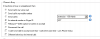
On the forwarding extension, set as the image shows.. that's all there is to it.
On a phone config, use the SP itself for the extension to subscribe if you want to have the BLF for that SP.

Callers can then just dial the forward extension to park/unpark calls at the SP it is forwarded to.
 

Attachments

  • SP7.PNG
    SP7.PNG
    7.9 KB · Views: 2,099
What version are you on?

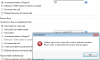
I can do it in the MyPhone client - but not in the Admin Console. It does appear to work as you say when making the setting from MyPhone.
 

Attachments

  • Screen Shot 2013-06-21 at 9.28.30 AM.png
    Screen Shot 2013-06-21 at 9.28.30 AM.png
    27.1 KB · Views: 2,021
@craigreilly

In v12 you can put it in the external number. In v11 I think you have to put it in the mobile number field.
 
ahh - a little regression going on there, eh? And since this was in the v12 forum - I should have been testing there.
 
@craigreilly
@cobaltit

Setting up a Forwarding Rule to send a call to a Shared Parking Orbit is NOT a good idea. Keep in mind that SPxx orbits can accomodate ONLY ONE call, so attempting to forward a call to an SPxx which already has a call parked would result in a failed transfer.

Legacy Parking Orbits (*0x / *1x) can accomodate multiple calls. Not sure if there is a way to forward calls in this way though - Parking Orbits (both types) were not conceived to be used/abused in this way ;)
 
I figured there was a reason v11 didn't allow it... But strange to see it back in v12.
 
Okay, I thought I was losing it when I read all of this because, the solution I came up with is create a contact, name Park SP0 and then add the SP0 as a number.

When you get a call, you just transfer to the contact name Park SP0. if you want to pick it up then you do the same thing.

Works the same for paging.

Jasit
 
I'm more than happy to stop using/abusing it.. once those feature requests get fulfilled! ;)
 
Status
Not open for further replies.

Latest Posts

Forum statistics

Threads
111,838
Messages
589,296
Members
164,668
Latest member
Infinity Network