Solved A stop job is running for Pacemaker HA CM

Status
Not open for further replies.

JLSeagull

Forum User
Joined
Jan 1, 2020
Messages
84
Reaction score
21
Hello folks! (I really don't know anymore where put this thread, so feel free to move it to another forum).

Suddenly my secondary SBC begun to take a long time to reboot...20 minutes. This happen just when it reboot for itself. I mean if I do a reboot it restart normally (but I had put a cron job to reboot the computer once a day).

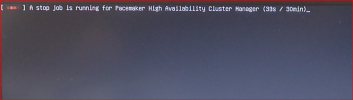
This is the message on display:

"A stop job is running for Pacemaker High Availability Cluster MAnager ( XX / 30 min)"

Is there any known workaround?
1651751617237.png
 
Last edited:
Hi!

So when you manually reboot your SBC machine, it restarts OK, but when you restart with a cronjob, this happens?

What have you installed the SBC on Debian 10 x64 machine of a RPi?
Also what exactly have you put in crontab? Did you set it while in root?
 
  • Like
Reactions: JLSeagull
Hi!

So when you manually reboot your SBC machine, it restarts OK, but when you restart with a cronjob, this happens?

What have you installed the SBC on Debian 10 x64 machine of a RPi?
Also what exactly have you put in crontab? Did you set it while in root?
Hi @NickD_3CX ! Thank you for reply. See my answers to your questions below (after ">"), please.

So when you manually reboot your SBC machine, it restarts OK, but when you restart with a cronjob, this happens?
> Yes. This is the behaviour.

What have you installed the SBC on Debian 10 x64 machine of a RPi?
> I didn't installed my secondary SBC in a RPi. It's installed in a dedicated laptop running Debian 9. And it worked fine for months without problems.

lsb_release -a

Distributor ID: Debian
Description: Debian GNU/Linux 9.13 (stretch)
Release: 9.13
Codename: stretch

Also what exactly have you put in crontab?
> no big deal, just asked to restart the machine

# m h dom mon dow user command
20 08 * * * root /sbin/shutdown -r now \n

Did you set it while in root?
> Yes!
 
Instead of using the /sbin/shutdown -r now command, you could try /sbin/reboot.

Also I'm not sure what the "\n" is at the end.

Last comment, if you access the crontab using the command sudo crontab -u root -e, I think you don't need to specify the user in the actual crontab line, so it would look something like this:
Bash:
# m h  dom mon dow   command
20 08 * * * /sbin/reboot
 
  • Like
Reactions: JLSeagull
Instead of using the /sbin/shutdown -r now command, you could try /sbin/reboot.

Also I'm not sure what the "\n" is at the end.

Last comment, if you access the crontab using the command sudo crontab -u root -e, I think you don't need to specify the user in the actual crontab line, so it would look something like this:
Bash:
# m h  dom mon dow   command
20 08 * * * /sbin/reboot
@NickD_3CX , thank for the tips!

Yesterday I changed the crontab command for...

# m h dom mon dow user command
20 08 * * * root /sbin/reboot -f \n

...and in fact my goal (do a fast reboot) was achieved, but there is a big difference between "shutdown -r now" and "reboot -f", because while the first one "turn off" the pacemaker service before of the reboot of the machine, the second one terminate the pacemaker service in a abrupt way.

I've cut a piece of the file pacemaker.log (it's too big) to investigate what is happening, but it's not clear for me.

Regards to the option "\n" if I am not wrong it force an "end of line".

You can change the status of this thread to SOLVED, OK?!

Thanks!
 
Last edited:
Regards to the option "\n" if I am not wrong it force an "end of line".
I believe this is the "line break" character for Linux as far as I am aware, but I don't think you need to add it here.

You can change the status of this thread to SOLVED, OK?!
Glad we could help!
 
Status
Not open for further replies.

Forum statistics

Threads
111,974
Messages
590,081
Members
164,899
Latest member
mazet