Accepting Multiple Calls in Small Office

Status
Not open for further replies.

StartSomethingGood

Bronze Partner
Basic Certified
Joined
Nov 8, 2021
Messages
8
Reaction score
1
Hello,

I'm somewhat new to 3CX but have had experience setting up call routes in the past on other phone systems. So far, I really like 3CX.

I have a small office with 5 users in it. They are using 3CX 4SC Standard Version hosted by 3CX.

There is a problem I cannot seem to find a solid answer for and am hoping it's just a change to my approach that will fix it.

I'm open to any suggestions on how to resolve. I would like to keep it hosted by 3CX on their platform rather than moving it local or to AWS or Azure.

When an incoming call comes in, it goes to a ring group (ext 800). This ring group rings all 5 users. Ring Strategy is set to Ring All

The problem occurs in the following scenario:
  • Only one user is in the office (any user, this happens quite frequently because they are all out and about)
  • Incoming call makes phone ring and the one user answers it
  • While on phone, another call comes in. This rings all of the other phones except the user on the phone.
  • The user has to put the call on hold, run to another phone and answer it.

Is there any way to allow the one user's phone when on the phone?
OR
Is there a better way to approach this so that if any one user is there by themselves, they can pick up multiple calls coming in?

Thanks
 
Last edited:
Hi @StartSomethingGood,

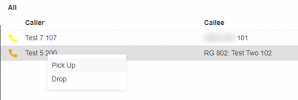
There are two ways you can handle this. You can dial *20* to pickup a call coming in to the system. If you'd like a more specific method, knowing the call is only bound for the RG, you can use the panel to pick up the call provided the extension has the right enabled ["Perform operations (divert, transfer, pickup)"] .

1636446118952.png

From the panel, you can see the callee is dialing the Ring Group (RG) specifically. If you use *20* you may pickup any call coming in to the system that may not be bound for the RG.
 
I've solved this at one of my clients that sounds like yours. However, the disclaimer is that this isn't supported and doesn't scale on larger systems. It also requires that you self-host the instance.

Under Settings -> Parameters:
ALLOWUSEBUSYOPTFORGROUP = 1

On each extension:
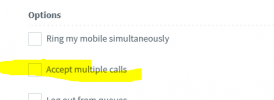
Forwarding rules, Accept multiple calls is turned on.

Again, this only works on self-hosted instances, and is not supported but I do use it if the customer twists my arm enough. My understanding is that when you attempt to scale this hack, the PBX chews up more resources to keep track of calls.
 
I've solved this at one of my clients that sounds like yours. However, the disclaimer is that this isn't supported and doesn't scale on larger systems. It also requires that you self-host the instance.

Under Settings -> Parameters:
ALLOWUSEBUSYOPTFORGROUP = 1

On each extension:
Forwarding rules, Accept multiple calls is turned on.

Again, this only works on self-hosted instances, and is not supported but I do use it if the customer twists my arm enough. My understanding is that when you attempt to scale this hack, the PBX chews up more resources to keep track of calls.
@StartSomethingGood
I just want to stress out that doing this causes known issues, especially with actions involving transfers that can result in calls hanging and calls not having any audio.

If you do this and run into ANY issues remotely similar to what I described, delete the parameter first, restart all services, then try again. Never go to support with this parameter because 99,99%, the first thing they will tell you to do is remove it and try again.

There is a reason why we haven't put this as a checkbox in the Management Console. If it worked flawlessly, we would have...
 
  • Like
Reactions: RCT-CP
@NickD_3CX huh, I wasn't aware of those issues. I guess knock on wood that it's behaving in the single instance it's enabled for. I'll put that warning in my internal docs! I only allowed it because the customer refused to change their behavior and it was a deal breaker for them. :\
 
Is the problem you cannot accept multiple calls?

1638193524938.png

Alternatively, purchase a Pro edition so you can queue calls up.
 
Is the problem you cannot accept multiple calls?

View attachment 26226

Alternatively, purchase a Pro edition so you can queue calls up.
The concern is that you have a limited number of users answering inbound calls, and they want to know when someone else is waiting their turn. Goes against the point of having them queue, but I think it's a learned practice from key systems when you'd see the next line presence ringing on your end point, letting you grab the next caller to put them on hold.
 
The concern is that you have a limited number of users answering inbound calls, and they want to know when someone else is waiting their turn. Goes against the point of having them queue,
This is exactly what a queue does.
IMO I think it's an outdated practice to pick a call up and stick them on hold, they might as well wait in a queue.

You can use the panel from the web client to see what calls are waiting.
 
This is exactly what a queue does.
IMO I think it's an outdated practice to pick a call up and stick them on hold, they might as well wait in a queue.

You can use the panel from the web client to see what calls are waiting.
I 101% agree with you, but in my case the users and owner refuse to use an IVR or ACD. They want callers to feel greeted and taken care of without "feeling like they're calling a large practice" :rolleyes:
 
Hi,
we are oftenly facing this situation when we discuss about "call scenario" with the client because oftenly they want this just because it was like this before (bein able to take multiple calls for an agent in a ring group / queue).

You will not find perfect answer here, despite lot of users including myself oftenly ask this, because 3cx developpers don't want it. They think its best for everyone (caller and callee) that user should only take one call at a time and I tend to be agree with that. Problem is : how to do when client don't want this ?

You have 2 solutions, first one is try to adopt 3cx point of view and make a queue.

Second is to try to make a workaround that will do kind of what you are looking for even if 3cx is not design for this.
Simplest option can be, as others stated to use for the "ring group even if busy" option. Not supported by 3cx, some says it can cause problems but we use it sometimes without problems so far.
Other option in your case can be to play with disconnect from group with status change when out of office, destination if no answer and/or hotdesking. You will have to use the fact than if a call goes directly to an extension and not a ring group, the user will be able to see and take the second call.
 
Status
Not open for further replies.

Forum statistics

Threads
111,974
Messages
590,083
Members
164,901
Latest member
Silent_Guru