Access from 3cx console to Yealink phones don't work...?

Status
Not open for further replies.

FredyWenger

Customer
Joined
Jun 18, 2018
Messages
104
Reaction score
4
We use some Yealink SIP-T46S phones over a SBC.
As we had a strange problem today (see below), I started the console (note: the 3cx is hosted at a provider) and seen, that there is a FW-update to the T46S.
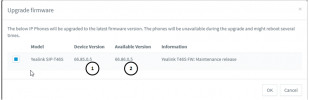
We actually have: 66.85.0.5.
New version: 66.86.0.5
I then have assigned the new version to my phone and a message was showed, that the phone will get the new FW version and then restart automatically, what can take some time.
This was more than a hour ago...
I then have tried to reboot the phone from the console -> nothing happens...

Question:
Should this work?

(From "memory" I think, we always had such problems and it can't be, that we have to do the firmware update manually every time).
Thanks

Strange problem:

Today, we had a strange problem with one of our phones.
A T46s stopped to work in the middle of a call.
In the console, the phone was set to "New"...?
I then had to assign the the phone again to the ext.- number to get it work again
Any idea, how this can happens?
Thanks
 
Hi Fredy

Should this work?
Yes it should, unless there is a problem that prevents it.

Any idea, how this can happens?
Without details it's hard to say, but it appears like the phone dropped off the network. It appears as new if you simply pull it out of the plug and wait two minutes so this is probably what happened if I was to guess.


Now as for the problem with the upgrade, we need a lot more information to understand what conditions the phone is deployed in. Please read the below and share some more information, especially how the system is hosted, how the phones are provisioned, what path they use to reach the system and whether they have access to the internet or not.
https://www.3cx.com/community/threads/information-to-provide-when-requesting-help.67558/
 
I'm the CEO of a small IT company and not a "full time engineer".
I only access the 3cx console, if there are some problems or an important update to do.
Principally the 3cx console would be easy and logical to use, when anything would work as expected.
We use 3cx since a few years now, and I had similar problems multiple times (especially regarding firmware updates). This mostly endet up, with doing the updates manually, phone after phone...
Therefore I asked here...

"Without details it's hard to say, but it appears like the phone dropped off the network. It appears as new if you simply pull it out of the plug and wait two minutes so this is probably what happened if I was to guess"
The phones was not dropped off the network.
After the issue, the phone was dropped from the network (plug an reconnect the network cable) to try resolve the issue -> has not helped.
Further, the phone was rebooted (directly from device) what also don't have helped.


My data:
3CX Version: 18.0 (Build 461)
Server OS: Debian 10 (I assume)
Is the 3CX Server Hosted and where: Yes at peoplefone (Switzerland)
IP Phone: Yealink T46S, FW: 66.86.9.5
Provisioning Method: SBC
Trunk Provider or VoIP Gateway: peoplefone(Switzerland) sip.peoplefone.ch
Has the Firewall Checker passed: yes
Are custom Phone Templates being used: No
 
Could you kindly confirm the firmware is indeed 66.86.9.5.

The 3rd digit needs to be zero in order to be able to upgrade via 3CX. If it is anything other than zero, that indicates a custom solution similarly used by Dutch Lydis firmware (ie. 66.86.188.3).

Those phones for example will reject the 3CX firmware, and would explain why the firmware updates from the management console fail.
 
Sorry (bad) typo: 66.85.0.5 ( 1 ) :
1649776595060.png

The new version would be 66.86.0.5 ( 2 )
 

Attachments

  • 1649776500258.png
    1649776500258.png
    2.7 KB · Views: 1
Hi Fredy,

Thanks for confirming! In this case we should be ok to upgrade. Let's continue troubleshooting:

Firstly, change the name on one of the extensions that uses a T46S, the go to phones, select it, and click reprovision.

This will tell us whether the phone can establish a connection with 3CX and receive files (ie. the config file).

See if the name changes on the Yealink, and let me know how this goes and we will then move on to the next checkpoint.
 
"Firstly, change the name on one of the extensions that uses a T46S, the go to phones, select it, and click reprovision."
First, I don't want to change the names to the extensions, but assume, that I can change it back after the test?
Second: How (or where) to change the name of an extension?
The name to my extension actually is: 840 (last three numbers to the phone).
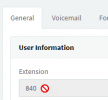
If I click "Edit Ext", the name to the extension is greyed out:
1649840500259.png
 
Hi Fredy,

Yes of course, we will change it back afterwards. This is just for testing purposes so we can eliminate various common issues one by one.

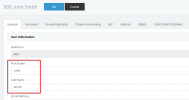
Are you able to edit these fields below? Your management console account may not have all the rights if you cannot edit them.

1649840713623.png

If you don't have full access we can try something else instead.

PS: You cannot edit the Extension number.
 
So.. you meant change the user information's not name of the extension:;-)
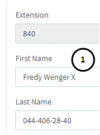
O.K. - done:
1649841934851.png
Added a X to First name ( 1 )
Then select the phone and clicked "Reprovision"...
and.. nothing happens...
In the console, the "X" to the first name is showed, on my phone, nothing happens and the "X" is not showed (note: the "X" also ist not showed to my extension on other phones)...
 
Ok then we clearly found a problem here. The mechanism that provides the firmware, is the same mechanism that provides provisioning. So if reprovisioning does not work, then it makes sense that the firmware update also failed.

Do you perhaps use VLANs or special firewall settings that block the phones from reaching the internet?
Can you share some more details of how the internal network is setup so we can understand what path the phones will use when they try to reach the cloud PBX?
 
We have two configurations:
Company: phone -> LAN -> SBC -> firewall (WatchGuard) -> internet (glas) -> provider
Home office: phone -> LAN -> firewall (small Synology router) -> internet (TV) -> provider
I don't think, that something is blocked...
For testing, I have assigned a new FW right now to a phone (T46s) at the home office.
I now wait about a hour to check, if this phone is updated...
=> If yes, we have a problem with our SBC or firewall in the company.
=> If no, it should be something else
We have no problems with the calls....
Please give me special settings for the firewall, if there are some (especially for our problem -> FW update / reboot / provisioning not working) in the meantime.
Thanks
 
Update:
Done the same with a phone at the home office:
- Update FW -> not working
- Changed first name -> reprovisioned-.> not working
About 20 minutes ago (I think, this should be enough time).
Question:
As I wrote, our 3cx is hosted at a provider (Peoplefone) - I have access to the 3cx console, but no access to the undelaying Linux:
Are the settings at the provider (FW/Linux), that can trigger our issue?
If yes, which exactly (I then would send an E-mail to the provider)?
 
Further question:
In the company, all phones are configured to use the SBC:
My phone ( 1 ) don't show, that it accesses the 3cx over the SBC
An other phone ( 2 ) shows the access over the SBC (what is correct):

I checked my phone ( 1 ) with the web interface - it definitely is configured to use the SBC.
Any idea, what that can be?
 
I think about 10 mins should be ok to complete the update on a T46S. It will be a good idea to contact your provider for support, but we can try one more thing first.

We have a way to see what happens when the phone tries to provision or upgrade. I will provide you with instructions so we can do a packet capture and see at which steps the process is getting stuck

1. Login to the web UI of your T46S (Phone Web Page Password found in your extension provisioning page)

2. Click Settings > Configuration > Pcap Feature > Start

3. Go to 3CX and send the upgrade command to the phone, then wait 30 sec. and also send a reprovisioning command

4. Wait 1 minute max. then go to the Yealink web UI and press Stop on the pcap.


Upload this file to any sharing service you use, and send me the link in a private message (click my name and Start conversation).

I can take a quick look and see if there is anything that stands out which may be causing this.
 
Done...
1649849924776.png
Has not worked as expected :-(
Pressed Start ( 1 ) - done the tasks in console
A new file ( 3 ) was created directly in the (Chrome) browser ( 3 ) after a few second Netzwerkfehler (network error) was showed to the file. I then have done and export to the diagnostic files ( 4 ) what has created a .tar file ( 5 )
I then have clicked your name, but found no option to upload a file
Where / how can I upload the file...?
 
You will have to redo the procedure until you get a pcap (not the tar file).

Avoid using the firmware upgrade this time, just use the reprovision button (to prevent phone rebooting and losing the pcap).

Upload this file to any public file sharing service you prefer, and send me the public URL link in a private message so i can download it. You cannot attach files in the private message.
 
It don't work principally!
Tried again in chrome (only reprovision) and same network error.
Tried also in FireFox -> also not worked
I further don't know, if this really make sense as I think, nothing is triggered on the phone from the provider.
I can start the PCAP and after I while - also without any action in the console - the download breaks.
Maybe It would make more sense, to start a capture in the console ( 1 )?
1649851790913.png

What do you mean?
And.. there is really no way to upload a file?
 
I can start the PCAP and after I while - also without any action in the console - the download breaks.
Like I said in my first reply, this seems to show that the network connection is indeed dropping out, or unreliable.
This would also fit with the fact that reprovisioning and upgrading is also failing.

The network is a common factor here, so this is the first thing I would suspect.

Consider what we learned so far:

- Phone dergeisters
- Phone stops in the middle of a call
- Phone does not reprovision
- Phone cannot upgrade (and you say you had this in the past too if you remember correctly)
- Pcap also stops downloading


I think it's time to contact your provider or 3CX partner and get some direct assistance because none of what we have seen so far is considered normal behavior for Yealink or 3CX.
 
I have wasted a few hours now (once more) to try get it to work as it should.
As I worte im my first posting, we are a small IT company and have NO problems with our internet connection principally.
The phones normally also works without problems - so we also don't have a principally issue here.

The problem is, that the access from the 3cx console to the device for actions like update firmware, reboot and reprovision don''t work and this since a long time now).
I have done what you have suggested, what has took a few hours of time on my side...
So..it would be nice, if you would give me further hints, what can cause this problem and not leaving me in the dust - you're the expert here.

I have asked, if some settings on the 3cx side can cause this problem, and if yes, which settings?
Further, I have asked, if some special settings are needed especially for the not working actions on the firewall.
And my last suggestion was to do a trace on the 3cx console and send you the result.
=> I think, you should be able to see the problem in the log...?

Thanks!
 
I have asked, if some settings on the 3cx side can cause this problem, and if yes, which settings?
There are no known 3CX settings that can cause this which I could advise you of. I focused your attention on troubleshooting client-side from the phone specifically because it is the most important part in the chain. It can tell us more information than anything else.

And my last suggestion was to do a trace on the 3cx console and send you the result.
This would not be a useful test, we need to see the phone traffic directly. But you were not able to get a pcap due to a network error.. If you do manage to get a pcap, I will gladly look at it to see if there is something useful.

have NO problems with our internet connection principally.
The internet connection can work and you can still face networking problems regardless.

- Phone dergeisters
- Phone stops in the middle of a call
- Phone does not reprovision
- Phone cannot upgrade (and you say you had this in the past too if you remember correctly)
- Pcap also stops downloading
All the above issues we discussed together can 100% happen when there is a networking issue, so it is reasonable to suspect there might be a network error. I did not say that your internet connection is broken.


If you were to re-read the entire conversation I don't think we left you in the dust.
We tried a few things together, but were not able to progress enough given the circumstances we have.

I think you understand that a forum discussion is not the same as having a professional visit you and check everything. The forum is for discussion and general help, but it is not free commercial support. For that you need to contact a 3CX Partner which can visit you on site and investigate deeper into what may be causing this.

I hope this clears any misunderstanding caused on my part, and sets your expectations to reasonable level.
 
Status
Not open for further replies.

Forum statistics

Threads
112,149
Messages
590,964
Members
165,170
Latest member
SupportRock