Access to 3CX DB

Status
Not open for further replies.

Michele Communikare

Bronze Partner
Advanced Certified
Joined
Apr 12, 2021
Messages
21
Reaction score
3
Hi,

I have a client who asks me, instead of always creating Reports, to access the 3CX DB directly to read the details of the calls.

It's possible?

Thank you
Michele
 
Hi,

I have a client who asks me, instead of always creating Reports, to access the 3CX DB directly to read the details of the calls.

It's possible?

Thank you
Michele
There is the CDR for this. Accessing the database would render your installation unsupported. Never mess with the DB!
 
  • Like
Reactions: ChrisC_3CX
Thanks,

What are the client that can read the CDR from 3CX server CDR Socket?


Thanks
Michele
 
3CX just supplies you with the data, you have to write your own application to store and produce the required reports
 
Thanks,

What are the client that can read the CDR from 3CX server CDR Socket?


Thanks
Michele
It's just UDP packets, like syslog. Any application that can read network packets should be able to be programmed to read it.

I personally recommend using the file method.
 
  • Like
Reactions: VoIPTools
OK, there is a method to download CDR file from 3CX management interface?

Michele
 
OK, there is a method to download CDR file from 3CX management interface?

Michele
No, you'll need to use SFTP and download the file/files. That can probably be automated by a bash script.
 
Hi,

I see that the protocol is TCP
1627057146465.png

How can I change it to UDP?

Here the configuration of 3CX:
1627057185798.png


Thanks
Michele
 
OK,

Thanks

Michele
 
As @SweetAction mentions, I have created a couple of Windows based tools for capturing/processing CDRs:
  • CallVitesse - which captures/buffers CDRs from 3CX sent over a network (TCP) connection
  • CallSequitur - which connects with CallVitesse and provides the display/analysis functions
If all you need to do is capture CDRs into a text file on another computer (using the 3CX CDR service in either active or passive mode) then CallVitesse will do this for you. CallVitesse would usually run on another PC [unless your 3CX PBX is running on Windows in which case you can run it on the same PC] and which connects with the 3CX TCP socket. You can capture CDRs and save to text files in one of 3 modes depending on your needs: Single File for all calls mode, Separate Files for each call with 3CX file naming convention or Separate Files for each call with simple sequential naming.

If you want to live monitor (either single or multi-instance) PBX activity, analyze/view simultaneous (concurrent) call levels plus lots more then you need CallSequitur (which does need an unlock key for anything other than trial use). However if you only need to capture CDRs into text file(s) using CallVitesse then you wouldn't need CallSequitur at all (so you should disable the buffering process for CallSequitur with the 'No CallSequitur' command in the CallVitesse aux_config file).

If you are interested then you can find the latest versions of the installer files along with full documentation for each program here.
 
@Michele Communikare
OK, there is a method to download CDR file from 3CX management interface?

This is actually possible. The file is created within 3CX's log folder:

Linux: /var/lib/3cxpbx/Instance1/Data/Logs/CDRLogs
Windows: C:\ProgramData\3CX\Instance1\Data\Logs\CDRLogs

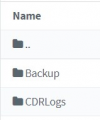
That said, it can be downloaded from the Management Console the same way you would download a log file. Navigate to "Dashboard >> Activity Log >> Logs >> Instance >> CDRLogs" and double click the file.

1627288106886.png
 
Regarding CDR data, I always recommend you NOT use the IP Socket approach for one obvious reason. If your socket goes down, even briefly, for any reason, you loose the data and there is no way to go back and get it. As @Frederick Marcoux recommended, use the file based approach. That way, you never lose any data and your application can always start where it left off. 3CX Exporter can automate the entire process if you don't want to build the solution yourself.

However, it will be interesting to see what new APIs are provided by 3CX with V18. 3CX has announced a new REST API and Gateway service. With any luck, we will be able to get historical information, as well as real-time events, from these new tools. We will just have to wait and see...
 
  • Like
Reactions: Evolute IT
Status
Not open for further replies.

Latest Posts

Forum statistics

Threads
111,982
Messages
590,120
Members
164,909
Latest member
Jacob.Ive